Microsoft Copilot ContextIQ Review: Persistent Memory Tested
Microsoft Copilot ContextIQ and persistent Memory tested across Word, Teams, and Outlook. What works, what doesn't, and whether $30/month is justified.

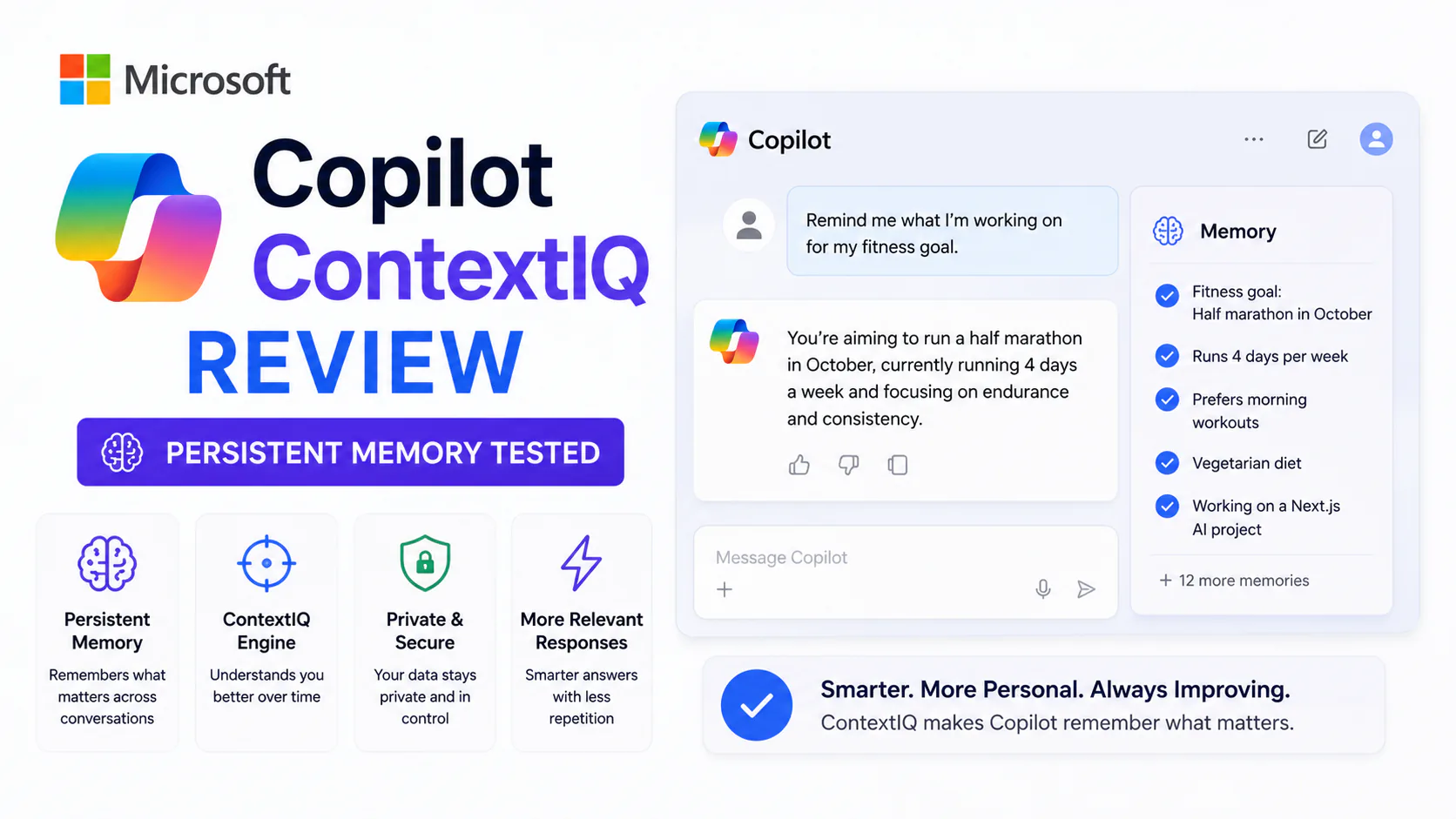
Bytewaves Score Card
Every time you open Microsoft Copilot, it used to have no idea who you were. You'd explain the project, re-attach the file, remind it of your preferred format. Every session started from zero, and every session wasted the same two minutes.
That has changed. Through a rolling series of updates from mid-2025 into 2026, Microsoft shipped two capabilities that fundamentally alter how Copilot works in daily practice: ContextIQ (a real-time grounding system that pulls relevant files, meetings, and emails into your prompt automatically) and Copilot Memory (persistent preferences and working-style recall across sessions). Together, they push Copilot from a useful but forgetful assistant toward something that actually knows how you work.
The question is whether those changes justify the price, close the ecosystem gaps, or fix the security concerns that have surrounded Copilot since launch. This review answers all three.
TL;DR: ContextIQ genuinely solves Copilot's biggest UX problem. The slash-picker and implicit grounding in Outlook and Teams reduce friction significantly. Copilot Memory works as advertised but needs manual upkeep. At ~$30/user/month on top of an M365 subscription, the value case is strong for deep M365 shops and weak for anyone with significant non-Microsoft tooling.
What ContextIQ actually is
ContextIQ is the grounding layer inside Microsoft 365 Copilot. "Grounding" means giving the AI real data to reason about instead of relying on its training weights alone. Without it, Copilot is a capable general-purpose assistant. With it, Copilot can reason across your actual files, your actual meetings, and your actual email threads.
The primary interface is a forward slash (/) typed in the Copilot Chat prompt box, or the "Add content" button alongside it. Both open a picker that surfaces recently used files, SharePoint folders, OneDrive documents, Teams conversations, Loop Notebooks, and recurring meetings. You select what's relevant and ask your question. Copilot reads the grounded sources and generates a response anchored to them.
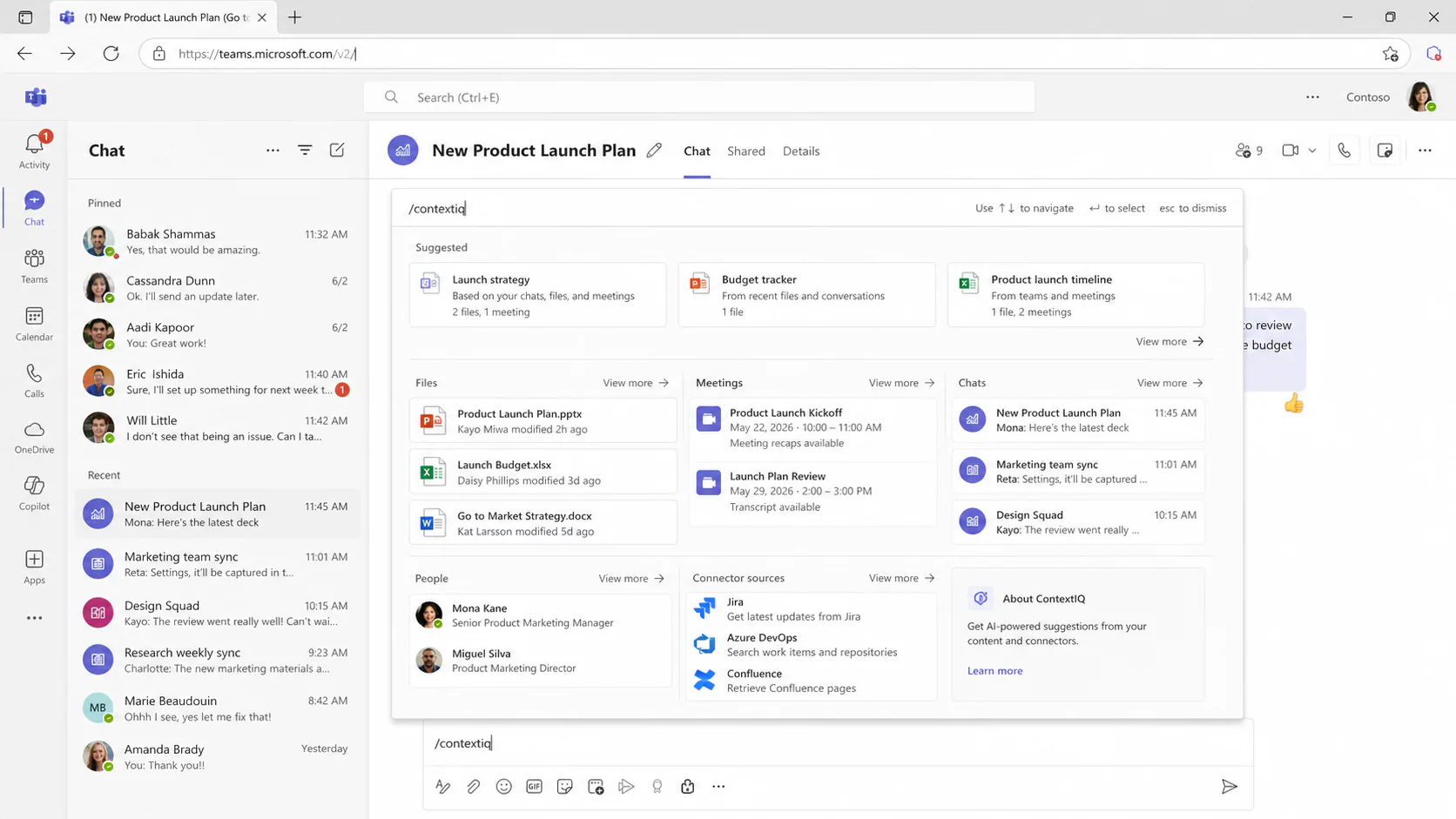
What makes it more than a file-uploader is the intelligence behind it. ContextIQ proactively suggests sources as you type based on what the Microsoft Graph infers to be relevant. You don't need to know the exact filename. Start typing a prompt about the Q3 planning cycle and ContextIQ surfaces that meeting series, the associated SharePoint deck, and the Outlook thread where stakeholders pushed back on headcount. That proactive relevance is the real feature.
Where ContextIQ reaches
Between the mid-2025 launch and June 2026, the list of reachable sources has expanded considerably:
- OneDrive and SharePoint files and folders (GA: June 2025)
- Teams chats (August 2025)
- Loop Workspaces and Notebooks (August 2025, expanded March 2026)
- Recurring meeting series from Teams (June 2025)
- Teams channels (March 2026, significant capability expansion)
- Emails in Outlook with implicit grounding (January 2026, expanded May 2026)
- Third-party sources via Microsoft Graph Connectors: Salesforce, ServiceNow, GitLab, Jira, Zendesk, Miro, Dropbox, Google Drive, Amazon S3, and more (20+ new connectors since October 2025)
The Teams channel expansion in March 2026 deserves specific attention. It means a new team member can ask Copilot in a channel to summarize the last 30 days of decisions without anyone having to write anything up. The channel becomes queryable institutional knowledge, not a scroll-back wall.
Implicit grounding in Outlook
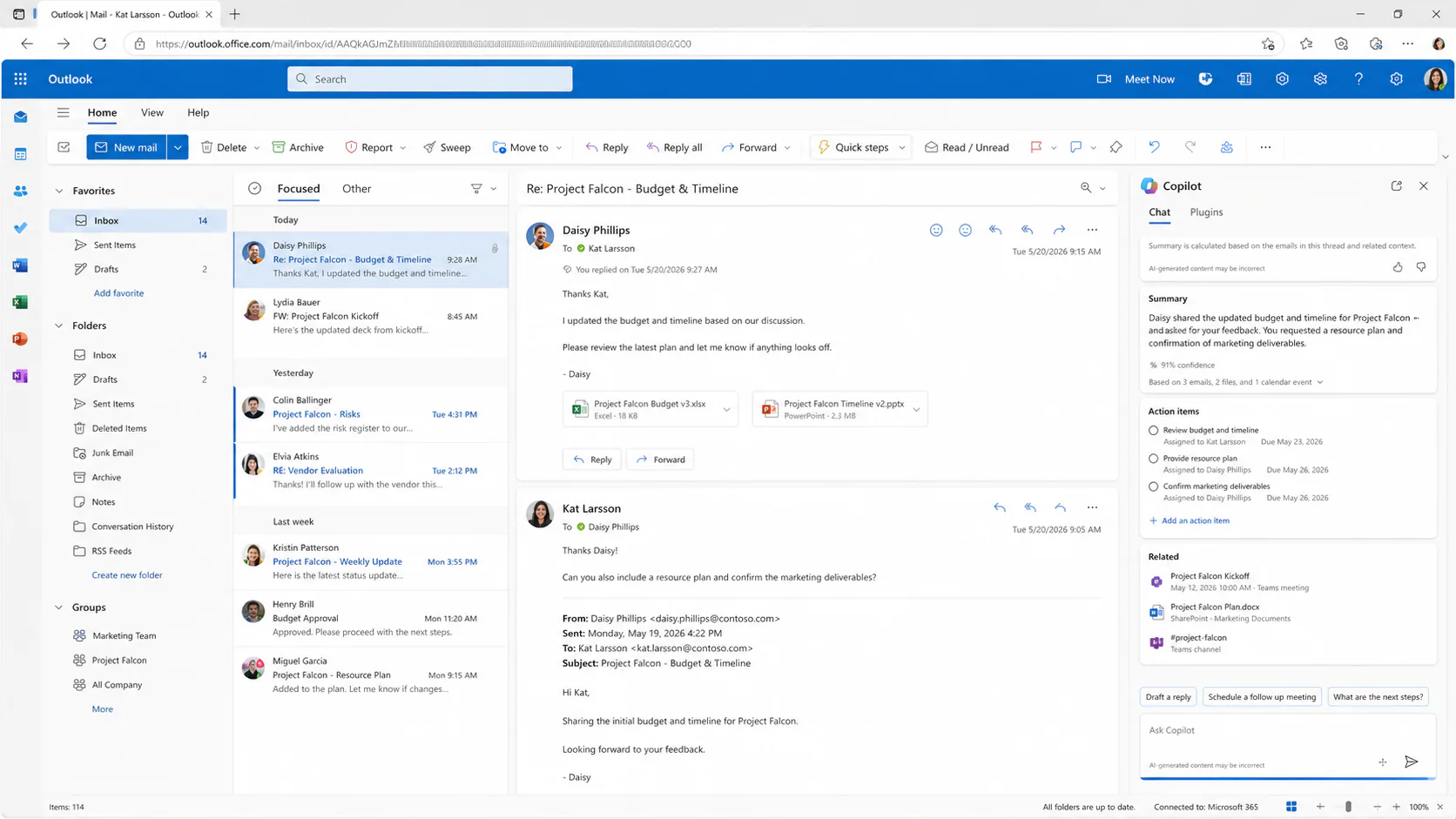
Starting in January 2026 and expanded in May 2026, Outlook introduced a behavior worth calling out on its own: when you open an email thread and launch Copilot Chat alongside it, that thread is automatically added as a grounding source. You don't invoke anything. You don't type a slash. Copilot already knows what you're looking at.
Highlight a section of the email and the context updates to that selection. Ask "what action items came from this thread?" and Copilot answers from the actual thread, not from a generic instruction. This is the most friction-free Copilot interaction currently available and it sets a reasonable standard for how the other apps should eventually work.
Copilot Memory: how persistent personalization works
Copilot Memory (Preview since September 2025, expanded through 2026) stores user preferences and working-style notes across sessions. It is the answer to the "explain yourself again" problem.
Memory is explicit, not passive. Copilot stores a preference only when you tell it to, either by asking it directly ("remember that I prefer bullet-pointed summaries") or by confirming when it asks. A subtle "Memory updated" badge appears when storage occurs. You can view, edit, or delete every stored entry in the Settings pane, or disable Memory entirely.
What it stores in practice:
- Output format preferences ("give me executive summaries, not long prose")
- Recurring project terminology and code names
- Stakeholder context ("when I say 'the Barrow team' I mean the Berlin office")
- Communication style notes ("I CC Maria on anything related to compliance")
When Memory works, it removes a class of low-level friction that's easy to underestimate in aggregate. The tenth time you don't have to tell an AI tool your preferred format is noticeably faster than the tenth time you do.
What Memory cannot do yet
Voice chat cannot modify memories directly. If you want to add or adjust a preference during a voice session, you need to open the Settings pane manually. This is a deliberate privacy safeguard, and a reasonable one, but it creates a two-tier experience between voice and text workflows. Anthropic models used inside some M365 Copilot experiences are also currently out of scope for the EU Data Boundary, which matters for European enterprises evaluating compliance exposure.
Work IQ: the 2026 layer above Memory
By 2026, Microsoft introduced Work IQ as the intelligence layer that sits above individual Memory entries. Work IQ maintains a role-aware context engine that persists across apps, remembering job functions and project history. It enables the agentic behaviors currently in preview: autonomous channel monitoring, multi-step email triage, and task creation in Planner without user prompting.
Work IQ is not yet GA for all tenants as of June 2026. It represents the trajectory, not the current baseline.
Real-world performance across the three core apps
Copilot's quality is noticeably uneven across the M365 suite.
Word is the strongest application. Agent Mode (GA: November 2025) lets Copilot make changes directly to a document while narrating its reasoning. Combined with ContextIQ, a user drafting a proposal can reference a SharePoint deck, a meeting summary, and an email thread, then ask Copilot to write a first section. The output quality is consistently higher than comparable tasks in other apps, and the grounding prevents the hallucination issues that plague context-free generation.
Outlook is close behind Word and gaining rapidly. Implicit grounding (the automatic email-as-context behavior) is the most frictionless Copilot interaction in the suite. Voice catch-up on mobile, which lets users process their inbox hands-free, is genuinely useful for anyone with a heavy email volume. Thread summary quality is high and action-item extraction is reliable.
Teams is the highest-ambition application and the one with the most uneven results. The March 2026 channel integration is a step forward, but full Copilot Chat embedding across chats, channels, calling, and meetings (April 2026) pushed into territory where the feature complexity sometimes outpaces the reliability. Intelligent Recap is solid. Agentic channel monitoring is still preview-quality for most use cases.
Excel and PowerPoint are where the experience degrades meaningfully. Agent Mode rolled out to Excel in January 2026, but generated outputs in both apps require more manual correction than Word or Outlook produce. Users expecting the same quality they experience in Word will be disappointed in Excel-specific tasks like formula generation and data analysis.
Pricing and licensing
Microsoft 365 Copilot is an add-on, not a bundled feature. The current pricing structure:
- M365 Copilot add-on: approximately $30/user/month, requires an existing M365 Business or Enterprise subscription
- Underlying M365 subscription: $12.50 to $22/user/month depending on plan
- Effective fully loaded cost: approximately $42 to $52/user/month per seat
Copilot Chat (the basic tier) is available free inside Teams and provides limited ContextIQ access without the full M365 Copilot features. This free tier is Microsoft's adoption wedge; it is less capable than the paid offering but enough to demonstrate the value case.
At $30/month for the add-on, Copilot is priced significantly above standalone alternatives like ChatGPT Plus ($20/month) and Claude Pro ($20/month). The comparison is partly misleading since those tools have no native app embedding, but it matters to finance teams doing seat-by-seat ROI calculations. A 1,000-person deployment is a $360,000 annual decision before counting the base M365 license.
For official pricing details, see Microsoft 365 Copilot pricing.
How it compares to the alternatives
For M365-native teams, the comparison set isn't ChatGPT or Notion AI. It's the tools competing on enterprise cross-app grounding.
| Feature | M365 Copilot (ContextIQ + Memory) | Google Gemini (Workspace) | Coworker AI | Notion AI |
|---|---|---|---|---|
| Cross-app grounding | Word, Teams, Outlook, SharePoint | Docs, Gmail, Drive, Meet | 40+ tools natively | Notion only |
| Persistent memory | Yes (Copilot Memory, explicit) | Partial | Yes (OM1 Org Memory) | No |
| Third-party connectors | 20+ via Graph Connectors | Limited | 40+ natively | No |
| Price | ~$30/mo add-on | Included in Workspace | ~$30/user/mo | $10-18/user/mo |
| Best for | Full M365 shops | Full Google Workspace shops | Mixed enterprise stacks | Notion-centric teams |
| Biggest weakness | Ecosystem lock-in | Ecosystem lock-in | Smaller brand trust | No email or calendar |
The core insight: Copilot's ContextIQ depth inside Word, Teams, and Outlook is its strongest differentiator, and nothing else currently achieves the same native integration across that specific trio. If your team lives in M365, that depth is real and valuable. If your team uses Slack, Jira, Google Drive, or Salesforce as primary tools, Copilot's advantage evaporates and alternatives like Coworker AI or Google Gemini become more competitive.
For a broader look at how embedded AI performs across project management contexts, the best project management tools with embedded AI roundup covers several tools that compete or complement Copilot in team workflows.
Security and compliance
The security picture has two layers: what Microsoft has built and what organizations must do themselves.
What Microsoft provides: Copilot only surfaces content the signed-in user already has permission to see. Security labels and compliance controls from the M365 environment carry through automatically. Prompts and responses are not used to train foundation LLMs. Memory flows through Microsoft Purview for eDiscovery. Compliance certifications include GDPR, EU Data Boundary, ISO 27001, HIPAA, and ISO 42001.
What organizations must manage themselves: The overpermissioning problem. Copilot can access everything a user has permission to see, and Concentric AI's Data Risk Report found an average of 802,000 overshared files per organization. If permissions aren't audited before Copilot deployment, the assistant will surface files that employees technically have access to but should never see in practice.
The EchoLeak vulnerability (CVE-2025-32711) disclosed in 2025 demonstrated the risk concretely. A zero-click exploit allowed retrieval of sensitive information from Microsoft Graph and Outlook APIs without user interaction. Microsoft patched it and confirmed no active exploitation, but the incident put enterprise security teams on notice that deeply embedded AI creates attack surfaces that traditional data loss prevention tools weren't designed for.
The U.S. House of Representatives banned congressional staff from using Copilot over concerns about sensitive data transmission. That's an outlier context, but it signals the kind of scrutiny regulated industries apply before deployment.
Before enabling Copilot: Run a permissions audit first. Overpermissioning is the single largest deployment risk. If employees have access to files they shouldn't, Copilot will surface them.
Pros and cons
Pros
- The ContextIQ slash-picker and implicit grounding in Outlook eliminate the biggest friction point in Copilot's UX, making it materially faster than pre-ContextIQ versions for research-heavy tasks.
- Copilot Memory works as described: explicit storage, transparent controls, and visible confirmation when preferences are logged, so it doesn't feel like passive surveillance.
- Teams channel integration (March 2026) turns channel history into queryable institutional knowledge, which has genuine value for onboarding and project continuity.
- Enterprise compliance controls (Purview, GDPR, EU Data Boundary, tenant-wide Memory toggles) are more mature than most competitors, giving regulated industries a realistic path to deployment.
- The Graph Connector ecosystem has expanded meaningfully (20+ new connectors since October 2025), starting to address the non-Microsoft tooling gap.
Cons
- At $42 to $52/user/month fully loaded, the per-seat cost is one of the highest in the enterprise AI market and demands a clear ROI case before committing at scale.
- ContextIQ's depth is entirely M365-native. Teams running significant workloads in Slack, Jira, Google Drive, or Salesforce hit the ecosystem boundary quickly, and connectors don't fully close the gap.
- Excel and PowerPoint performance lags Word and Outlook by a noticeable margin. Generated outputs require more manual cleanup, undermining the consistency users expect across a suite.
- Overpermissioning is a deployment prerequisite problem that organizations must solve themselves before enabling Copilot at scale; there is no automated fix inside the product.
- Feature availability varies by platform and license tier, with many capabilities launching web-first and reaching desktop and mobile weeks later, complicating rollout planning.
Who should use Microsoft Copilot with ContextIQ
Use it if:
- Your organization is all-in on M365, with Word, Teams, Outlook, and SharePoint as the primary tools for most employees.
- You have the IT resources to run a permissions audit before deployment and to manage ongoing compliance requirements.
- Your use case centers on document drafting, email management, or meeting intelligence, where Copilot performs most consistently.
- You're in a regulated industry (finance, healthcare, legal) and need compliance certifications like HIPAA or GDPR with enterprise-grade controls.
Skip it if:
- Your team's primary collaboration tools are outside M365 (Slack, Google Workspace, Jira). Copilot's grounding advantage disappears at the M365 boundary.
- You're evaluating it for Excel-heavy or PowerPoint-heavy workflows. Current performance in those apps doesn't justify the add-on price.
- Your organization hasn't done a permissions audit. The overpermissioning risk is real and you must solve it before deployment, not after.
- Budget is tight and standalone tools at $20/month would serve the actual use case. The premium makes sense when the cross-app integration justifies it, not as a general-purpose AI upgrade.
Is it worth $30 a month?
For organizations already running M365 Business or Enterprise licenses, ContextIQ and Memory meaningfully improve on what Copilot was 12 months ago. The slash-picker is a genuine UX improvement. Implicit grounding in Outlook is the single best Copilot interaction in the current suite. Memory works and removes low-level friction over time.
The remaining honest reservations are: the cost is high relative to standalone tools, the M365 dependency is a real ceiling, and the Excel and PowerPoint quality gap creates an uneven experience across the suite.
If your team works primarily in Word, Teams, and Outlook, and the compliance controls matter to your industry, the case for the add-on is solid. If a significant portion of your work context lives outside M365, pay $20/month for something that travels with you instead.
For a look at how Copilot's multi-model orchestration layer has evolved alongside these features, the Copilot Wave 3 review covers the model-routing capabilities that now run underneath ContextIQ.
Frequently asked questions
ContextIQ is the grounding layer inside Microsoft 365 Copilot. It surfaces relevant files,
meetings, emails, and third-party data in real time using a / slash-picker or the "Add
content" button, and can proactively suggest sources as you type based on Microsoft Graph
signals. It launched in mid-2025 and expanded to Teams channels in March 2026.
Copilot Memory stores user preferences and working-style notes across sessions, but only when explicitly prompted. You tell Copilot to remember something, a "Memory updated" badge confirms storage, and the preference applies in future sessions across Word, Teams, and Outlook. You can view, edit, or delete every entry in Settings, or disable Memory entirely.
The Copilot add-on is approximately $30/user/month on top of an existing M365 subscription. M365 Business plans start at around $12.50/user/month, making the effective total $42 to $52/user/month per seat. Basic Copilot Chat is available free inside Teams with limited ContextIQ access.
Copilot only accesses content the signed-in user already has permission to see, and data does not leave the M365 service boundary or train foundation LLMs. The primary risk is overpermissioning: if employees have too-broad file access, Copilot will surface it. A permissions audit before deployment is essential, not optional. The EchoLeak vulnerability (CVE-2025-32711) patched in 2025 also illustrated that AI-integrated platforms create attack surfaces traditional DLP tools weren't built for.
Both are deeply embedded in their respective ecosystems and are each other's closest competitors. Copilot has the stronger cross-app grounding story inside Word, Teams, and Outlook. Gemini has a native price advantage since it's included in Workspace plans rather than charged as a $30/month add-on. The decision is largely determined by which platform your organization already standardizes on.