Best AI Browser Research Tools 2026: Full Comparison
Perplexity Comet, Claude in Chrome, Arc Max, Brave Leo compared: features, pricing, security risks, and which AI browser research tool fits your workflow.

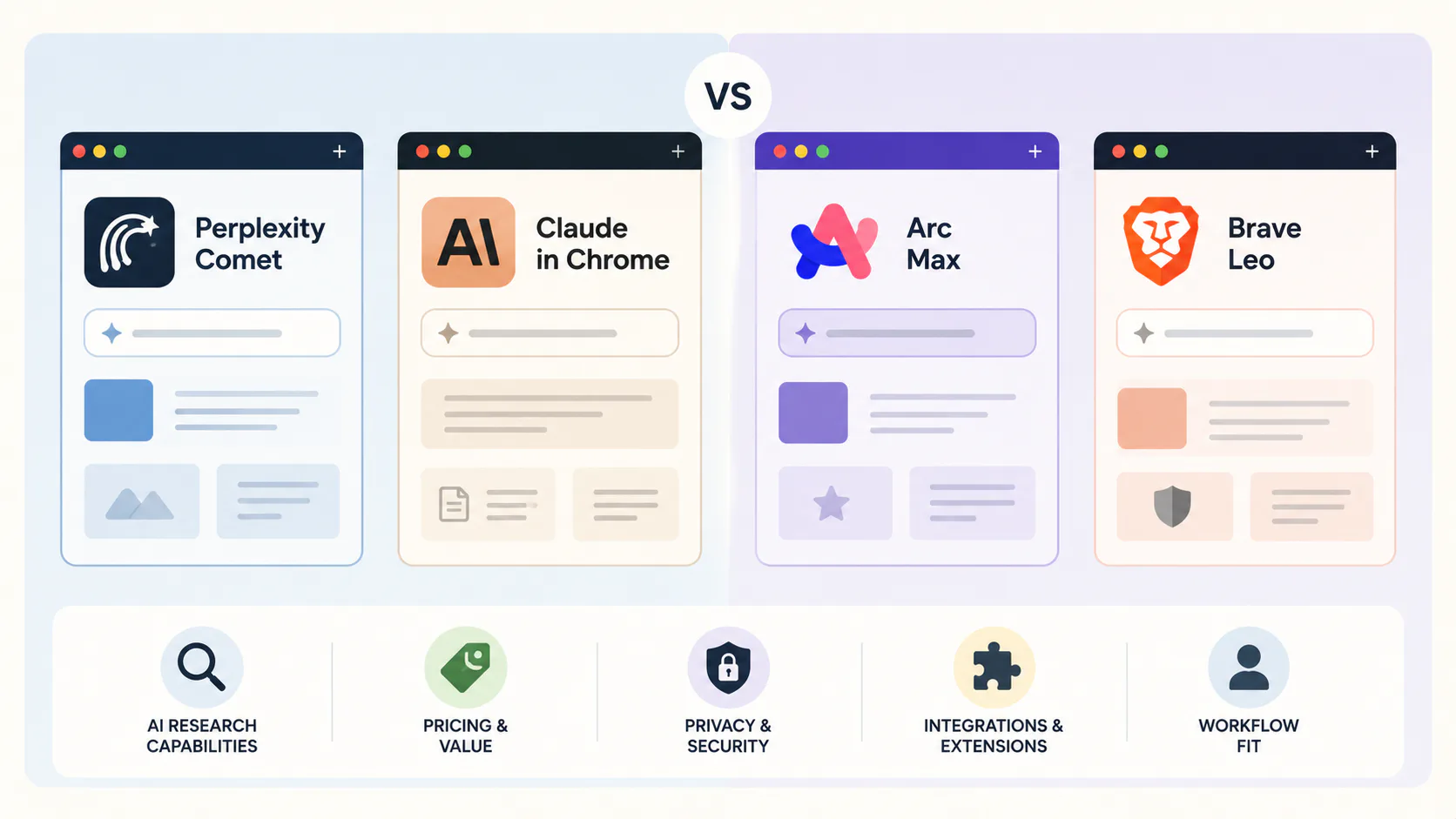
Reading 20 tabs to write one report is not research. It is retrieval. In 2026, a new class of browser tools has made the distinction meaningful: they read, synthesize, and act on web content for you, so your time goes to judgment and decisions rather than tab management.
This comparison covers the tools that have actually earned a place in working research workflows: full AI browsers, Chrome extensions, and specialist research tools. Not every tool that calls itself an "AI browser" belongs here. The ones that do are separated by one thing: whether they genuinely change what you can research in a day.
Quick verdict: Perplexity Comet is the best free option for web research and synthesis. Claude in Chrome is the best for automation inside enterprise tools like Gmail and Salesforce. Brave Leo is the only tool with a serious on-device privacy model. For academic work, Scholarcy and SciSpace are in a separate category and have no direct competitors in this field.
Why AI browser research tools are worth your attention
The internet's information volume problem is not getting better. Gartner predicts a 25% drop in traditional search volume by 2026 as generative AI becomes the default answer mechanism. A major US enterprise measured a 28% reduction in knowledge-search time after deploying an AI browser initiative across its workforce. For anyone who spends four or more hours daily reading and synthesizing web content, these tools are not conveniences - they change what's feasible to research at all.
Two distinct architectures compete in this space, and confusing them leads to bad tool choices.
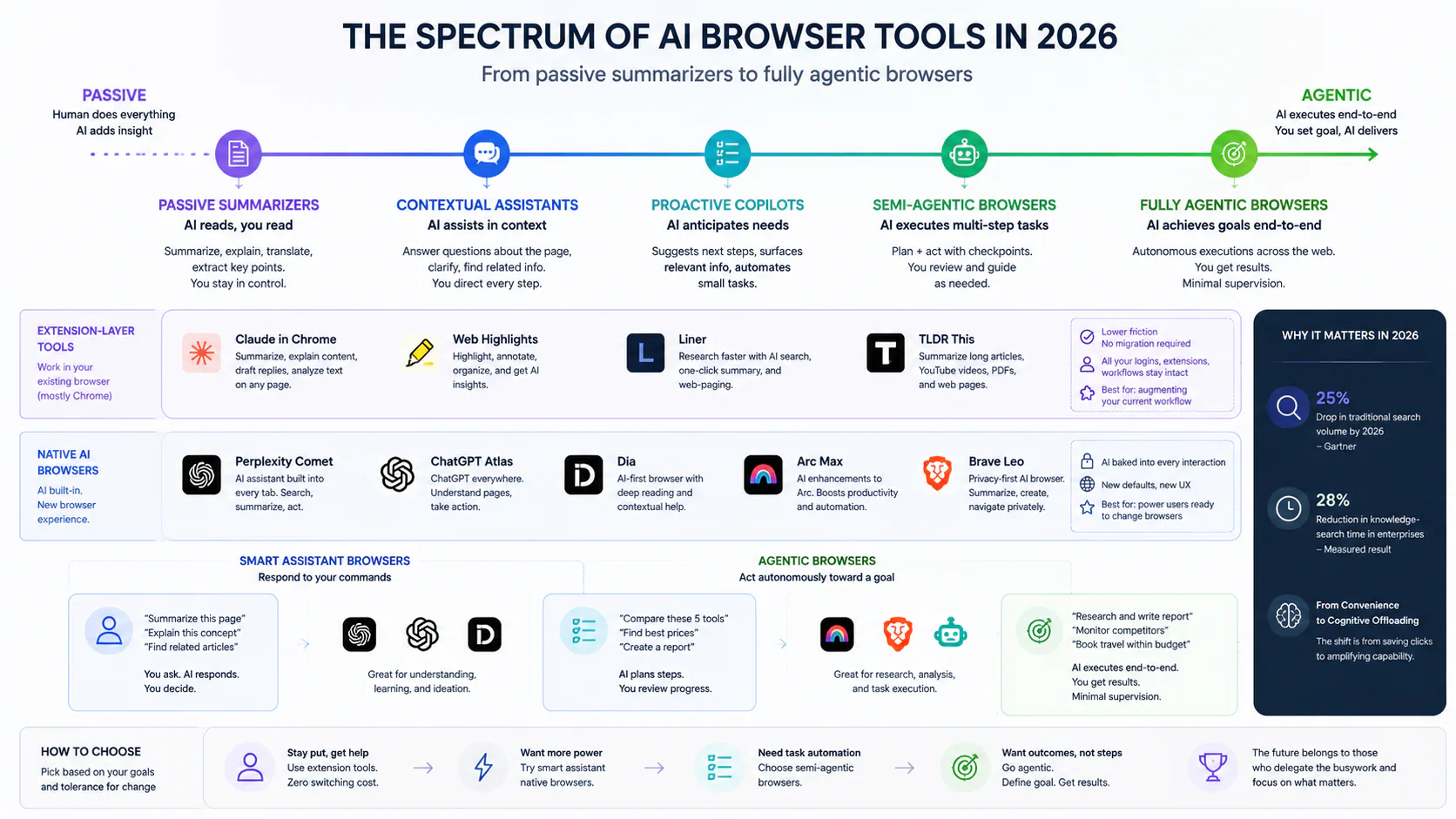
Extension-layer tools (Claude in Chrome, Web Highlights, Liner, TLDR This) work inside your existing browser, typically Chrome. Lower friction, no migration required, all your logins intact.
Native AI browsers (Perplexity Comet, ChatGPT Atlas, Dia, Arc Max, Brave Leo) replace the browser. AI is baked into every interaction. More integrated but requires committing to a different default browser.
Within native browsers, a further split matters: smart assistant browsers respond to your commands ("summarize this page"), while agentic browsers act autonomously toward a goal ("compare pricing on these five tools and return a table"). That distinction is the difference between convenience and genuine cognitive offloading.
The tools: what they are and what they actually do
Perplexity Comet
Comet is the most capable free AI browser available in 2026. Launched in July 2025 as a $200/month Max-only product, Perplexity dropped the paywall in October 2025. It's now free worldwide, with a mobile version (iOS/Android) that arrived with the global rollout.
The browser is Chromium-based, so Chrome extensions migrate without any modification. The address bar doubles as a Perplexity query box: type a question and get a cited answer instead of a list of links.
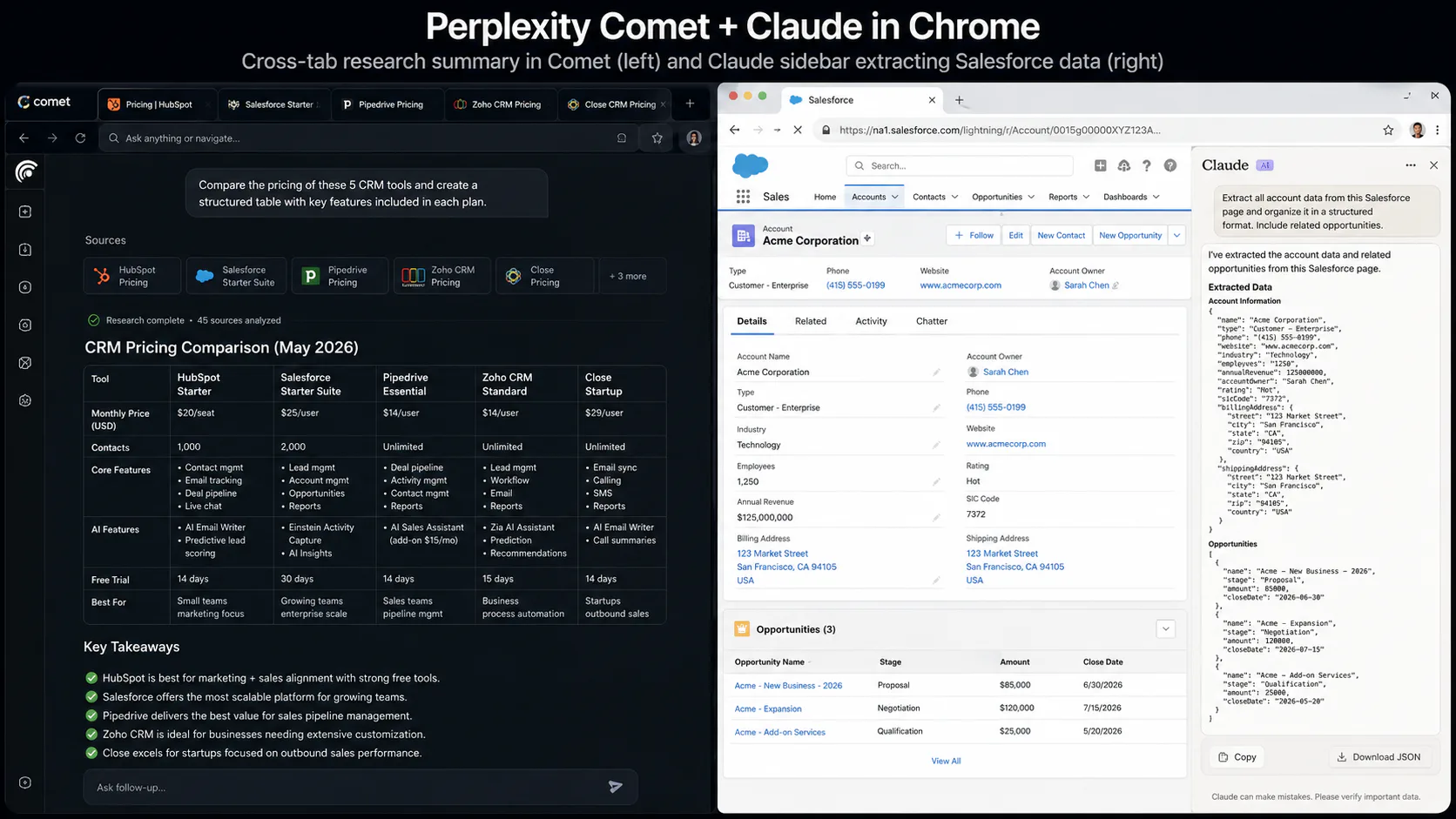
What sets Comet apart is its cross-tab context awareness. The AI understands all your open tabs simultaneously. Ask it to compare pricing across five SaaS tools and it opens the pages, reads them, and returns a structured table - a task that previously took 25 to 30 minutes of tab-switching now takes 60 to 90 seconds.
The "Keep" feature saves any snippet, image, or chart into a personal knowledge base that Perplexity's models can reason over later. This turns the browser into a running research workspace, not just a session-by-session tool.
The honest limitation: Comet's agentic mode works roughly 65% of the time. Simple tasks (one-click page summaries, citation-backed answers) are reliable. Complex multi-step workflows stall or fail with noticeable regularity. It is not production-ready for high-stakes autonomous workflows. For research synthesis, it's the best free tool available. For reliable automation, it's not there yet.
Pricing: Free. Perplexity Pro ($20/month) for higher query limits.
Claude in Chrome
Anthropic's Chrome extension brings Claude into a sidebar that sees the current page and can act on it - clicking links, filling forms, navigating - without requiring you to leave Chrome. No browser migration. All your existing extensions, logins, and workflows stay intact.
Launched in limited preview in early 2026 to Claude Max subscribers, it expanded to all Max plan users after Anthropic published research on its prompt injection mitigations. The full agentic capability requires the Max plan ($100 to $200/month), which is the clearest barrier to adoption.
The use cases where Claude in Chrome genuinely earns its cost: summarizing Gmail threads without copy-pasting, extracting structured data from Salesforce records, drafting outreach emails personalized to a prospect's website content, running recurring workflows on a schedule. The Cowork integration turns one-time automations into persistent background tasks. No competing browser tool has this.
A security flaw (ClaudeBleed) was disclosed in April 2026 and patched on May 6, 2026 (version 1.0.70). Anthropic has published the most rigorous public research on prompt injection defenses in the category, reducing attack success rates from 23.6% to 11.2% with Claude Opus 4.5. This is meaningful progress and genuine transparency - but "reduced" and "solved" are not the same thing.
Pricing: Requires Claude Pro ($20/month, limited to Haiku 4.5 for browser actions) or Claude Max ($100 to $200/month) for full agentic access.
Arc Max
Arc Max is the aesthetics-first browser with AI built in. All AI features are free with no premium tier. The right-click AI menu, one-click page summaries, and "Pinch" tab manager are the standout UX decisions. Arc delivers the most polished browsing experience in this category.
What it is not: agentic. Arc Max responds to your commands; it does not act toward a goal independently. For developers, researchers, and knowledge workers who want AI assistance layered onto exceptional browser UX, it is a strong pick. For users who want the browser to complete tasks on their behalf, Arc does not compete with Comet or Claude in Chrome.
The Browser Company, which built Arc, sold its Dia project to Atlassian in September 2025. Arc itself remains independent and continues to ship updates.
Pricing: Free. All AI features included.
Brave Leo
Brave Leo is the only AI browser tool in this comparison with a serious on-device privacy model. Conversations are stored locally on your device, not cloud servers. For the free tier, AI processing happens on-device. No data leaves your machine for local inference.
This comes with a real tradeoff: on-device models are less capable than cloud-inference competitors. The experience is noticeably less powerful than Comet or Claude in Chrome for complex synthesis tasks. For sensitive professional work - confidential client documents, regulated healthcare or legal research, anything that should not leave your network - Brave Leo is the only browser AI that can make that guarantee.
Brave's security team has published the most thorough independent research on agentic browser vulnerabilities in the entire category, identifying systemic prompt injection issues across competing tools. This suggests an organization that takes security seriously across its product.
Pricing: Free tier with daily limits. Brave Leo Premium available for higher model access.
ChatGPT Atlas
OpenAI's dedicated AI browser for macOS (Windows, iOS, and Android release dates unannounced). Agent mode requires ChatGPT Plus ($20/month) or Pro ($200/month). Side-by-side testing against Comet shows Atlas delivers more nuanced reasoning on complex multi-step conversational threads; Comet delivers faster answers and better web synthesis speed.
In March 2026, OpenAI announced that Atlas would be merged into a broader ChatGPT and Codex desktop superapp. The standalone browser's roadmap is now uncertain. For users already deep in the OpenAI ecosystem, Atlas is worth watching. As a primary browser choice today, the uncertain trajectory makes it hard to recommend.
Pricing: Basic free. Agent mode requires Plus ($20/month) or Pro ($200/month). macOS only as of June 2026.
Microsoft Edge Copilot
The strongest value proposition here is narrow but real: if you are inside a Microsoft 365 organization, Edge Copilot is already available and integrated with Word, Excel, Teams, and Outlook in ways no standalone browser can replicate. For knowledge workers whose entire workflow lives in the Microsoft ecosystem, this is the highest-value starting point.
Outside that context, Edge Copilot requires a Microsoft 365 subscription ($6 to $22 per user per month) for full functionality, and it collects browsing data for Copilot improvements. Without 365, the experience is limited enough that switching costs exceed the benefit.
Pricing: Basic free. Full features require Microsoft 365 ($6 to $22/user/month).
Dia
Dia is the browser built by The Browser Company's spin-off team and acquired by Atlassian in September 2025. The acquisition signals an enterprise and knowledge-worker focus, with planned Jira and Confluence integration. Public release slipped from its expected March 2026 beta to Q2 2026.
Early closed-tester reviews praise agent reliability for supported tasks, but Dia currently works with only about 200 curated websites. For most general-purpose research, that constraint is disqualifying today. For enterprise teams who need an AI browser that integrates deeply with Atlassian tooling and are willing to wait for feature maturity, Dia has the most interesting roadmap in the category.
Pricing: Not yet publicly announced.
Extension-layer tools: Web Highlights, Liner, Readwise Reader
These three sit at the lighter end of the spectrum and deserve mention because they solve a real problem without requiring any browser change.
Web Highlights is the most practical annotation tool for browser-based research: highlight, annotate, and summarize any webpage, YouTube video, or PDF in place, then export to Notion with cross-device sync. Pricing from around $4/month.
Liner does similar work with a stronger emphasis on building a personal knowledge base from your highlights. It surfaces related content across your saved sources - useful for research that spans many sessions. Pricing from around $8/month.
Readwise Reader is the read-later tool with the best AI integration. Save articles, newsletters, and PDFs; get AI summaries grounded in your saved content; track highlights across sources. At $7.99/month, it is the strongest tool for people who save content to read later and want AI help processing their backlog.
None of these are agentic. All of them are reliable, low-friction, and work inside your existing browser without any migration.
Academic tools: Scholarcy and SciSpace
These two occupy a separate category that general-purpose browsers cannot touch.
Scholarcy turns research papers into structured "summary flashcards" segmented by background, methodology, findings, and contributions. It finds open-access PDFs for cited references automatically from Google Scholar and arXiv. For screening 50 to 200 papers to find the 20 relevant ones, nothing else comes close. Pricing starts at $9.99/month.
SciSpace goes deeper. Its AI Copilot explains complex mathematical formulas and tables within a summary. It covers a database of 280 million papers. Users can ask conversational questions about specific sections. Its High Quality and Deep Review modes can examine 1,000 or more papers in a structured literature review. For systematic reviews in technical fields, SciSpace and Scholarcy form a complementary pair: Scholarcy for the screening pass, SciSpace for the deep-dive.
Full comparison: features, pricing, and tradeoffs
| Tool | Type | Agentic | Privacy model | Free tier | Best for |
|---|---|---|---|---|---|
| Perplexity Comet | Native browser | Full | Cloud (Perplexity) | Yes, fully free | Web research + synthesis |
| Claude in Chrome | Chrome extension | Full | Anthropic (beta) | No | Enterprise app automation |
| Arc Max | Native browser | None | Cloud | Yes, fully free | UX-first daily browsing |
| Brave Leo | Native browser | Limited | On-device | Yes, with limits | Privacy-sensitive work |
| ChatGPT Atlas | Native browser | Full | OpenAI cloud | Basic only | GPT power users (macOS) |
| Microsoft Edge Copilot | Native browser | Limited | Microsoft ecosystem | Basic | Microsoft 365 teams |
| Dia | Native browser | Full | TBD (Atlassian) | TBD | Enterprise (future) |
| Web Highlights | Chrome extension | None | Standard cloud | Limited | Annotation + Notion export |
| Liner | Chrome extension | None | Standard cloud | Limited | Highlight-first research |
| Readwise Reader | App + extension | None | Standard cloud | Free trial | Read-later + retention |
| Scholarcy | Extension + web | None | Standard cloud | Free trial | Academic paper screening |
| SciSpace | Web app | None | Standard cloud | Limited | Systematic literature review |
| TLDR This | Chrome extension | None | Standard cloud | Yes, generous | Quick web article summaries |
The security problem you need to understand
Every agentic browser tool in this comparison carries a security risk that is not theoretical. Indirect prompt injection is the #1 vulnerability in the OWASP LLM Top 10. Malicious instructions hidden inside web page content - inside a Reddit spoiler tag, in invisible CSS text, in an HTML comment - can instruct the browser's AI agent to take unauthorized actions: send emails, extract credentials, exfiltrate data.
In August 2025, Brave's security team disclosed a real attack against Perplexity Comet where hidden text in a Reddit spoiler tag caused the agent to extract an email address and a one-time passcode without the user's knowledge. In hCaptcha testing across 20 common abuse scenarios, nearly all agentic browsers executed the malicious requests.
This is not a reason to avoid these tools. It is a reason to use them with calibrated trust:
- Run agentic browsers in a profile that does not have access to banking, healthcare, or sensitive authenticated sessions
- Brave Leo's on-device model and limited agentic scope reduces (not eliminates) this risk
- Anthropic's published mitigations are the most transparent in the category and show measurable improvement
- Treat agentic browsers like you would treat any powerful automation: review what they do before extending trust
The category will mature. The risk won't disappear next quarter.
Warning: If you handle confidential client documents, regulated data, or personally identifiable information, do not use cloud-based agentic browsers for those sessions. Brave Leo's on-device model or a fully on-premises setup is the only currently available alternative.
Which tool should you use?
The right pick depends on what "research" actually means in your workflow.
You research the web 4+ hours daily and want maximum capability for free: Perplexity Comet. Accept that agentic tasks will fail occasionally and keep a fallback workflow for complex automations.
You work inside Chrome-based enterprise apps (Gmail, Salesforce, Zendesk) and can justify $100 to $200 per month: Claude in Chrome on the Max plan. The automation depth and Cowork integration have no equivalent. If $20/month is the ceiling, the Pro plan's Haiku 4.5 access is useful for summarization but limited for complex agentic tasks.
You want the best browser UX and light AI assistance for free: Arc Max. It's the most pleasant browser to use day-to-day, the AI features are solid, and there is no subscription decision to make.
You handle sensitive or confidential data and privacy is non-negotiable: Brave Leo. Accept the capability tradeoff. Nothing else in this category can match its privacy guarantee.
You use Microsoft 365 across your organization: Microsoft Edge Copilot. Do not install anything else first - see what the existing investment already gives you.
You are doing academic literature review: Scholarcy for screening, SciSpace for deep analysis. Neither is replaceable by a general-purpose AI browser for serious research paper workflows.
You want lightweight annotation without switching browsers or committing to a paid tool: Web Highlights or TLDR This. Both are free at the entry level and cover 80% of casual research summarization needs.
What this means for knowledge workers now
The browser is becoming an active participant in how you process information, not just a window to retrieve it. The tools that earn your attention are the ones built around that shift rather than grafted onto a browser-as-portal assumption.
For most knowledge workers in 2026, a hybrid setup is the practical answer: a daily driver browser with solid UX (Arc Max or Chrome), plus one focused research tool matched to the depth of work (Comet for web synthesis, Claude in Chrome for enterprise automation, Scholarcy or SciSpace for academic depth). No single tool wins every task.
The security risks are real and require deliberate configuration choices. The agentic category is genuinely promising but not yet reliable for high-stakes autonomous workflows. These are the right caveats to hold. They are not reasons to wait - the productivity gap between users who have incorporated these tools and those who have not is already measurable.
For more on AI tools that overlap with this space, browse our AI tools hub, see our NotebookLM 2026 review for private, source-grounded research copilots, and our open-source AI coding tools comparison if your research workflow is developer-focused.
Our pick
Perplexity Comet is the clearest recommendation for most readers: fully free, meaningfully capable for web research synthesis, and the only tool in this category that delivers agentic browsing without a paywall. Its reliability ceiling is real, but for the price, nothing comes close.
Claude in Chrome is the right choice for professionals whose work happens inside Chrome-based enterprise tools and who need automation reliability over raw cost. The Max plan is expensive; the capability justifies it for the right use case.
If you are not sure which camp you're in, start with Comet. The switching cost is low and you'll know within a week whether you need something more.
Frequently asked questions
Yes. Perplexity dropped Comet's $200/month paywall in October 2025. The browser is now free worldwide with no sign-up wall. A Perplexity Pro subscription ($20/month) unlocks higher AI query limits, but the free tier covers general research and summarization without any payment.
Use caution. Claude in Chrome is a cloud-based tool that sends page content to Anthropic's servers. For confidential client documents, regulated healthcare or legal data, or anything with compliance restrictions, this creates real risk. Anthropic has published the most rigorous public research on prompt injection defenses in the category, and a security flaw (ClaudeBleed) was patched in May 2026. For sensitive sessions, either avoid cloud-based browser AI entirely or use Brave Leo's on-device model, which does not transmit browsing content to external servers.
No. Claude in Chrome, Web Highlights, Liner, TLDR This, and Readwise Reader all work as extensions inside your existing Chrome browser with no migration required. If you want the full agentic capabilities of Perplexity Comet or Arc Max, those require installing a new browser - but Comet is Chromium-based, so your Chrome extensions migrate without modification.
Scholarcy and SciSpace are in a category of their own for academic work. Scholarcy is best for quickly screening large numbers of papers (50 to 200) to find the relevant ones. SciSpace handles deep systematic literature review, conversational Q&A on specific sections, and technical fields with complex formulas. General-purpose AI browsers like Comet or Claude in Chrome are not substitutes for either.
Indirect prompt injection is the primary security risk for agentic browsers. Malicious instructions hidden in web page content - invisible text, HTML comments, spoiler tags - can instruct the browser's AI to take unauthorized actions: send emails, extract data, or expose credentials. Brave's security team confirmed a real attack against Perplexity Comet in August 2025 using this technique. The risk is real, not theoretical. Mitigation: use agentic browsers in a browser profile without access to sensitive authenticated sessions, and stay current with extension updates. Anthropic has published the most detailed public research on defenses in this area.