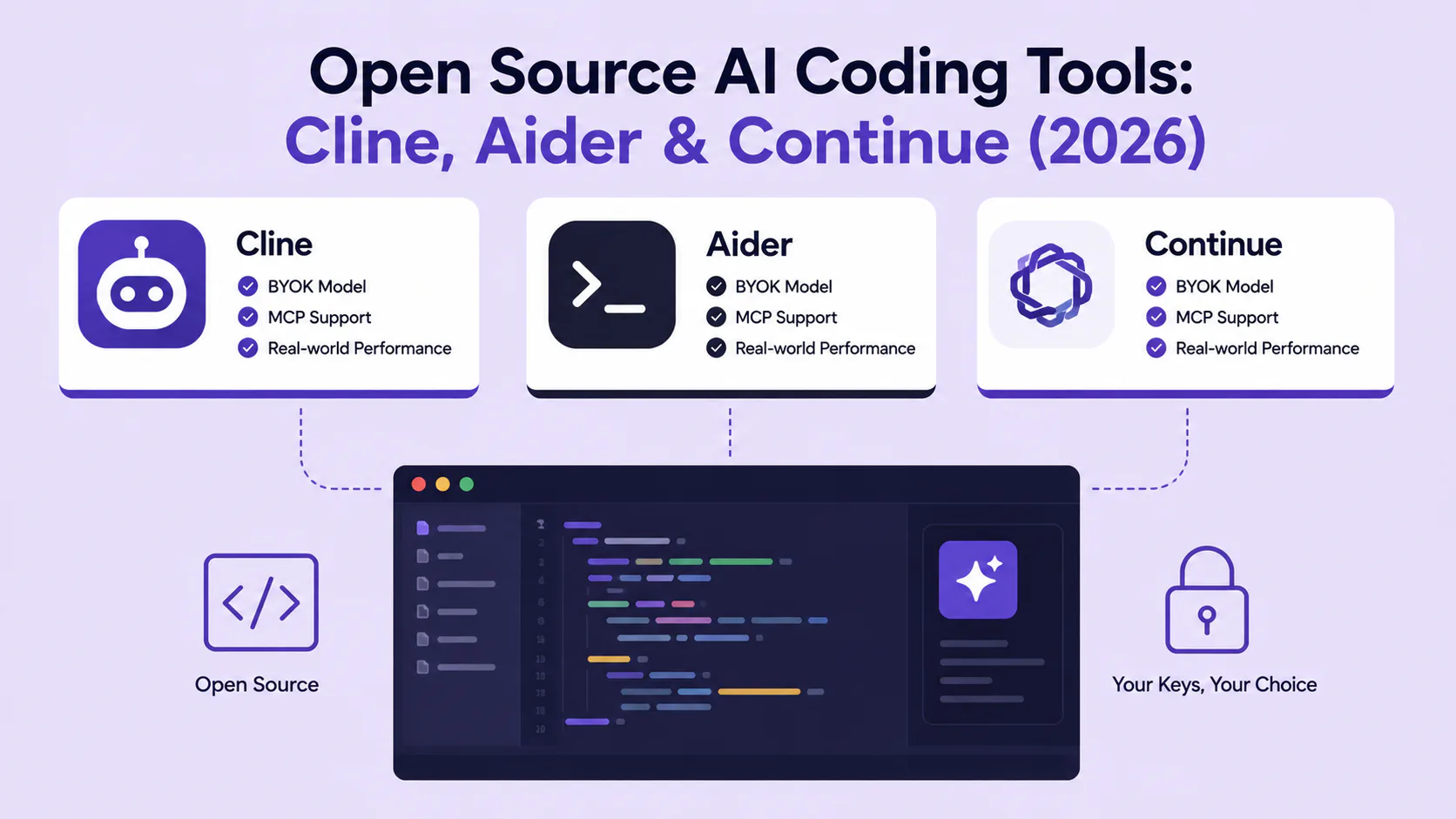
Open Source AI Coding Tools: Cline, Aider & Continue (2026)
Cline, Aider, and Continue compared for 2026: BYOK privacy, MCP support, git workflows, pricing, and which open-source AI coding assistant fits your team.

Bytewaves Score Card
Cursor and GitHub Copilot get most of the attention, but they share a structural problem: you pay per seat, you trust someone else's servers with your code, and you cannot change the model when a better one ships.
Three open-source tools have emerged as the serious alternative: Cline, Aider, and Continue. All three run on your own API keys, support local models, cost nothing beyond what you spend on tokens, and give you full access to the source code. The differences between them are where things get interesting.
This review is based on the tools' current feature sets as of mid-2026, cross-referenced against community benchmarks, real-world use cases, and published changelogs. Here is what actually separates them, and which one deserves a place in your workflow.
TL;DR: Cline is the best pick for VS Code users who want autonomous, multi-file agentic work with human approval gates. Aider wins for developers who live in the terminal and value a clean git audit trail. Continue is the only open-source tool with full JetBrains support and built-in inline autocomplete. All three beat GitHub Copilot on cost and privacy at scale.
Why open-source AI coding tools matter in 2026
The AI coding tools market hit an estimated $12.8 billion in 2026, up from $5.1 billion two years prior. According to the latest Stack Overflow Developer Survey, 84 percent of developers are either using or planning to adopt AI coding tools. GitHub reports that over 51 percent of all code committed to its platform in early 2026 was generated or substantially assisted by AI.
The commercial tools captured the early adopters. Now the question for teams is different: what happens when you need to keep your code on-premises, when per-seat costs reach $20,000 a year across a 50-person engineering org, or when a model you rely on changes behavior after a quiet update?
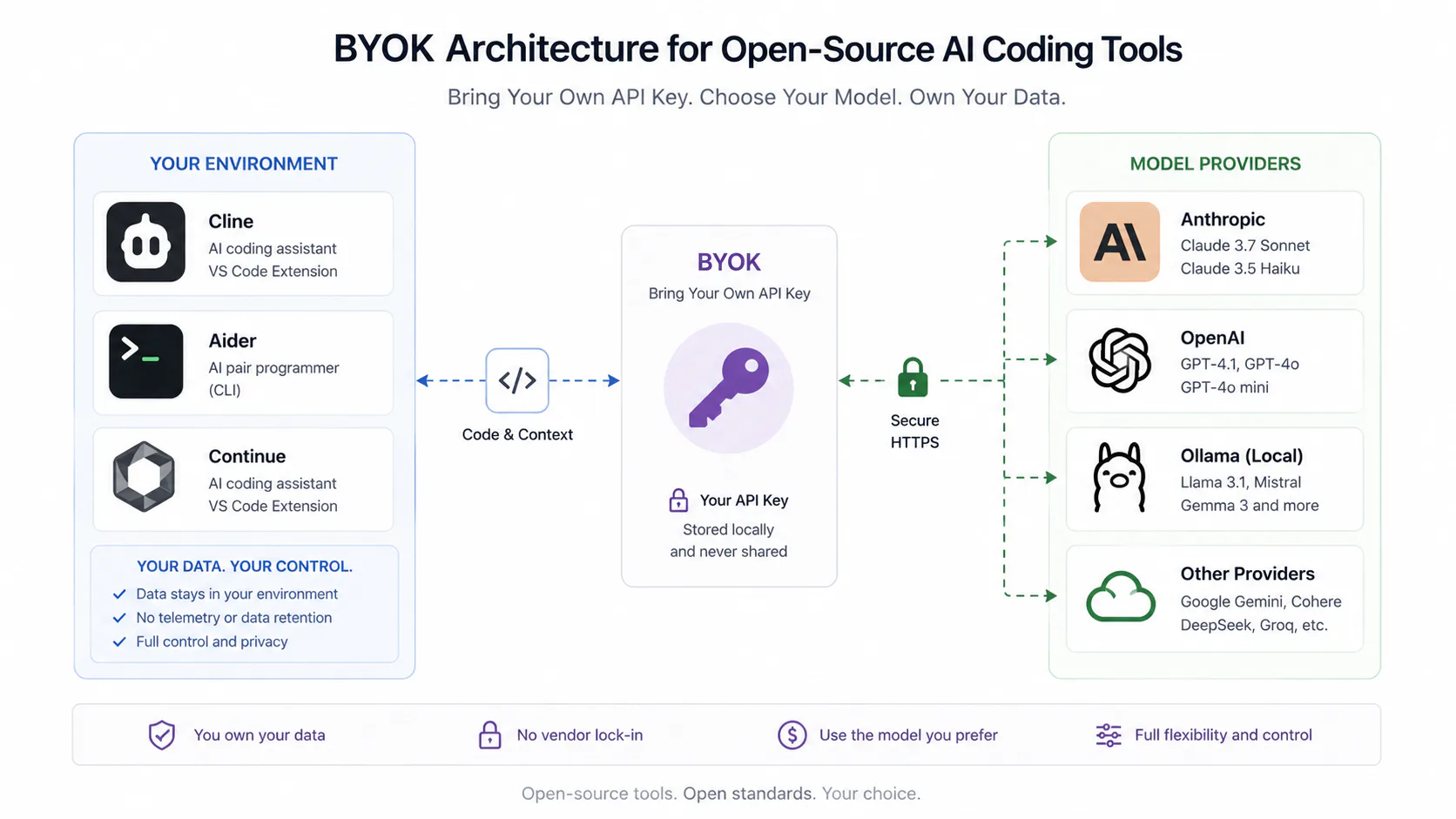
That is the gap these three tools fill. They share one core philosophy: bring your own API key, choose your own model, own your data.
The agentic shift changes everything
Traditional coding assistants are assistive: they suggest completions as you type. The tools in this review are largely agentic: they read your codebase, create and edit multiple files, run your test suite, debug failures by reading stderr, and iterate until tests pass. That implement-test-fix loop is what separates them from line-by-line completion tools.
One data point worth pausing on: developers now spend 11.4 hours per week reviewing AI-generated code versus 9.8 hours writing new code (as of early 2026). The bottleneck has moved from writing to reviewing. Tools with strong audit trails matter more than they did two years ago.
Cline: the autonomous VS Code agent
Cline started life as a VS Code extension called "Claude Dev," created by Saoud Rizwan in June 2024. After a rename and a period of rapid growth, it has reached more than 5 million installs and 58,000 GitHub stars. It ships under Apache 2.0 and is currently at v3.81.
How Cline works
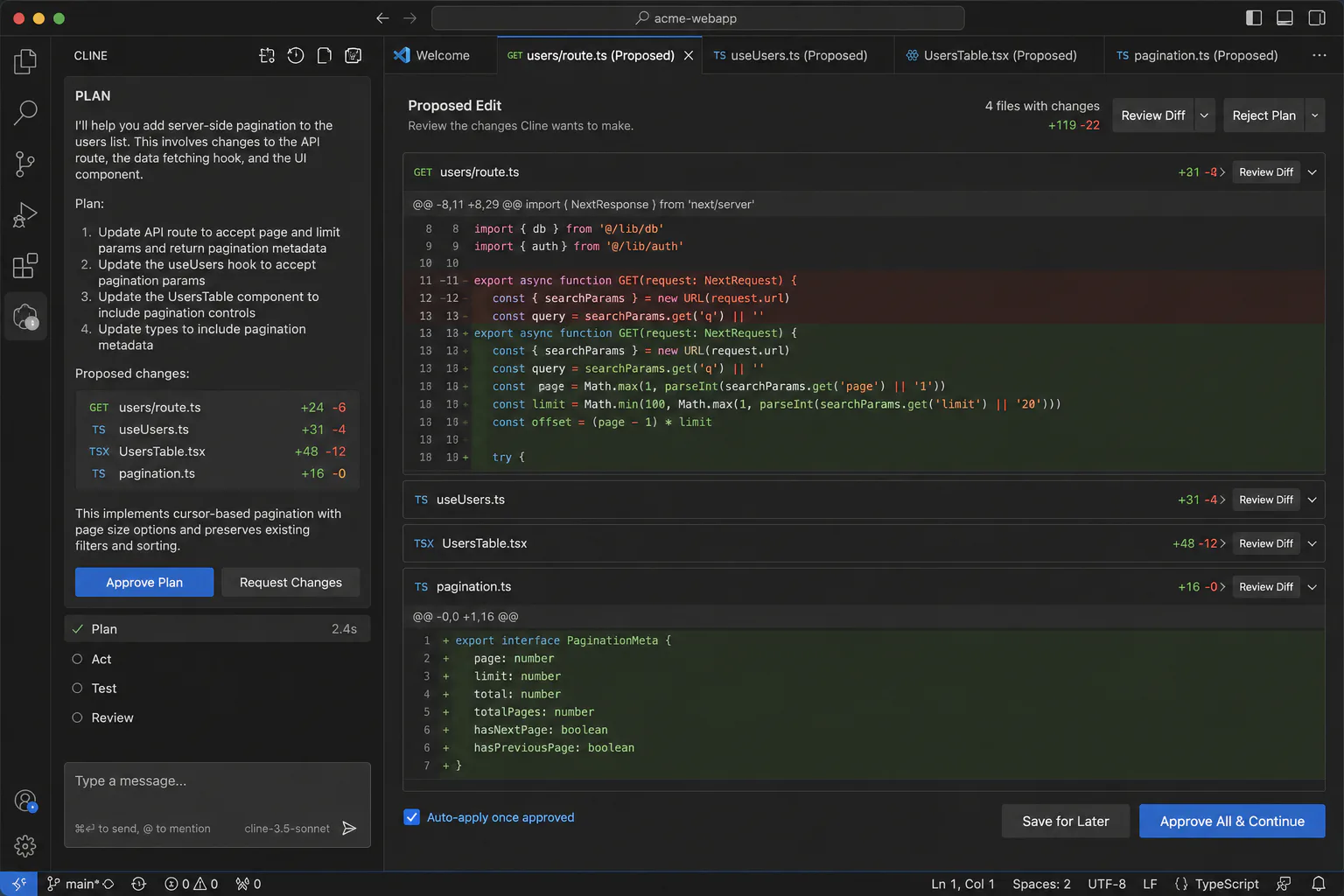
Cline runs as a sidebar inside VS Code. You describe a task in natural language, and Cline reads your codebase, proposes a plan, then executes it with explicit approval gates at each step. The core loop is: plan, review, act, repeat.
The Plan/Act split is Cline's most important UX decision. Before touching any file, Cline shows you its intention. You approve, reject, or redirect. This keeps a human in the loop without breaking the agentic workflow.
Key features as of mid-2026:
- Runs in VS Code, JetBrains, Cursor, Windsurf, Zed, Neovim, and a CLI for macOS and Linux
- Supports 30+ LLM providers including Claude, GPT-4o, Gemini, DeepSeek, and local models via Ollama
- MCP Marketplace: an in-editor browser for connecting GitHub, Slack, Linear, databases, and 50+ other services via Model Context Protocol
- Subagents (February 2026): parallel read-only agents that explore the codebase, trace cross-cutting concerns, and return reports to the main agent, without being able to write files or run destructive commands
- Automatic model routing (March 2026, v3.2): routes each subtask to the cheapest model that can handle it, bringing typical monthly API costs to around $8-12 for moderate use
- Workflow Hooks: inject custom validation scripts at key workflow moments
- Browser automation via Puppeteer for end-to-end testing and UI verification
Real-world performance
For full-stack feature scaffolding, Cline is the strongest of the three. A representative workflow: you describe a feature in natural language, Cline reads the codebase, creates and edits files across the frontend and backend, runs the test suite, reads the failure output, and iterates. The approval gates add a few seconds per step but prevent the runaway edits that make agentic tools dangerous in production codebases.
The automatic model routing added in v3.2 is a meaningful improvement. Tasks like generating boilerplate or writing tests get routed to cheaper models (Haiku, Gemini Flash) while architectural reasoning gets sent to stronger ones (Claude Sonnet, Opus). Monthly bills are noticeably lower than naively using a single frontier model for everything.
One genuine limitation: Cline's Subagents are read-only. They can research and report but cannot write. For truly parallel agentic work where multiple agents write files simultaneously, Cline's architecture is not there yet. Community forks like Roo Code and Kilo Code are experimenting with full parallel write access, but Cline itself remains sequential at the write layer.
Cline pricing
The core Cline extension is free. You pay the model provider for tokens consumed. No Cline subscription exists. At the team's recommended settings (automatic model routing enabled), expect $8-12 per month per developer for moderate daily use, scaling up significantly for heavy agentic workflows with large codebases.
Aider: the terminal-native git-first tool
Aider is the tool for developers who have not left the terminal since 2018 and do not plan to. With 41,000 GitHub stars and 6.8 million PyPI installs, and roughly 15 billion tokens flowing through it each week, it is far larger than its reputation outside terminal-native circles suggests.
Its design philosophy is deliberate constraint: small surface area, deep integration with the tools you already use (git, ripgrep, tree-sitter, your linter, your test runner), and no IDE plugin required.
How Aider works
You invoke Aider from the command line inside a git repository. You describe what you want to change, and Aider uses its repo map to understand the structure of the codebase without loading every file into context. It proposes changes, applies them, and commits them automatically with descriptive commit messages.
The key architectural differentiator: every AI edit becomes a git commit. Your git log becomes a complete audit trail of what the AI changed, when, and in response to what prompt. Undo is git revert. Review is git diff. This keeps everything in the tools developers already know instead of a proprietary history panel.
Architect Mode is Aider's most sophisticated feature. Your request goes to a stronger "architect" model (typically Claude Opus or GPT-4o) that proposes a solution in prose. That proposal then goes to a cheaper "editor" model (Haiku, GPT-4o-mini) that translates it into specific file diffs. High-quality reasoning at reduced token cost. The pattern works particularly well on refactoring tasks where the "what to do" requires deep understanding but the "how to write it" is mechanical.
One self-referential stat: 88 percent of the code in Aider's latest release was written by Aider itself.
Real-world performance
Aider is excellent for large-scale refactoring. Renaming a function used across 40 files, upgrading all dependencies and fixing breaking changes, converting a Python 2 codebase to Python 3: these are tasks where Aider's repo map and git-native workflow shine. Every change is reviewable as a diff. Nothing is hidden in a chat history.
The limitation is the surface. If you want visual diff review, a clickable UI, or browser automation, Aider does not offer these. For teams who consider terminal comfort a basic professional expectation, this is not a limitation. For everyone else, it is a dealbreaker.
Aider also lacks native parallel execution. It processes tasks sequentially. For a single developer working through a well-defined task list, this is fine. For a team wanting to spin up multiple agents on parallel branches, Aider's architecture does not help.
Aider pricing
Aider is free and open source (Apache 2.0). Install it with pip install aider-chat. You pay only for API tokens. The Architect/Editor pattern meaningfully reduces costs compared to routing everything through a frontier model.
pip install aider-chat
aider --model claude-sonnet-4-6
Continue: the IDE-native team tool
Continue.dev occupies a different position. Where Cline and Aider are primarily agentic, Continue explicitly covers both ends of the spectrum: inline autocomplete (like Copilot), a chat panel, multi-file agent mode, and team-wide config sharing. It has 25,000+ GitHub stars and is the only tool here with full JetBrains IDE support alongside VS Code.
How Continue works
Continue installs as an extension in VS Code or JetBrains (IntelliJ, PyCharm, WebStorm, and the full JetBrains family). It adds four distinct modes:
- Autocomplete: inline suggestions as you type, using a model you configure
- Chat: ask questions and generate code without leaving the IDE
- Edit: select code, describe the change in natural language, apply it
- Agent: make multi-file changes across the codebase
Model routing in Continue is explicit rather than automatic. You assign roles in a config file: one model for autocomplete (typically a fast, cheap model), another for chat, another for agent tasks. The routing is version-controlled, reviewable, and identical across every developer machine in the team.
Continue Hub at hub.continue.dev is what makes Continue interesting for larger organizations. Teams publish a shared config.json that defines which models, which context providers, and which coding rules everyone uses. A new hire can be configured correctly before lunch.
Note: Continue supports Model Context Protocol, allowing integration with GitHub, Sentry, Snyk, Linear, and other development services. It also runs automated AI review agents in Pull Requests as a CI step.
Real-world performance
Continue is the smoothest onboarding experience of the three, particularly for teams coming from GitHub Copilot. The inline autocomplete mode feels familiar, the chat panel maps to how most developers already think about AI assistance, and adding agent capabilities on top of that is incremental rather than a workflow overhaul.
The tab completion speed depends heavily on your model choice. A cloud API model typically introduces a 0.5-1.5 second delay that makes completions feel noticeably less fluid than Copilot. A local model on a capable GPU can get this below 100ms. If you want Copilot-speed completions without Copilot's per-seat pricing, plan for local model infrastructure.
For regulated environments, Continue's self-hosting story is the strongest of the three. You can run entirely on-premises with a local model (Qwen2.5-Coder or Llama 4 Scout are the current viable options), point it at your internal Continue Hub instance, and have code that never leaves the network. The compliance documentation gap (no SOC 2, HIPAA, or PCI DSS certification for any of these tools yet) remains a procurement obstacle, but the technical architecture is sound.
Continue pricing
Continue is free and open source (Apache 2.0). The VS Code and JetBrains extensions are free. Continue Hub is free for individuals; enterprise pricing for centralized management and SSO is available on request.
Feature comparison: Cline vs Aider vs Continue
| Feature | Cline | Aider | Continue |
|---|---|---|---|
| Primary environment | VS Code (sidebar) | Terminal | VS Code + JetBrains |
| Inline autocomplete | No | No | Yes |
| Agentic multi-file edits | Yes | Yes | Yes |
| Native git commits | Via hooks | Yes (automatic) | Via MCP |
| Parallel agents | Yes (read-only Subagents) | No | Via CI |
| Browser automation | Yes (Puppeteer) | No | No |
| MCP support | Yes (Marketplace) | No | Yes |
| JetBrains support | Partial | None (editor-agnostic) | Full parity |
| Local model support | Yes (Ollama + others) | Yes (75+ providers) | Yes (Ollama + others) |
| Automatic model routing | Yes (v3.2+) | Via Architect/Editor mode | Manual config |
| GitHub stars (mid-2026) | 58k | 41k | 31k |
| License | Apache 2.0 | Apache 2.0 | Apache 2.0 |
How these tools compare to Copilot and Cursor
GitHub Copilot has 4.7 million paid subscribers (up 75% year-over-year) and is used by 90% of Fortune 100 companies. For a solo developer or a small team where zero-configuration matters and sovereignty is not a constraint, Copilot's polish is hard to argue against.
At scale, the math changes. A 50-person engineering team at Copilot's current pricing spends over $12,000 per year before negotiating enterprise pricing. The open-source trio costs nothing beyond API tokens, and those can be reduced significantly with model routing and local models for routine completions.
Cursor is the most direct commercial competitor to Cline specifically. Cursor wins on inline completion and chat-driven micro-edits inside a polished custom editor. Cline wins on multi-file autonomous tasks, terminal automation, and browser-driven verification. The practical tradeoff: Cursor offers a more refined single-developer experience; Cline offers more flexibility and lower cost at team scale.
For teams that also use a commercial agent like Cursor 3, a common pattern is emerging: run Aider for quick auditable edits on defined tasks, and reserve Cursor for complex orchestration that benefits from parallel cloud agents. The open-source tools are not mutually exclusive.
Pros and cons
Cline
Pros:
- Best human-in-the-loop UX of any open-source agentic tool, with step-by-step approval gates that prevent runaway edits
- Automatic model routing keeps API costs around $8-12 per month for moderate use, significantly cheaper than a flat frontier-model approach
- MCP Marketplace connects to GitHub, Slack, Linear, and 50+ other services inside the editor without manual configuration
- Browser automation via Puppeteer enables end-to-end testing workflows that no other open-source tool supports natively
Cons:
- No inline autocomplete means you still need a separate completion tool if you want suggestions while typing
- Subagents are read-only: genuinely parallel agentic writes are not available in the base tool, which limits throughput on large parallel tasks
- Token costs can compound quickly on large codebases when auto-approval is enabled and the agent runs unchecked
- UX is noticeably less polished than commercial alternatives like Cursor, which matters for teams with less terminal-comfortable developers
Aider
Pros:
- Git-native commit workflow means every AI edit is reviewable, reversible, and auditable with tools the entire team already knows
- Architect/Editor mode reduces costs by separating reasoning (expensive model) from implementation (cheap model)
- Self-improving: the project dogfoods itself, with 88% of its latest release written by Aider, which is a credibility signal for the tool's capabilities
- No IDE dependency: works with any editor and is the most portable of the three tools
Cons:
- Terminal-only surface is a hard filter: developers who are not comfortable in the command line cannot use this tool effectively
- No browser automation, no visual diff panel in an IDE, no MCP marketplace
- No native parallel execution: Aider processes tasks sequentially, which is a bottleneck for high-throughput workflows
- Onboarding requires comfort with git, pipx/pip, and command-line flags, which adds friction for less technical team members
Continue
Pros:
- The only open-source AI coding tool with full JetBrains IDE support (IntelliJ, PyCharm, WebStorm), which is non-negotiable for many enterprise Java and Kotlin teams
- Inline autocomplete makes the transition from GitHub Copilot nearly frictionless for teams used to suggestion-style assistance
- Shareable team configs on Continue Hub enforce consistent model routing, context providers, and coding rules across large engineering organizations
- Self-hosting with local models is the strongest compliance story among the three tools for regulated environments
Cons:
- Tab completion with cloud API models introduces a 0.5-1.5 second delay that makes suggestions feel slower than Copilot or Cursor
- No SOC 2, HIPAA, or PCI DSS certification, which means compliance teams in regulated industries must do significant custom documentation work before enterprise deployment
- For large teams needing SSO, audit logs, and centralized management, the enterprise offering is not yet as mature as GitHub Copilot Enterprise
Who should use each tool
Use Cline if:
- You work primarily in VS Code and want a capable autonomous agent with explicit approval gates before each action
- You are building or working on full-stack applications where multi-file coordination is the main challenge
- Cost control matters: the automatic model routing and token-by-token billing make it economically predictable at team scale
- You want browser automation and MCP integration without setting up separate infrastructure
Skip Cline if:
- You need inline autocomplete as part of your core workflow (you will still need Copilot or Continue for this)
- You are a JetBrains user and cannot add VS Code to your workflow
- You want truly parallel write-access agentic work today rather than the read-only Subagent model
Use Aider if:
- You live in the terminal and consider this non-negotiable
- Git audit trails are a compliance or code-review requirement on your team
- You are doing large-scale refactoring tasks across polyglot codebases where repo-map intelligence matters
- You want the broadest LLM provider support (75+ providers) and want to switch models freely
Skip Aider if:
- Your team has developers who are not comfortable with command-line tooling
- You need an IDE-integrated visual workflow or browser automation
- You want native parallel agent execution
Use Continue if:
- Your team uses JetBrains IDEs: this is the only viable open-source option with full parity
- You want a Copilot replacement that preserves the inline suggestion workflow while adding agent capabilities
- You are building out a standardized AI tooling configuration for a large engineering organization via Continue Hub
- You are in a regulated environment where self-hosting with local models is a technical requirement
Skip Continue if:
- You need near-instant tab completions and cannot invest in local model infrastructure (cloud models introduce noticeable latency)
- You need enterprise certification (SOC 2, HIPAA) out of the box
Is it worth switching from GitHub Copilot?
For solo developers or small teams where zero-configuration and polish are the top priorities: probably not yet. Copilot's onboarding is genuinely seamless and the suggestion quality has improved significantly.
For teams at 10 or more developers, the calculus shifts. The per-seat costs compound, the model lock-in becomes more constraining as better models ship, and the data sovereignty question becomes harder to ignore. A 20-person team on Copilot Business spends roughly $4,800 per year. The same team running Continue or Cline on a mix of cloud API and local models can get below $2,000 per year with some configuration investment.
The compliance gap is real and should not be minimized. None of the three tools has SOC 2 documentation, which blocks procurement in 67% of regulated enterprise environments. If you are in fintech, healthcare, or defense, build in time for custom audit documentation.
The broader trend is clear: enterprise adoption of open-source AI coding tools is accelerating as companies build internal forks with custom security policies and model integrations. According to Gartner, 75% of enterprise software engineers will use AI code assistants by 2028. A meaningful slice of that growth will go to configurable, self-hostable tools.
For more on the competitive landscape, see our Cursor 3 review and our breakdown of Lovable vs Bolt.new vs v0 for the no-code side of AI-assisted development.
Verdict
Cline is the best starting point for most VS Code developers who want agentic AI assistance without giving up control. The approval gates are thoughtful, the model routing keeps costs predictable, and the MCP Marketplace makes it extensible without custom plumbing.
Aider is the right choice if git-native workflows and terminal-first operation are non-negotiable. It is not for everyone, but for developers who meet it where it is, it is the most auditable and flexible tool of the three.
Continue earns its place specifically for JetBrains teams and organizations that need a consistent, shareable configuration across a large engineering org. The inline autocomplete story and Continue Hub are genuine differentiators no other open-source tool matches.
All three beat GitHub Copilot on cost and privacy at scale. None of them beat Copilot on out-of-the-box polish. That gap is closing faster than most people expect.
Frequently asked questions
The tools themselves are free and open source under Apache 2.0 licenses. You pay only for the API tokens consumed by the model provider you connect (Anthropic, OpenAI, Google, etc.). With model routing and local models for simpler tasks, moderate daily use typically costs $8-15 per month per developer. Running fully local models via Ollama reduces this to near zero.
Continue is the only one of the three with full JetBrains support across IntelliJ, PyCharm, WebStorm, and other IDEs in the family. Cline has partial JetBrains support as of 2026, but Continue has full feature parity between its JetBrains and VS Code extensions.
Yes. All three support local models via Ollama or similar runtimes. As of early 2026, models like Qwen3-Coder-Next, Llama 4 Scout, and DeepSeek V3.2 have crossed the viability threshold for real coding tasks on capable hardware. This makes fully on-premises operation technically achievable for the first time.
No. As of mid-2026, none of the three have official SOC 2 Type II, HIPAA, or PCI DSS documentation. This is the primary enterprise procurement blocker. Teams in regulated industries can still use them (self-hosting with local models is the standard approach), but must create custom audit documentation. This certification gap is expected to become a competitive focus in the next 12 months.
Cost volatility is the top pain point cited by teams using agentic tools. Cline's automatic model routing (v3.2+) helps by routing cheap tasks to cheaper models. Aider's Architect/Editor mode reduces costs by separating reasoning from implementation. Continue lets you assign explicit models per task type in a version-controlled config. Setting spending limits at the API provider level is an additional safeguard all three tools recommend.