Free AI Tools That Are Actually Worth Using (2026)
The best free AI tools in 2026 by category: chatbots, coding, research, design, and productivity. No paywalls, no trials, no watermarks.

Bytewaves Score Card
Most "free AI tools" lists are a bait-and-switch. They lead with tools that cut you off after ten messages, watermark everything you produce, and quietly expire your access after a trial period.
This list is different. Every tool here has a permanent free tier that's genuinely useful for daily work, not just a demo. The free AI tier has matured enough that a student, freelancer, or small business owner can now build a complete workflow across writing, research, coding, design, and productivity without paying for a single subscription.
Here's what's actually worth your time in 2026, broken down by category.
TL;DR: NotebookLM is the most underrated free tool on this list. Gemini Code Assist is the most generous free coding tool (180,000 completions/month). Fathom is the only meeting transcription tool with a truly unlimited free tier. If you use only one AI chatbot for free, Claude's 200K context window makes it the strongest option for long documents.
Why free AI tiers are actually good now
The short answer is competition. When ChatGPT, Gemini, Claude, DeepSeek, and Perplexity are fighting for the same users, the free tier becomes a product, not an afterthought.
The result: GPT-5.5 Instant is now the ChatGPT free default. Claude's free tier includes a 200K token context window, meaning you can paste an entire book for analysis without hitting a limit. Gemini's free tier integrates directly into Google Docs, Sheets, and Gmail. DeepSeek's chat interface has no usage limits at all.
The catch is that not all free tiers are equal. Some show you features you can't use, downgrade your model during peak traffic, or log your inputs for training. Knowing which tools give genuine daily utility, and which are designed to frustrate you into upgrading, is the whole point of this guide.
Best free AI chatbots and assistants
ChatGPT free tier: the most versatile
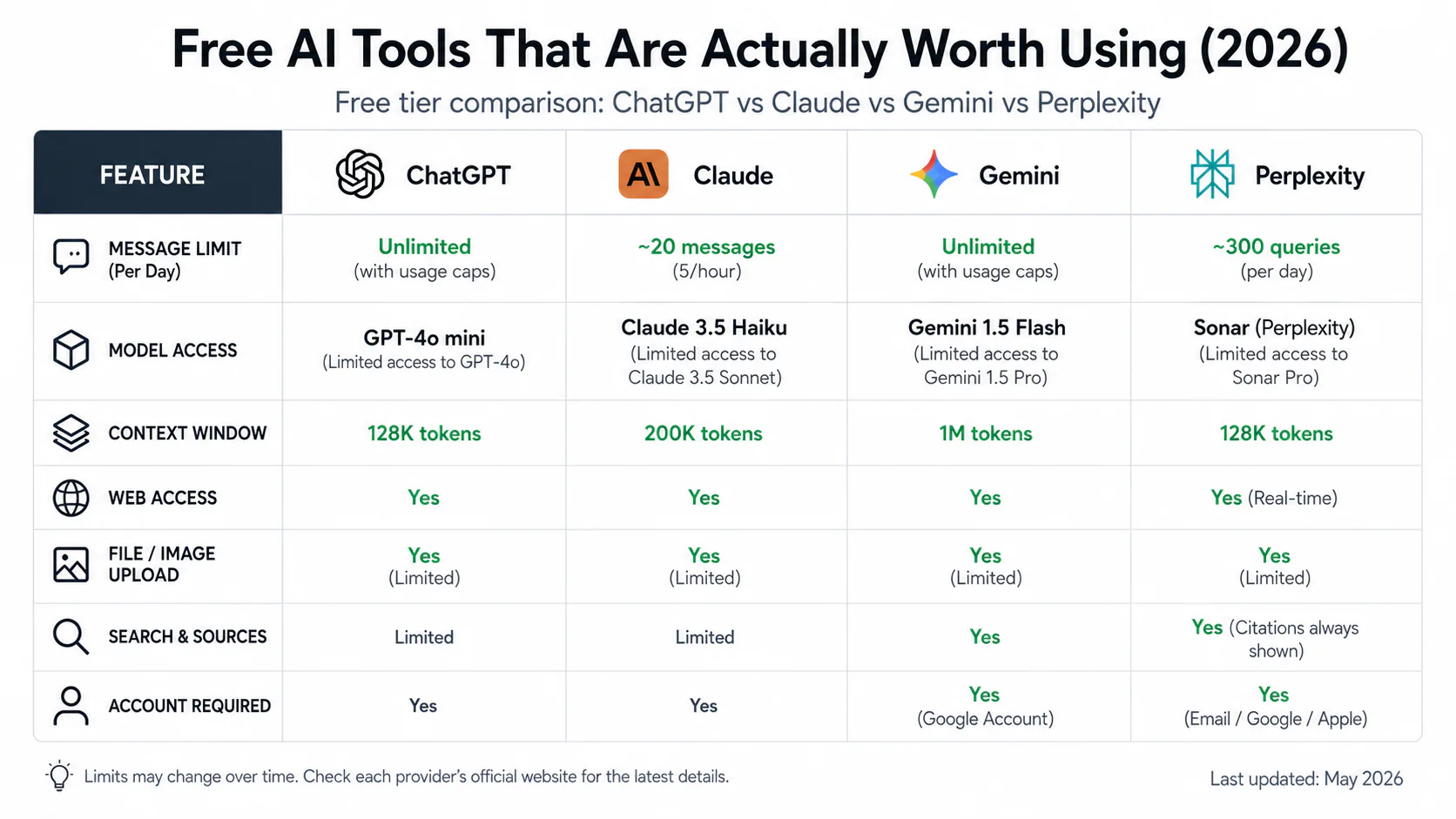
ChatGPT is still the most widely used AI tool in the world, and the free tier is more capable than it's been at any point. The default model as of May 2026 is GPT-5.5 Instant, with limited access to the flagship GPT-5.5 (roughly ten messages per five-hour window before switching back to Instant).
File uploads (PDFs, images, spreadsheets, code), web browsing, and approximately two to three DALL-E image generations per day are all included on the free tier. For general writing, brainstorming, summarizing, and everyday Q&A, it covers most daily needs without ever hitting a wall.
The limitation that matters most: free users are deprioritized during peak traffic. When demand spikes, OpenAI may quietly downgrade the model quality rather than queue you. If you need consistent flagship model access, that costs $20/month for Plus.
Claude free tier: best for long documents
Claude's free tier includes Sonnet 4.6 with a 200,000 token context window. In practical terms, that's enough to paste an entire research paper, a full codebase, or a lengthy contract and ask Claude to analyze it in a single message. No other major free AI chatbot matches this context window size.
The trade-off is strict daily message limits. Heavy users hit them within a few hours. For occasional long-document work, editing, and nuanced reasoning tasks, the free tier delivers genuine value. For all-day usage, the message cap becomes a real constraint.
Gemini free tier: best for Google Workspace users
If you live in Google Docs, Sheets, or Gmail, Gemini's free tier is the most immediately valuable option on this list. It integrates directly into Google's productivity suite on personal accounts, with no subscription required. Ten Deep Research reports per month are included free, plus full access to Gemini 3 Flash and limited access to Gemini 3.1.
Gemini grew from 6% to 25.46% of global generative AI web traffic between early 2025 and March 2026, the largest share gain by any AI chatbot tracked. A significant part of that growth is attributable to the Workspace integration reaching hundreds of millions of existing Google users.
DeepSeek: no limits, strong at math
DeepSeek's web interface and mobile app are completely free with no subscription fees and no daily usage limits. That's a meaningful differentiator when every major competitor imposes some form of daily cap.
DeepSeek is particularly strong at mathematical reasoning and code-related tasks. The privacy caveat is real: it's a Chinese-owned platform with different data handling norms than US-based providers. For sensitive business communications or confidential documents, that's a genuine concern worth weighing.
Perplexity: free cited research
Perplexity's free tier gives you five Pro Searches per day and unlimited standard searches. Every response cites its sources, which makes it fundamentally a research tool rather than a creative assistant. For journalists, students, and content creators who need verifiable information, it fills a distinct niche that ChatGPT and Claude don't cover as cleanly.
The Comet browser (formerly a $200/month perk) became free to everyone on March 18, 2026. It adds AI-powered article summaries and research into the browser itself.
Best free AI for research and knowledge work
NotebookLM: the most underrated free AI tool in 2026
NotebookLM is completely free, and it does something no general-purpose chatbot does: it grounds all its answers exclusively in the sources you upload. Upload up to 50 sources per notebook (PDFs, Google Docs, YouTube videos, websites, audio files), and it becomes a custom AI expert on only those materials. No hallucination from outside context. Every answer cites the specific source.
The practical uses are significant. A graduate student uploads 15 academic papers and generates a study guide with cross-paper contradiction detection in minutes. A lawyer uploads case documents and queries them without the AI inventing case law it hasn't read. A product manager uploads a competitor's documentation and asks pointed questions.
Audio Overviews (AI-generated podcast-style discussions of your uploaded content) are also free and genuinely useful for processing dense material.
Free limits: 100 notebooks, 50 sources per notebook, 500,000 words per source. The paid tier (via Google One AI Premium at $19.99/month) raises those limits, but the free tier covers most real workflows comfortably.
Our full NotebookLM 2026 review covers the RAG mechanics and how it compares to Perplexity in depth.
Best free AI coding tools
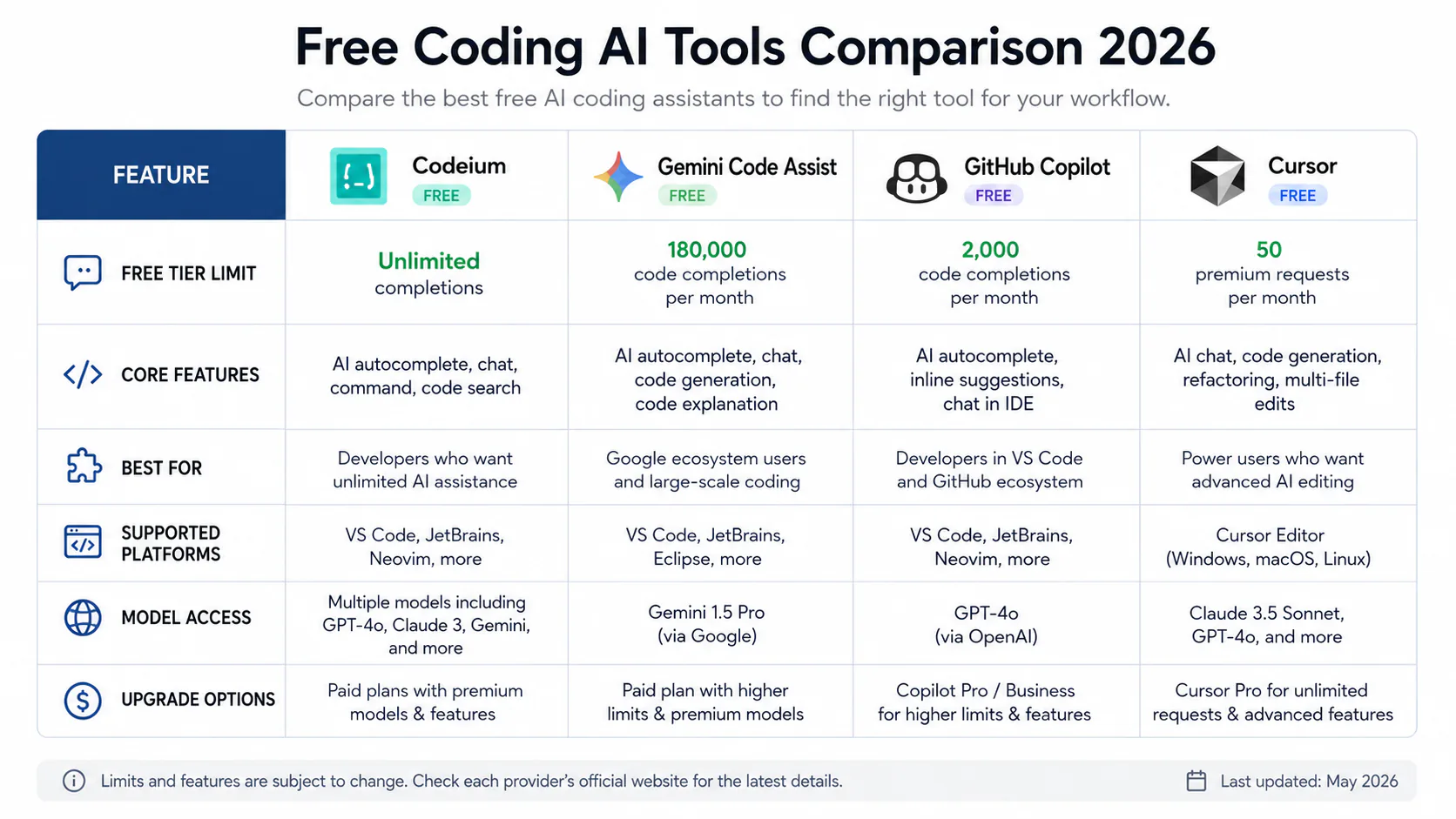
Gemini Code Assist: 180,000 completions per month
For raw free tier generosity, Gemini Code Assist is not close. Individual developers get up to 180,000 code completions per month at no cost, with no credit card required. It supports VS Code and JetBrains IDEs, and covers debugging, generation, and natural language chat.
For a professional developer writing code all day, 180,000 completions is effectively unlimited. It's the strongest free coding tool allocation available from any major provider.
Codeium: truly unlimited for individuals
Codeium has no usage limits on the free tier for individual developers. It supports 70-plus programming languages and 40-plus editors including VS Code, JetBrains, Vim, and Neovim. Output quality is comparable to paid GitHub Copilot on most standard tasks.
The free tier is permanent, not a trial. For solo developers and open-source contributors who want Copilot-quality completions without the $10/month subscription, Codeium is the straightforward choice.
GitHub Copilot free tier
GitHub Copilot now has a free tier for individuals: 2,000 completions and 50 chat messages per month. It's significantly more limited than Codeium or Gemini Code Assist. Students and qualifying open-source maintainers get full unlimited access free through GitHub Education.
Cursor Hobby tier
Cursor's free Hobby plan includes 2,000 completions and 50 premium requests per month. The more meaningful free value is the AI-native editing environment: the entire IDE is rebuilt around AI interaction, rather than adding AI as a plugin layer. For understanding unfamiliar codebases and refactoring with AI guidance, the experience is qualitatively different from plugin-based tools.
Best free AI for design and image generation
Canva AI free tier: best for non-designers
Canva's free tier includes thousands of design templates, a drag-and-drop editor, limited AI image generation (Magic Media credits), AI text generation (Magic Write), and background removal. For anyone without a design background producing social media graphics, presentations, or marketing materials, it's the most accessible starting point.
Bing Image Creator: 200 images per day with commercial licensing
Bing Image Creator (Microsoft Designer) generates up to 200 AI images per day with commercial use permitted, using a free Microsoft account. It runs on DALL-E technology. For content creators who need commercial-licensed AI images at volume, this is the most generous free option available.
Ideogram: the best free option for text-in-images
Ideogram generates images with accurate embedded text, which is the consistent failure point of most competing image generators. For logos, social graphics, and mockups requiring readable text within the image, it's the strongest free option.
ChatGPT Images 2.0
DALL-E was retired in May 2026 and replaced by ChatGPT Images 2.0 (launched April 21, 2026). It's accessible via the ChatGPT free tier with approximately two to three generations per day.
Best free AI productivity tools
Fathom: unlimited free meeting transcription
Fathom transcribes and summarizes meetings with no monthly usage cap, for free. It works with Zoom, Google Meet, and Microsoft Teams. One of the only AI productivity tools to offer a genuinely unlimited free tier rather than a capped monthly allowance.
For anyone doing regular client calls or internal meetings, Fathom replaces transcription services that cost $30-50/month with nothing.
Otter.ai free tier
Otter.ai offers 600 minutes of meeting transcription per month with real-time transcription and AI summary generation. The 600-minute cap is enough for light users; heavy meeting-goers will hit it and need to upgrade or switch to Fathom.
Gamma: free AI presentations
Gamma turns a text prompt into a polished presentation in seconds. The free tier includes approximately 400 AI credits on signup (roughly 40 presentation decks). It exports to PowerPoint. For anyone who needs to produce quick pitch decks or slide presentations without design effort, it covers the majority of real use cases before you exhaust the free credits.
Free tier feature comparison
| Tool | Free model | Key free limit | Commercial use | Best for |
|---|---|---|---|---|
| ChatGPT | GPT-5.5 Instant | ~10 flagship msgs/5hr | ✓ | General use, image gen |
| Claude | Sonnet 4.6 | Daily message cap | ✓ | Long documents, writing |
| Gemini | 3 Flash (full) | 10 Deep Research/month | ✓ | Google Workspace |
| DeepSeek | DeepSeek-V3 | None | ✓ (check ToS) | Math, coding |
| Perplexity | Standard | 5 Pro Searches/day | ✓ | Cited research |
| NotebookLM | Gemini 3.5 Flash | 100 notebooks | ✓ | Grounded document Q&A |
| Gemini Code Assist | Gemini | 180,000 completions/month | ✓ | Code completion (VS Code, JetBrains) |
| Codeium | Proprietary | Unlimited | ✓ | Code completion (70+ languages) |
| GitHub Copilot | GPT-4o | 2,000 completions/month | ✓ | Code completion (GitHub ecosystem) |
| Cursor Hobby | Claude/GPT-4o | 50 premium requests/month | ✓ | AI-native editing |
| Bing Image Creator | DALL-E | 200 images/day | ✓ | Commercial images at volume |
| Canva AI | Proprietary | Limited AI credits | ✓ | Templates, non-designers |
| Fathom | Proprietary | Unlimited | ✓ | Meeting transcription |
| Suno AI | Proprietary | ~5 songs/day | ✗ | Music generation |
The real limitations of free AI tiers
These limitations are real. Knowing them upfront prevents unpleasant surprises.
Usage caps hit harder than advertised. A viral thread in April 2026 coined the term "AI shrinkflation": same pricing, noticeably tighter free headroom. ChatGPT's flagship model access is capped enough that power users hit it within hours. Claude's daily message limit is strict enough to interrupt a working session. If you're doing intensive daily work, plan to manage multiple accounts or rotate platforms.
Privacy is often the trade-off. Most free AI tools log and use your inputs to retrain their models. The email draft you typed for a sensitive business negotiation may become training data. Paid enterprise tiers consistently offer stronger data privacy protections, including zero-retention options. For anything confidential, check the privacy policy of the specific tool before using the free tier.
Watermarks on creative tools. Several free video generation tools (Runway, Loom) add watermarks to outputs. Suno's free tier restricts commercial use explicitly. For professional work intended for client delivery, watermarks or commercial restrictions can make the output unusable.
Soft paywalls are common and intentional. Many free tools show you premium features you can't use. Blurred outputs, locked buttons, and "upgrade to access" prompts are designed to interrupt your workflow at moments of maximum frustration. If you're building a repeatable production workflow, test whether the free tier's specific limits affect your actual use case before depending on the tool.
The multi-model stacking approach
The most effective free AI strategy in 2026 is not finding one perfect tool. It's combining free tiers across platforms based on what each does best:
- NotebookLM for document-grounded Q&A and research synthesis
- Claude for long-form writing, editing, and document analysis
- Perplexity for research that requires cited sources
- ChatGPT for general tasks, image generation, and coding help
- Gemini for anything inside Google Docs, Sheets, or Gmail
- Codeium or Gemini Code Assist for daily code completion
Combined, this stack covers most daily AI needs without any subscription. The cost is managing multiple accounts and knowing which tool to reach for based on the task.
Starter stacks by user type
Students: NotebookLM (upload all course materials) + Perplexity free (cited research) + Claude free (essay drafting with 200K context) + Gamma free (presentations). Monthly cost: $0.
Writers and marketers: Claude free (writing quality) + Perplexity free (source gathering) + Grammarly free (grammar polish) + Canva free (graphics) + Bing Image Creator (commercial images). Monthly cost: $0.
Developers: Codeium (unlimited completions) + Cursor Hobby (AI-native editing for complex tasks) + ChatGPT free (debugging explanations). Monthly cost: $0.
Business professionals: ChatGPT free (emails, reports) + Fathom (unlimited meeting transcription) + Gemini free (Google Workspace integration) + NotebookLM (document synthesis). Monthly cost: $0.
When the free tier stops being enough
The free tier pays off for the majority of casual to moderate users. Upgrade to a paid plan when you're hitting limits every single day, which is a reliable signal that the tool generates enough value to justify the cost.
The standard $20/month paid tier across ChatGPT, Claude, Gemini, and Perplexity roughly five-times your usage headroom and unlocks the flagship models without rate limits. For Claude specifically, the Pro tier adds access to Opus 4.6 and removes the daily message cap. For ChatGPT Plus, you get approximately 150 flagship messages per three-hour window.
If you have no enterprise data privacy requirements and your usage stays under the free limits, there is no compelling reason to pay. The tools covered here are strong enough for real work without any subscription.
Pros and cons of free AI tiers in 2026
Pros
- The top models in the world (GPT-5.5 Instant, Claude Sonnet 4.6, Gemini 3 Flash) are accessible without a credit card, which would have been unthinkable two years ago.
- Permanent free tiers, not 14-day trials: every tool on this list has an indefinite free tier, not a countdown to a paywall.
- Claude's free 200K token context window processes entire books and codebases for nothing, a capability that cost hundreds of dollars per month as recently as 2024.
- Specialized free tools cover every niche: NotebookLM for document grounding, Fathom for unlimited meeting transcription, Codeium for unlimited code completion, Gamma for AI presentations.
- Multi-model stacking gives a combined free daily usage that exceeds what any single $20/month plan offers.
Cons
- Daily message limits on ChatGPT and Claude are tight enough to interrupt a working session for heavy users, with no warning before you hit the cap.
- Privacy on free tiers is generally weaker than paid tiers: most tools retain inputs and use them for model improvement by default, which matters for sensitive documents.
- Model quality degrades during peak traffic on some platforms: ChatGPT may silently downgrade free users from GPT-5.5 to GPT-5.5 Mini when demand spikes.
- Suno, Runway, and other creative tools restrict commercial use or add watermarks on the free tier, making outputs unusable for professional deliverables.
- Free tools change: Midjourney's full-featured free tier no longer exists. The same risk applies to any tool here if competitive dynamics shift.
Who should use free AI tools (and who should pay)
Use free tiers if:
- You're a student, freelancer, or small business owner without a recurring AI tools budget and your usage stays under the daily limits.
- You're testing tools before committing to a paid plan.
- You need different tools for different tasks (document analysis, research, coding) and want to combine multiple free tiers rather than paying for a single all-in-one subscription.
- Your work doesn't involve sensitive or confidential information where data retention is a concern.
Upgrade to paid if:
- You hit free tier message limits multiple times per day on the same tool, which means the tool is generating real productivity value and $20/month is easy to justify.
- Your work involves confidential client data, legal documents, or business-sensitive information where you need contractual data privacy guarantees.
- You need consistent flagship model access without traffic-based degradation.
- You're using creative AI tools for commercial deliverables where watermarks or non-commercial restrictions make free outputs unusable.
Is it worth it?
For most people reading this: yes. A carefully assembled stack of free AI tools in 2026 genuinely covers the majority of AI use cases that paid tools cover, at the cost of daily limits, slightly reduced model access, and the overhead of managing multiple accounts.
The tools to prioritize first: NotebookLM (completely free, nothing else does what it does), Codeium or Gemini Code Assist if you write code, and Fathom if you're in meetings regularly. All three are free with no meaningful limits. Add Claude or ChatGPT as your primary chatbot depending on whether long-document context or versatility matters more to you.
If you're evaluating whether to pay for any specific tool, our AI browser research tools comparison covers paid research options, and our Google I/O 2026 recap explains where Gemini's free tier fits in Google's Flash-first strategy. Browse more on the AI tools hub.
Frequently asked questions
Every tool on this list has a permanent free tier, not a trial that expires. ChatGPT, Claude, Gemini, Perplexity, NotebookLM, Codeium, Fathom, and Canva all offer indefinite free access with defined usage limits. The limits are real, but the access doesn't expire. Suno's free tier requires creating an account but also does not expire.
Claude's free tier includes a 200,000 token context window, which is the largest available among free AI chatbots. That's enough to submit entire books, large codebases, or lengthy contracts in a single message. Gemini offers up to 1 million tokens for some use cases on its free tier. ChatGPT's free context window is smaller and not publicly specified, but is sufficient for most standard tasks.
DeepSeek's web interface and mobile app are genuinely free with no usage limits, which makes them technically generous. The concern for business use is data handling: DeepSeek is a Chinese-owned platform and operates under different data privacy norms than US-based providers. For personal use or tasks that don't involve sensitive information, the risk is lower. For confidential client documents, business strategy, or legally sensitive content, the safer choice is a US-based provider with a clear data retention policy.
For raw monthly volume, Gemini Code Assist gives 180,000 completions per month free for individuals, which is effectively unlimited for most developers. For no caps at all and broad editor support (70-plus languages, 40-plus editors), Codeium has no usage limits on its free individual tier. GitHub Copilot's free tier (2,000 completions/month) is significantly more restricted but integrates well with the GitHub ecosystem. For an AI-native editing experience, Cursor's Hobby tier is worth trying alongside one of the completion-focused tools.
Bing Image Creator (Microsoft Designer) explicitly permits commercial use on its free tier and allows up to 200 generations per day. Canva's free tier also permits commercial use for most design outputs, though specific premium elements have restrictions. ChatGPT's DALL-E image generation on the free tier permits commercial use per OpenAI's current terms. Suno AI explicitly restricts the free tier to non-commercial use only, which makes it unsuitable for client work or monetized content.