Real-Time AI Video Generators in 2026: Tested and Ranked
The best real-time AI video editing tools in 2026 compared: Veo 3.1, Firefly, Runway Gen-4.5, Kling 3.0, and Seedance 2.0 tested across use cases.

Bytewaves Score Card
A filmmaker types a sentence describing a coastal sunset chase scene. Within seconds, photorealistic footage appears: camera movement, lighting transitions, synchronized ambient audio. No crew, no location fees, no editing suite.
This is not a demo reel. It is the production reality of mid-2026, and it's moving fast enough that choosing the wrong tool last quarter already costs you.
Over 275 million videos were generated in Google Flow alone in its first five months. AI video generation volume grew 840% between January 2024 and January 2026. The category is genuinely fragmented: at least eight platforms with meaningfully different capabilities, pricing models, and commercial-use terms all compete for your workflow. This review covers every platform that matters, what each one actually does well, what it fails at, and exactly which workflows justify which tools.
TL;DR: Google Veo 3.1 in Flow is the quality benchmark for cinematic realism and native audio. Adobe Firefly is the only choice if commercial IP safety and Premiere Pro integration are non-negotiable. Kling 3.0 has the best price-per-quality ratio for human motion. Runway Gen-4.5 wins for camera-control-heavy creative briefs. Seedance 2.0 is the cheapest route to multi-shot audio-synced sequences. Sora is gone as of April 26, 2026.
What real-time AI video editing means in 2026
"Real-time" is doing a lot of work in this category and deserves a precise definition. No platform generates truly instantaneous video. The fastest tools require 30-90 seconds per clip at current model optimization levels. Google has listed genuinely instantaneous generation as an expected 2026-2027 advancement, meaning it doesn't exist in production today.
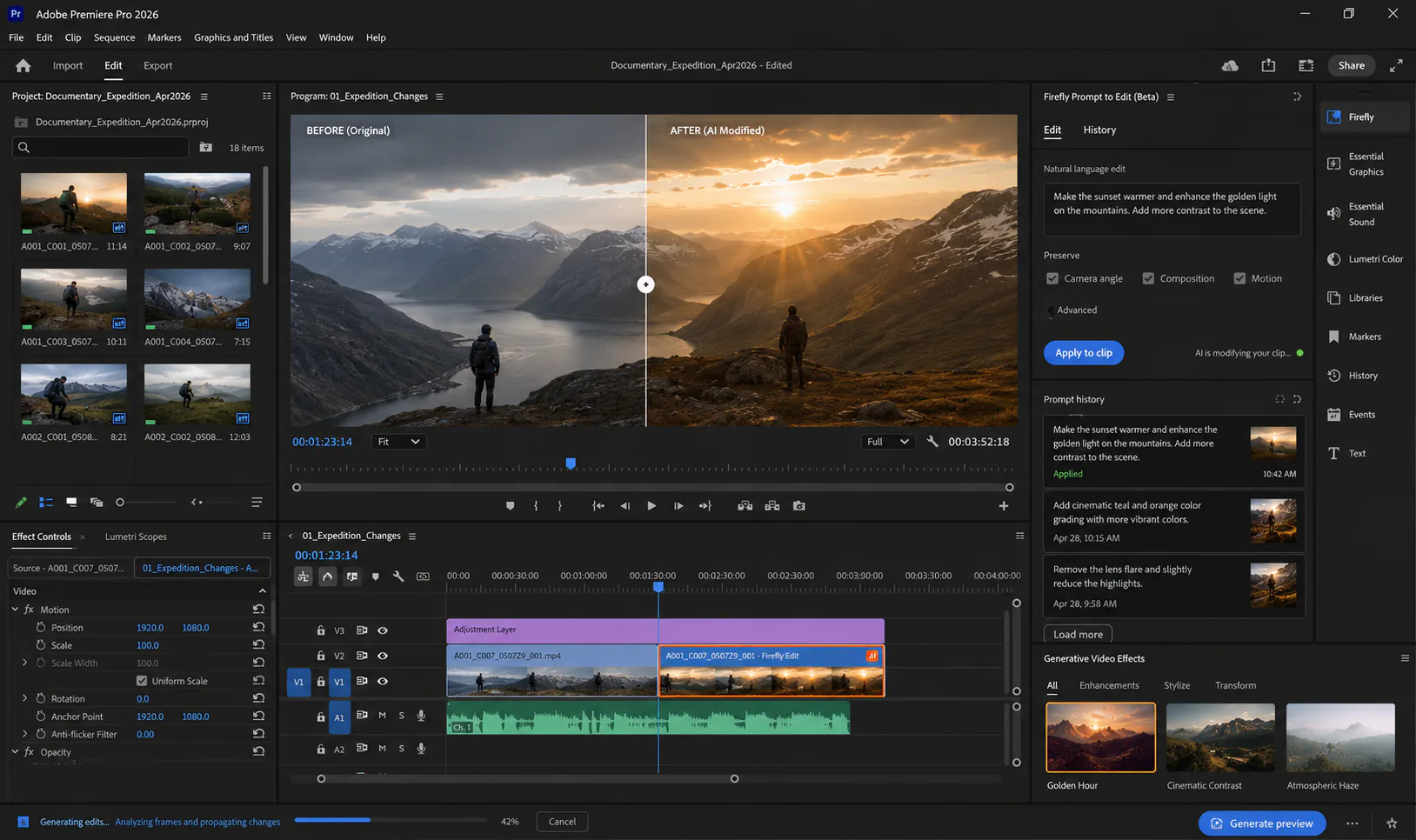
What has changed fundamentally is the workflow paradigm. The shift worth understanding is from text-to-video (generate new footage from a description) to prompt-to-edit (modify existing footage through natural language). Adobe Firefly introduced this in December 2025 with the ability to type "change the shirt to blue" or "remove the background crowd" and have those changes applied across existing frames in context. That capability is what makes AI video relevant to professional editors rather than just content generators.
These are the core interaction modes you'll encounter across platforms:
Text-to-Video: Generate new footage from a text description. The base mode on every platform. Quality varies enormously by model.
Image-to-Video: Animate a still image using a text-guided motion prompt. Kling 3.0 is the strongest here; useful for product marketing and social content from photography.
Prompt-to-Edit (Video-to-Video): Modify existing footage via natural language. Currently exclusive to Adobe Firefly. This is the capability that closes the gap with professional post-production.
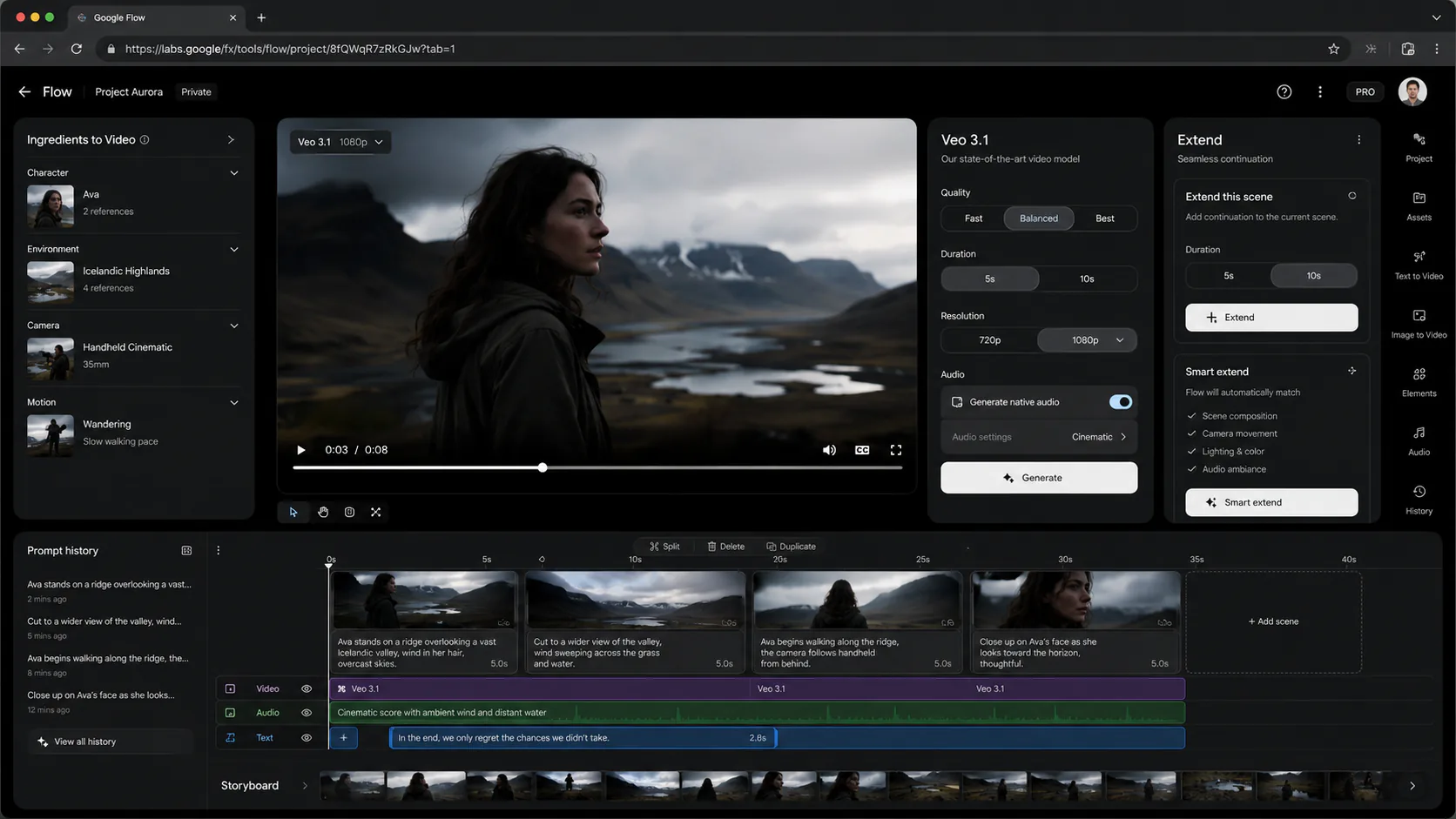
Frames-to-Video: Specify a starting frame and an ending frame; the model generates the intervening action. Google Flow's implementation for cinematic transitions.
Generative Extend: Add frames to the beginning or end of a clip. Adobe's term; Google Flow calls it "Extend." Eliminates reshoots for timing problems.
Ingredients-to-Video: Upload multiple reference images (character, object, setting) and generate a coherent video incorporating all references. Google Flow's architecture for character consistency across shots.
Native audio generation is the defining differentiator of this model generation. Veo 3 and Seedance 2.0 generate synchronized sound effects, ambient audio, and spoken dialogue from the same text prompt that generates the video. Earlier models required separate audio pipelines. This single capability rewrites the production workflow.
The platforms that matter: tool-by-tool breakdown
Google Veo 3.1 and Flow
Veo 3.1 is the consensus quality leader in 2026 for photorealism, native audio, and physics coherence. The claim about physics is not marketing: water surfaces behave with surface tension, fabric folds follow movement credibly, objects interact with realistic momentum. That level of physical accuracy was not achievable from any public tool as recently as 18 months ago.
The access structure matters for your planning. Google AI Pro gives capped monthly usage at 1080p; Google AI Ultra unlocks higher limits, early access to new features, and 4K output. A three-creations-per-day limit applies on standard tiers, which makes Flow impractical for high-volume production workflows without an Ultra subscription.
The Flow platform wraps Veo 3.1 in a production environment that goes beyond clip generation. Gemini integration enables natural-language timeline editing: "change the lighting to golden hour" or "make the cut faster" modify an assembled sequence. Ingredients-to-Video solves the character consistency problem that has historically prevented AI video from longer-form storytelling. Frames-to-Video lets you specify start and end frames with the model generating the bridge, which is genuinely useful for cinematically motivated transitions.
The strongest prompt for Veo is specific and cinematographic. Vague prompts produce generic results:
A woman walking on a beach at sunsetSlow push-in on a woman in a white linen dress walking barefoot on a wet sand beach at magic hour. Camera tracks left to right at knee height. Warm orange and pink sky reflected in shallow water. Distant waves. Light wind. Soft natural ambient sound.The difference between these two prompts in output quality is not marginal. Cinematographic language (camera movement type, height, direction, lighting condition, sound cues) communicates intent the model understands. Treat Veo like a director of photography, not a search engine.
Weakness: Usage caps at the Pro tier make Flow awkward for volume work. All processing is cloud-only, which raises data privacy concerns for client content. SynthID watermarking is non-removable on all outputs.
Best for: Cinematic pre-visualization, high-production-value social content, film concept development, and any workflow where audio quality is non-negotiable.
Adobe Firefly Video
Firefly's position in this market is unique: it is the only platform with deep integration into an existing professional NLE and a certified commercial-safety architecture. If you are a production professional running Premiere Pro, Firefly has zero switching cost. Everything generates inside the tool you already use, and the output is licensed from Adobe Stock and public domain content with Content Credentials (C2PA) for provenance.
The Prompt-to-Edit feature introduced in December 2025 is the capability that separates Firefly from every other tool in this list. Typing "remove the background crowd" into an existing clip applies the change contextually across frames. "Change the jacket to dark red" propagates across cuts. The Adobe team framed this precisely: "You're no longer at the mercy of the next random generation. You're directing the scene." That is a qualitatively different experience from regenerating until you get something close enough.
NAB Show 2026 (April) brought new AI-driven color grading directly into Premiere Pro, multi-track editing in the browser-based Firefly Video Editor, and Frame.io Drive infrastructure upgrades. Firefly Boards (infinite web canvas for mood boarding) generates assets that drag directly into the Premiere Pro Project Bin. The workflow integration is the tightest in the industry.
The December 2025 update also introduced unlimited generations for Pro-tier subscribers, removing the per-clip cost friction that previously made iterative creative work expensive. Custom AI model training is available for enterprise clients who need brand-specific visual identity and character consistency across campaigns.
Weakness: Raw generation quality trails Veo 3.1 and Kling 3.0 for purely cinematic output. If you need the most photorealistic footage possible for standalone clips, Firefly is not the top choice. Audio generation is partial rather than fully native.
Best for: Professional editors in existing Adobe workflows; productions requiring certified commercial IP safety; marketing campaigns needing brand-consistent AI training; any workflow where editing existing footage matters as much as generating new footage.
Runway Gen-4.5
Runway was the early-mover platform that established the professional AI video market before Veo 3 or Kling 3.0 existed. By 2026, it has been repositioned by market reality: Veo and Kling took the outright quality crown, and Runway's differentiation is now creative control rather than raw generation quality.
What Runway does better than its competitors is camera motion. The camera control toolkit is the most expressive of any platform: dolly zoom, tracking shots, crane moves, focal length control, motion intensity. For ad agency work where a specific camera movement is part of the creative brief, Runway's toolset gives you more options than any alternative. Multi-model access bundled into the subscription means you're not locked into a single generation engine.
Weakness: Testing consistently finds "strong camera motion but weak detail stability" in Gen-4.5 output. Fine features drift across frames: hands, text, specific object details can degrade in otherwise consistent generations. This is a material limitation for product-focused content where detail accuracy matters. Cost is approximately $0.30+ per clip at professional tiers, which adds up at volume.
Best for: Ad agency and creative professional work where camera movement specificity is part of the brief; iterative client-approval workflows that benefit from Runway's established professional ecosystem; productions where camera motion variety justifies per-clip cost.
Kling 3.0 and Seedance 2.0
These two Chinese-origin platforms represent the most aggressive price-quality competition the Western platforms face. Both carry content moderation risks you need to evaluate before committing to them for production use.
Kling 3.0 (Kuaishou) launched in early 2026 with the "Omni One" architecture, a unified engine handling text-to-video, image-to-video, and video editing. It currently holds the top position in blind-test ELO ratings for perceived quality and realism. The specific strength is human motion: realistic physical interactions, complex body movement, and expressive character behavior that other platforms handle less convincingly. At $6.99/month for the Standard plan, the price-per-quality ratio is the best in the market. TechCrunch has reported documented content censorship for politically sensitive topics; this is a real consideration for news-adjacent or politically themed production work.
Seedance 2.0 (ByteDance) has the most interesting technical profile in the category: multi-shot native capability, synchronized audio and video generation from a single prompt (matching Veo 3 on this), and up to 15 seconds per native clip with support for 12 file input references. At approximately $1.56/minute of output, it is the cheapest path to audio-synced multi-shot sequences. The February 2026 Tom Cruise/Brad Pitt viral incident (a two-line prompt produced a convincing deepfake that triggered industry-wide IP alarm) established both the power and the risk of Seedance's photorealism. ByteDance's platform policies and Chinese data residency add compliance complexity for regulated industries.
Best for Kling: Social content requiring convincing human movement; image-to-video for product marketing; budget-conscious production teams who need cinematic quality and can manage the content moderation constraints.
Best for Seedance: High-volume short-form content; workflows requiring synchronized audio without separate post-production steps; e-commerce video at scale.
Pika 2.5, LTX Studio, and HunyuanVideo 1.5
Pika 2.5 is the budget-accessible, social-first tool. "Scene Ingredients" and "PikaFrames" are its distinctive creative modes. Output quality is lower resolution and less cinematic than Veo/Kling/Runway, but iteration speed and accessibility are genuine strengths for viral-style content and rapid social clip production. If your primary output is TikTok or short Instagram Reels with a playful aesthetic, Pika's price point makes sense.
LTX Studio (Lightricks) is the platform to watch for longer-form generation. The LTX-2 open-source model (October 2025) introduced autoregressive video generation capable of continuous clips up to approximately 60 seconds, treating video as a sequence to predict token-by-token rather than generating all frames simultaneously. That native 60-second capability changes the use case profile for short-form storytelling entirely. Veo 3 integration handles audio generation within the LTX Studio platform. One of the few platforms offering meaningful open-source access to video generation infrastructure.
HunyuanVideo 1.5 (Tencent, open source, May 2026) is the self-hosting option. 8.3 billion parameters; generates 6-second 720p clips in 75 seconds on a single RTX 4090. No per-clip costs. Full local control. No platform dependency. Significant technical setup required; no native audio generation; resolution and clip length cap well below cloud platforms. For creators or teams who need privacy-first video generation or want to avoid per-clip API costs at scale, HunyuanVideo is the only practical open-source option. For a comparison of open-weight model considerations and licensing, see our DeepSeek V4 review which covers the same open-source vs. closed-platform trade-offs in the LLM context.
Head-to-head: platform comparison table
| Platform | Best for | Native Audio | Max Native Clip | Commercial Use | Approx. Price | Watermark |
|---|---|---|---|---|---|---|
| Google Veo 3.1 / Flow | Cinematic realism, audio | ✓ | 8-10s (extendable) | ✓ Paid tiers | Pro/Ultra sub | SynthID + visible |
| Adobe Firefly | Prompt-to-Edit, IP safety, Premiere Pro | Partial | Variable | ✓ Licensed IP | CC subscription | C2PA credentials |
| Runway Gen-4.5 | Camera control, creative briefs | ❌ | 4-16s | ✓ Paid tiers | ~$0.30+/clip | None |
| Kling 3.0 | Human motion, price-quality | Partial | 10s | ✓ Paid tiers | $6.99/mo Standard | None |
| Seedance 2.0 | Multi-shot, audio, volume price | ✓ | 15s | ✓ Paid tiers | ~$1.56/min | None |
| Pika 2.5 | Social, viral, budget | Partial | 3-5s | ✓ Paid tiers | Freemium | None |
| LTX Studio / LTX-2 | Long clips, open-source | Via Veo 3 | ~60s | ✓ | Freemium + API | None |
| HunyuanVideo 1.5 | Self-hosted, open source | ❌ | 6s (720p) | Check license | Free (self-host) | None |
Use cases by workflow type
How you should route depends on what you're actually producing, not on headline quality scores.
Cinematic pre-visualization and film development: Google Veo 3.1 in Flow. Directors and DPs visualizing shots before physical production get the most photorealistic and physically coherent reference footage here. The Frames-to-Video and Ingredients-to-Video features support narrative continuity across a sequence of shots.
Marketing and ad creative at volume: Kling 3.0 for human-motion-heavy content; Seedance 2.0 for audio-synced multi-shot at maximum price efficiency; Adobe Firefly for brand-consistent campaigns requiring commercial IP certification. Enterprise AI video spending grew 127% year-over-year in 2025; the tools at this layer have the most validated production use.
Professional post-production inside Adobe workflows: Adobe Firefly, exclusively. The Prompt-to-Edit capability for existing footage, Generative Extend for timing fixes, and Quick Cut for rough assembly are meaningfully different from anything a standalone generation tool offers.
Social content and short-form video: Pika 2.5 for fast iteration and playful aesthetics; Kling 3.0 for higher-quality social clips where human motion is the subject; Seedance 2.0 for audio-synced content when budget is the binding constraint.
Education, training, and talking-head content: Synthesia (AI avatars, not covered here in depth) and HeyGen are more purpose-built for this than the generation platforms. They integrate with AI audio tools for multilingual output. For an overview of how AI audio generation works alongside video, see our guide to AI audio and music tools in 2026.
Privacy-sensitive or self-hosted production: HunyuanVideo 1.5 on a single RTX 4090 is the only viable option today. Capability is meaningfully lower than cloud platforms, but the use case (no data leaving your network) justifies the trade-off for some regulated contexts.
Independent filmmaking and experimental projects: LTX Studio's 60-second native clips and open-source infrastructure give independent creators the most latitude. The AI film festival circuit (Reply AI Film Festival and others) is built on exactly this kind of tool.
The production workflow in 2026
Understanding how these tools slot into a real pipeline helps clarify when to use which layer:
Concept / Script
      │
Text Prompt (Cinematographic)
      │
┌─────┴──────────────────────┐
│                            │
Generate (8–15s clips)     Prompt-to-Edit
Veo 3 / Kling / Seedance   (Firefly on existing)
│                            │
└─────────┬──────────────────┘
          │
     Generative Extend
   (chain clips, fix timing)
          │
    Timeline Assembly
  (Gemini in Flow / Premiere)
          │
    Color + Audio Final
    (Premiere / Firefly)
          │
   Export + Disclosure
  (SynthID / C2PA watermark)
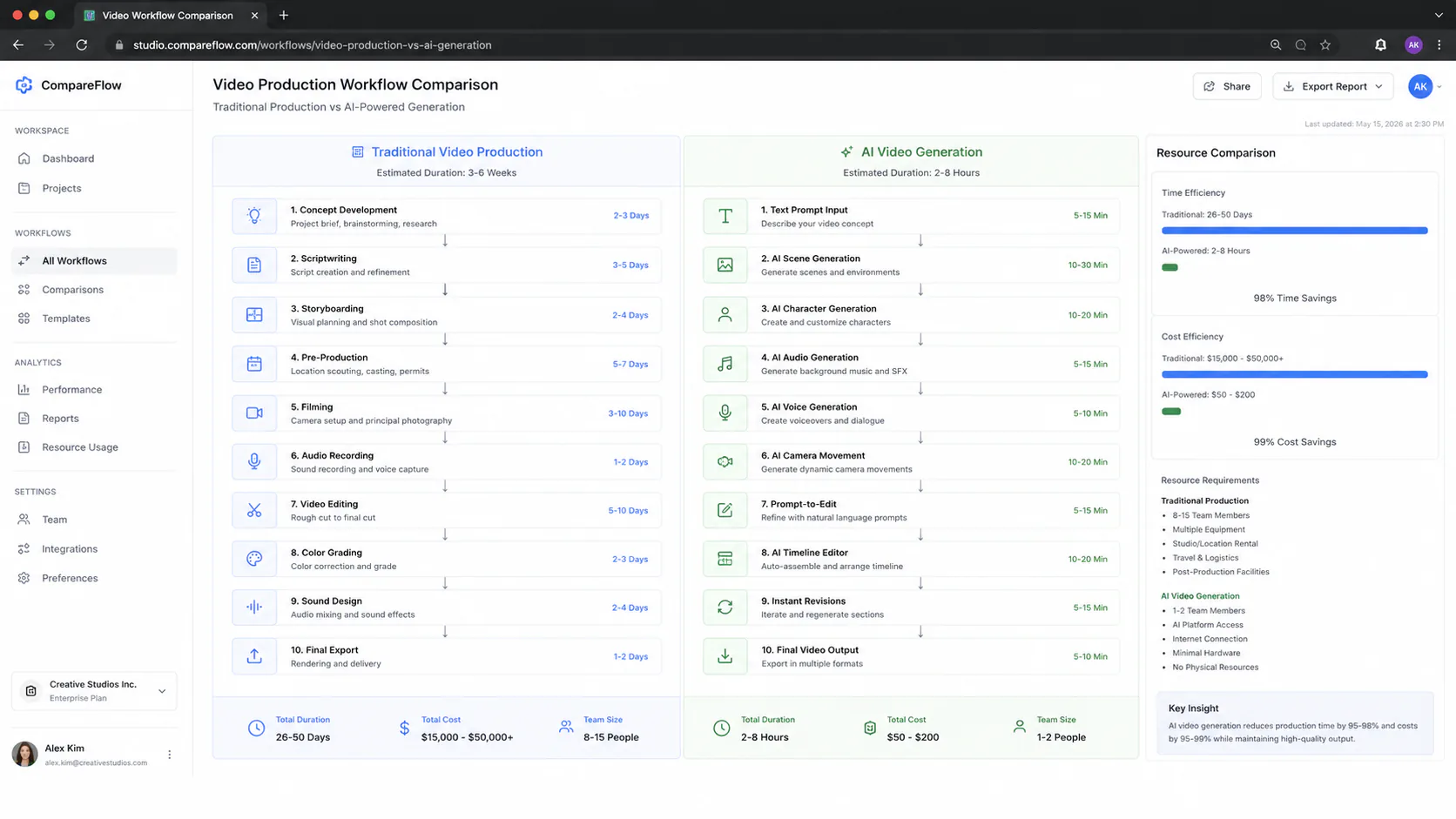
The workflow collapse compared to traditional production is meaningful: what previously required a storyboard artist, a camera crew, a location, an editor, a colorist, and a sound designer now compresses into a single application loop for many content types. This doesn't mean the skills become irrelevant; it means they shift toward prompt direction, editorial judgment, and quality review rather than technical execution.
Risks that belong in your production planning
None of these platforms is risk-free. Four specific risks need to be in your production plan before you commit to any of them.
Platform instability. Sora was the headline AI video model that created public awareness of this entire category. It was discontinued on April 26, 2026, less than 18 months after launch. If your production pipeline builds deep integrations around any single platform, you are building on a foundation that may not exist in 18 months. Multi-model access platforms (Runway, PostEverywhere, LTX Studio) partially mitigate this; building on APIs with abstraction layers helps.
Copyright and commercial licensing. More than 400 Hollywood filmmakers petitioned against AI copyright exemptions in March 2025. Legal analysis confirms ongoing uncertainty about whether AI-generated video trained on copyrighted material constitutes infringement. Adobe Firefly is the only platform with a certified commercially safe architecture (trained on licensed content). Kling, Runway, Seedance, and others offer no equivalent guarantee. If your production will be commercially distributed, this is a legal question your counsel needs to answer specifically for each platform.
Deepfake and synthetic media disclosure. The Seedance 2.0 deepfake controversy (Tom Cruise/Brad Pitt, February 2026) accelerated regulatory response. Multiple countries banned Grok in January 2026 over AI deepfakes. YouTube committed in 2026 to letting celebrities control their likeness. Google's SynthID, Adobe's C2PA Content Credentials, and emerging legislation (EU AI Act) are creating jurisdiction-specific disclosure obligations. Know which watermarking and disclosure requirements apply in your target distribution markets before committing to a platform.
Content moderation on Chinese-origin platforms. Kling and Seedance both have documented content moderation practices that differ from Western platforms, including censorship of politically sensitive topics per TechCrunch reporting. For most commercial production use, this is manageable; for news-adjacent, political, or documentary work, it is a material constraint.
Pros and cons
Pros
- Veo 3.1's native synchronized audio generation fundamentally changes the production workflow: a single prompt now produces both video and sound, eliminating a separate post-production stage.
- Adobe Firefly's Prompt-to-Edit is the only capability in this category that modifies existing footage via natural language rather than regenerating from scratch, making it genuinely relevant to professional editors for the first time.
- Kling 3.0's price-per-quality ratio makes cinematic-quality AI video accessible at $6.99/month, compared to Runway's per-clip costs that add up quickly at production volume.
- The LTX-2 open-source model and HunyuanVideo 1.5 give self-hosting options to teams with privacy requirements or volume economics that favor local compute.
- Generation latency has compressed dramatically: clips that took 10-20 minutes two years ago now complete in 30-90 seconds on the fastest platforms.
Cons
- Prompt skill is a real and non-trivial competency. The quality gap between a cinematographically precise prompt and a vague description is enormous; the tools are not yet smart enough to compensate for imprecise direction.
- Clip length remains the hardest constraint. The 2026 standard is 8-15 seconds per native generation; chaining clips through Extend introduces cut-point discontinuities that require editorial intervention. True long-form single-take generation does not exist outside LTX-2's experimental 60-second model.
- Platform dependency is a genuine production risk: Sora's April 2026 shutdown proved that even the most prominent model in the category can disappear with short notice.
- Character consistency across multiple shots with complex interaction (two characters having a conversation with natural expressions, across multiple camera angles) remains beyond reliable capability on any platform.
- Chinese-origin platforms (Kling, Seedance, HunyuanVideo) offer the best price-per-quality and some of the best technical capability, but bring content moderation, data residency, and geopolitical risk that must be evaluated for each production context.
Who it's for and who it's not
Use these tools if:
- You're producing marketing content, social clips, product video, or educational material where generation speed and cost matter more than narrative depth.
- You're a film director or DP using Veo 3 or Flow for pre-visualization, concept pitches, or storyboard replacement before physical production.
- You're an Adobe Premiere Pro user who needs to generate B-roll, fix clip timing with Generative Extend, or modify existing footage through natural language.
- You're an independent creator building short films, experimental content, or AI-native projects where the aesthetic of AI video is either acceptable or intentional.
- Your marketing team needs to respond to fast-moving trends and traditional production timelines are structurally incompatible with your content cadence.
Skip these tools if:
- Your production requires scripted drama with authentic human performance and emotional depth across sustained scenes. No current platform handles multi-character narrative with the consistency that scripted drama demands.
- Your distribution context legally requires footage that is demonstrably not AI-generated (certain documentary genres, live journalism, specific broadcast standards).
- Your client brief requires hand-accurate, text-accurate, or fine-detail-stable footage across cuts. These remain documented weaknesses even in the best platforms.
- You need a production pipeline that can scale without meaningful prompt engineering skill. The tools are accessible; quality output requires craft, and that craft takes time to develop.
Verdict
For most production contexts in 2026, no single tool is the right answer. The most efficient workflow routes by task: Veo 3.1 in Flow for original cinematic generation and audio-synced content; Firefly for any work that starts with existing footage or that requires certified commercial IP safety; Kling 3.0 for human-motion-heavy content at volume price points; Seedance 2.0 for maximum audio-synced output at lowest cost.
The platform you should most carefully avoid building a single-tool dependency on is whichever one you found in a competitor article six months ago. The Sora discontinuation is the object lesson. Build with abstraction layers, use multi-model access platforms where practical, and budget for the reality that your production stack will look different by mid-2027.
The quality is real. The risks are real. The tools that matter most are the ones you understand well enough to prompt precisely, not the ones with the best benchmark numbers.
Frequently asked questions
Veo 3.1 is accessible through Google AI Pro (paid subscription with capped monthly usage) and Google AI Ultra (higher limits, 4K output, early feature access). There is no free tier for production use, though Google One AI Premium subscribers can access Flow with a three-creations-per-day limit. Verify current pricing at Google One.
OpenAI discontinued the Sora web app and API on April 26, 2026. Sora content generated before discontinuation remains accessible within InVideo AI and Synthesia, which integrated it pre-shutdown, but no new Sora generations are possible. For cinematic realism comparable to what Sora offered, Veo 3.1 and Kling 3.0 are the current alternatives.
Adobe Firefly is the only platform with a certified commercially safe architecture, trained exclusively on Adobe Stock and public domain content, with Content Credentials (C2PA) for output provenance. All other major platforms (Runway, Kling, Seedance, Veo) carry varying degrees of legal uncertainty about training data and copyright. If your output will be commercially distributed, get legal counsel to evaluate your specific use case on your specific platform.
Natively, no: most platforms top out at 8-15 seconds per generation. Longer sequences require chaining clips through Generative Extend (Adobe, Google Flow) or sequential generation, with human editorial intervention at cut points to manage discontinuities. The exception is LTX-2 (Lightricks' open-source model), which supports continuous autoregressive generation up to approximately 60 seconds. Truly continuous 30-60 second generation from closed platforms is expected in the next architecture cycle but not available as of mid-2026.
It depends heavily on platform and required quality. On Seedance 2.0 at approximately $1.56/minute of output, a 60-second video assembled from four 15-second clips costs under $10 in generation costs, plus prompting time. On Runway Gen-4.5 at $0.30+ per clip, the same four clips cost $1.20+ plus subscription fees. On Adobe Firefly's Pro subscription with unlimited generations, the marginal cost is zero after the monthly subscription. The production cost collapse versus traditional video (down from $1,500 per project to under $15 for routine tasks, per 2026 production data) is real but assumes basic content types, not complex narrative productions.