How to Build Your First MCP Server: The 2026 Guide
Build your first MCP server in Python or TypeScript. Covers tool registration, stdio vs Streamable HTTP, security gotchas, and Claude Desktop setup.

Anthropic's SDKs for the Model Context Protocol passed 97 million monthly downloads in March 2026. That is roughly the download volume React's npm package took three years to reach, and MCP got there in about 16 months.
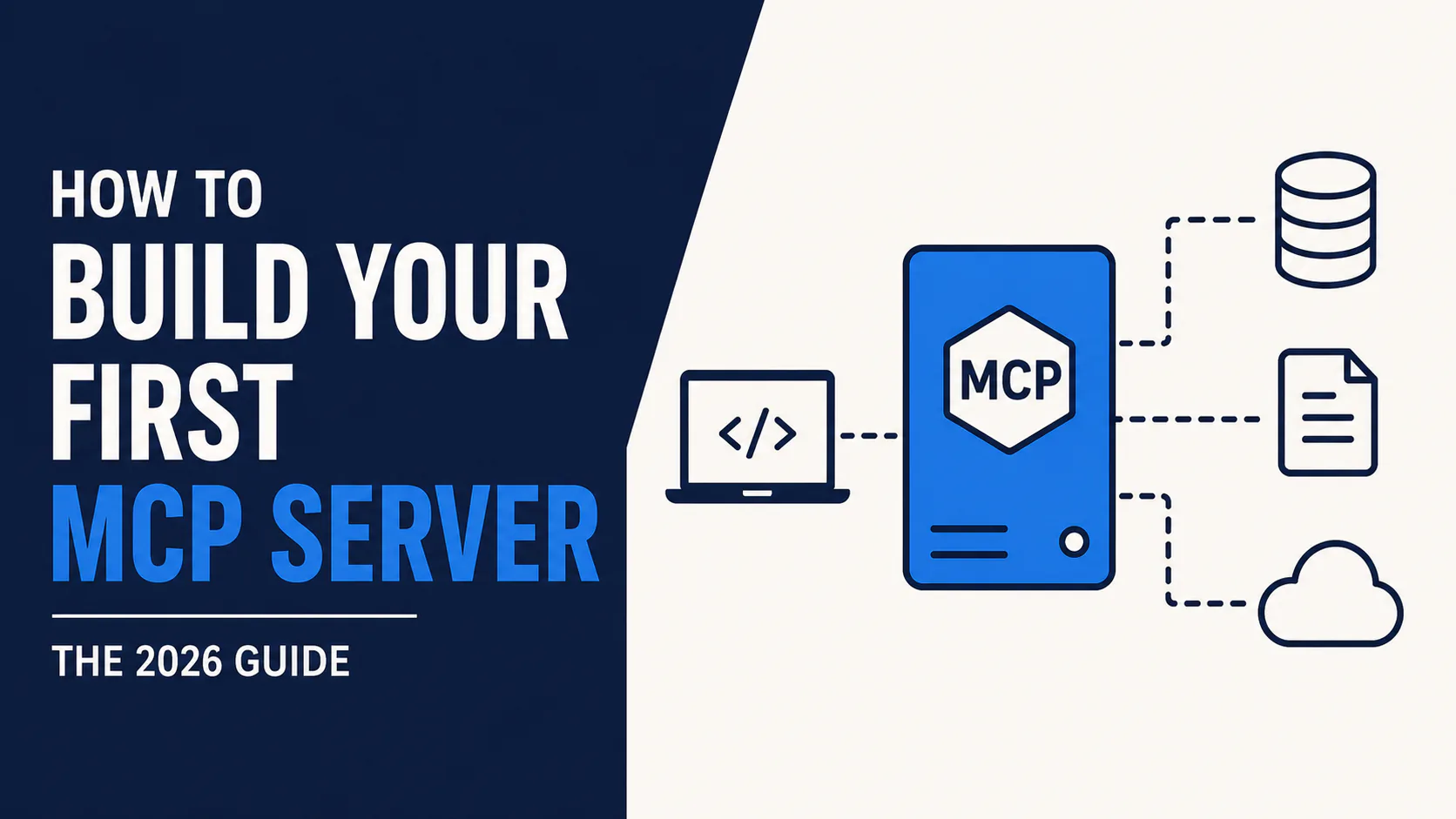
The reason is simple. Before MCP, every AI tool integration was custom: one connector for Claude, another for ChatGPT, another for your in-house agent. MCP replaces that mess with one standard. Build a server once, and any compatible client (Claude, ChatGPT, Cursor, VS Code) can use it.
This guide walks through building a real MCP server in both Python and TypeScript, testing it with the official inspector, wiring it into Claude Desktop, and avoiding the mistakes that trip up almost every first-time builder.
TL;DR: A basic stdio MCP server takes about 15 minutes to build in either language. Python's FastMCP needs less boilerplate; TypeScript gives you compile-time schema checking with Zod. Test with the MCP Inspector before touching any client config, and never write debug output to stdout in a stdio server.
What we're building
By the end of this tutorial you will have a working MCP server that exposes two tools to Claude Desktop: a calculator tool and a tool that fetches a fake weather report. It is intentionally simple. The goal is to understand the mechanics, not to ship a production integration on the first pass.
The architecture has three parts:
Claude Desktop (MCP Host)
      │
 MCP Client (built into the host)
      │  JSON-RPC 2.0 over stdio
      │
 Your MCP Server (what you build)
      │
 Tools / Resources / Prompts
The host is the AI application. The client is the bridge living inside it. The server is the small standalone program you write that exposes capabilities to anything that speaks the protocol.
Prerequisites
You need one of the following:
- Node.js 20 or later, for the TypeScript path
- Python 3.10 or later, for the FastMCP path
- Claude Desktop installed, if you want to test the live connection
- Basic comfort with JSON and either npm or pip
You do not need to know JSON-RPC in advance. MCP handles the protocol details; you only define what your tools do.
Step 1: Understand the three server primitives
Every MCP server exposes some mix of three things:
Tools are functions the model can call, with user approval. This is the workhorse primitive: database queries, API wrappers, calculations, file operations.
Resources are file-like data a client can read directly, such as API responses or database records. The model pulls from these without "calling" anything.
Prompts are reusable templates that teach a client how to use your server well, especially useful when your server wraps a complex API.
Most first servers, including the one in this tutorial, only need tools. Resources and prompts are worth learning once you have a working tool-based server.
Step 2: Choose stdio or Streamable HTTP
MCP supports two transports you should know about.
stdio spawns your server as a child process and talks to it over standard input and output. This is what Claude Desktop uses for local servers, and it is the right choice for personal tools and development.
Streamable HTTP runs your server as an HTTP service that can stream responses with Server-Sent Events. Use this when multiple clients need to connect at once, or when the server lives on a remote machine. It replaced the older SSE transport in the March 2025 spec update; SSE still works for backward compatibility but should not be used in new servers.
For this tutorial, build with stdio first. Switching to Streamable HTTP later only changes the transport layer, not your tool definitions.
Step 3: Build the server in Python with FastMCP
FastMCP wraps the official mcp package with decorators that remove most of the boilerplate. Start a virtual environment and install the dependencies.
mkdir my-mcp-server-python && cd my-mcp-server-python
python -m venv venv && source venv/bin/activate
pip install mcp fastmcp
Create the server file:
from mcp.server.fastmcp import FastMCP

mcp = FastMCP("my-mcp-server")

@mcp.tool()
def add(a: int, b: int) -> str:
    """Add two numbers."""
    return str(a + b)

@mcp.tool()
def get_weather(city: str) -> str:
    """Return a mock weather report for a city."""
    # Replace with a real API call in production
    return f"{city}: 22C, partly cloudy"

if __name__ == "__main__":
    mcp.run()
That is a complete, working server. The docstrings under each function become the tool descriptions the model reads, so write them the way you would document a public API: short, specific, and accurate.
Step 4: Build the same server in TypeScript
The TypeScript SDK is more explicit, which some teams prefer because it pairs with Zod for compile-time input validation.
mkdir my-mcp-server && cd my-mcp-server
npm init -y
npm install @modelcontextprotocol/sdk zod
npm install -D typescript @types/node
The SDK is ESM-only, so tsconfig.json needs settings that differ from common starter templates. Using CommonJS or bundler here causes import resolution failures that are hard to diagnose:
{
  "compilerOptions": {
    "target": "ES2022",
    "module": "Node16",
    "moduleResolution": "Node16",
    "outDir": "./build",
    "strict": true
  }
}
Now the server itself:
import { McpServer } from "@modelcontextprotocol/sdk/server/mcp.js";
import { StdioServerTransport } from "@modelcontextprotocol/sdk/server/stdio.js";
import { z } from "zod";

const server = new McpServer({ name: "my-mcp-server", version: "1.0.0" });

server.registerTool(
  "add",
  {
    description: "Add two numbers",
    inputSchema: { a: z.number(), b: z.number() },
  },
  async ({ a, b }) => ({
    content: [{ type: "text", text: String(a + b) }],
  })
);

server.registerTool(
  "get_weather",
  {
    description: "Return a mock weather report for a city",
    inputSchema: { city: z.string() },
  },
  async ({ city }) => ({
    content: [{ type: "text", text: `${city}: 22C, partly cloudy` }],
  })
);

const transport = new StdioServerTransport();
await server.connect(transport);
Zod earns its place here. If the model passes a number where the schema expects a string, the SDK rejects the call before your function body runs. Plain JavaScript would let that mismatch through and corrupt whatever you do with the value next.
Step 5: Avoid the stdio logging trap
This is the single most common first-server bug. In a stdio server, standard output is the same channel MCP uses to send JSON-RPC messages. Any stray console.log() or print() call corrupts that stream and breaks the connection in a way that looks like a random failure.
Wrong: console.log("debug info") or print("debug info")
Right: console.error("debug info") or print("debug info", file=sys.stderr)
Route every debug message to stderr instead of stdout, in both languages, for the life of the server.
Step 6: Test with the MCP Inspector before connecting any client
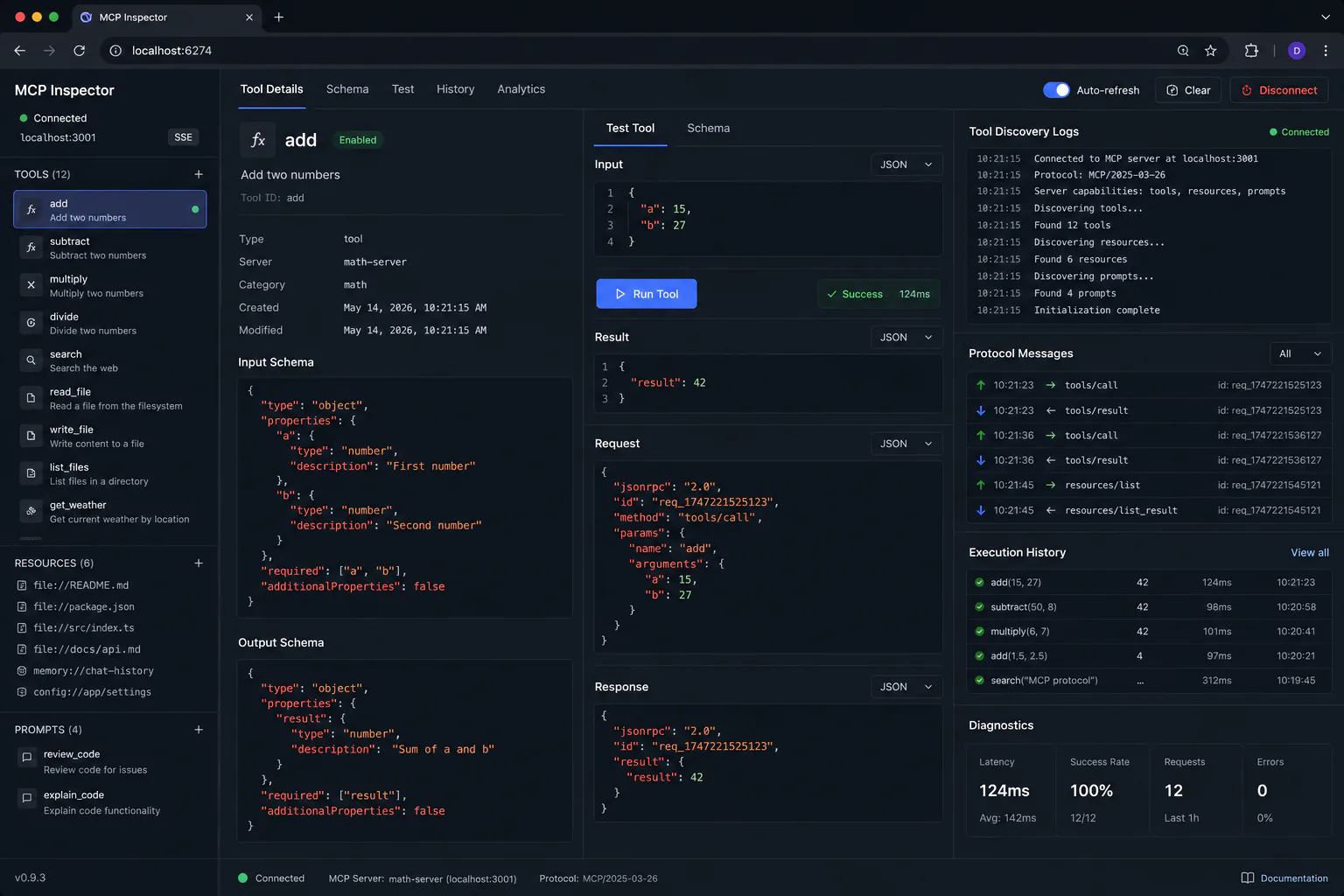
Never wire a new server straight into Claude Desktop. Test it in isolation first with the official inspector, which opens a local web UI for the protocol handshake and manual tool calls.
# TypeScript
npx @modelcontextprotocol/inspector node build/index.js

# Python
npx @modelcontextprotocol/inspector python server.py
In the inspector UI, you should see both tools listed with their schemas. Call add with two numbers and confirm you get a result back. If something is wrong with your schema or your transport, you will see it here instead of inside Claude Desktop's less informative error state.
Step 7: Connect to Claude Desktop
Once the inspector confirms the server works, add it to Claude Desktop's config file. The config requires an absolute path. A relative path here fails silently, with no error message pointing you to the cause.
{
  "mcpServers": {
    "my-server": {
      "type": "stdio",
      "command": "node",
      "args": ["/absolute/path/to/build/index.js"]
    }
  }
}
Restart Claude Desktop after editing this file. If the tools do not appear in the conversation, check the absolute path first; it is the cause of most connection failures at this step.
Step 8: Move to Streamable HTTP when you outgrow stdio
stdio only supports one client at a time, since the host spawns your server as a single child process. Once you need a team to share a server, or you need it running on a remote machine, switch to Streamable HTTP.
import { StreamableHTTPServerTransport } from "@modelcontextprotocol/sdk/server/streamableHttp.js";
import express from "express";

const app = express();
app.use(express.json());
// Register the same tools as before, then attach the
// Streamable HTTP transport instead of stdio.
Expect the network round trip to add roughly 40 to 70 milliseconds per call on a typical VPS, compared with 8 to 12 milliseconds of overhead for local stdio. For multi-client or production deployments, you will also need session management and, per the November 2025 spec update, OAuth 2.1 with PKCE for any publicly reachable server.
Security gotchas to know before going to production
MCP's security track record in 2025 and 2026 is not clean, and skipping this section is how servers end up exploited.
An Equixly assessment found command injection in 43% of tested MCP implementations, with 30% vulnerable to server-side request forgery and 22% allowing arbitrary file access. In April 2026, OX Security disclosed a systemic remote code execution vulnerability in the stdio transport affecting every major language SDK, an estimated 150 million-plus downloads across more than 7,000 public servers. Anthropic classified the underlying behavior as expected and did not change the protocol architecture, so the risk remains open for stdio deployments today.
There is also a trust problem in the broader ecosystem: a Q1 2026 census found only 12.9% of public MCP servers score as high trust on documentation, maintenance, and reliability. Before connecting any third-party server to a system that matters, treat it the way you would treat an unreviewed dependency: read the source, scope its permissions tightly, and prefer official vendor servers (Atlassian, Figma, Vercel, Cloudflare) or the reference implementations in Anthropic's own repository over random community projects.
For your own server, the practical checklist is short: validate every input with Zod or an equivalent, never pass user-supplied strings directly into shell commands or SQL, and scope file system access to the narrowest directory the tool actually needs.
MCP vs. function calling vs. LangChain
These three solve overlapping but distinct problems, and picking the wrong one for a given job adds unnecessary work.
| Dimension | MCP | Function calling | LangChain |
|---|---|---|---|
| Primary role | Tool connectivity protocol | Per-call tool declaration | Agent orchestration |
| Client reach | Any MCP-compatible client | Vendor-specific | Whatever you build |
| Schema maintenance | Server publishes once | Each app keeps its own copy | Framework-managed |
| RAG support | None built in | None built in | Built-in loaders and vector stores |
| Setup time | About 15 minutes for a basic server | Minutes, but per app | Hours for a full pipeline |
A practical rule that holds up across most teams: start with MCP for tool connectivity because it covers most integration needs with the least code. Reach for function calling directly when you are running a high-volume production agent with a small, fixed tool set and want to shave token overhead. Add LangChain or LangGraph when the job is genuinely RAG or multi-step agent orchestration, not simple tool calling. None of these are mutually exclusive. LangChain can consume MCP servers through adapters, so a common production pattern uses LangGraph for orchestration while MCP servers handle the standardized integrations underneath.
Who this tutorial is for
Build this if:
- You already use Claude Desktop, Cursor, or VS Code and want to expose your own data or API to them
- You are evaluating MCP as a faster alternative to writing one-off integrations for each AI tool you support
- You want hands-on understanding of the protocol before deploying a third-party server in production
Skip it if:
- Your actual need is RAG over a document set; start with LangChain's loaders and vector store integrations instead, since raw MCP has no built-in RAG support
- You need a production-grade remote server today; read the security section above closely and plan for an MCP gateway layer before exposing anything publicly
- You only need a single hard-coded tool call inside one app; plain function calling will be less code for that narrow case
Key takeaways
A basic MCP server is genuinely fast to build: fifteen minutes in either language gets you a working stdio server with two tools. The real engineering work shows up later, in the security review before any third-party server touches production data, and in the transport upgrade when you move from a personal stdio tool to a shared Streamable HTTP service.
Test with the Inspector before every client connection, route all debug output to stderr, and use absolute paths in any client config. Those three habits prevent the bugs that account for nearly every failed first attempt.
If you are deciding whether MCP is the right layer at all, default to it for tool connectivity and reach for LangChain only when the job is genuinely RAG or complex multi-step orchestration. For a deeper look at orchestration patterns once your server is running, see our guardian agents CI/CD guide and our breakdown of OpenAI's Assistants API migration for the function-calling side of this comparison.
Frequently asked questions
MCP is vendor-neutral. OpenAI, Google DeepMind, Microsoft, and AWS have all adopted it, and Anthropic donated the protocol to the Linux Foundation's Agentic AI Foundation in December 2025. A server you build works with any MCP-compatible client, not just Claude.
Python with FastMCP needs less code to get started, thanks to its decorator pattern. TypeScript with the official SDK and Zod gives you compile-time schema validation. Pick based on which language your existing stack already uses; both reach feature parity for basic tool servers.
In a stdio server, standard output carries the JSON-RPC protocol messages. Any console.log or print statement that writes to stdout corrupts that stream. Send debug output to stderr instead with console.error or print(..., file=sys.stderr).
Not without review. Independent security assessments have found command injection, SSRF, and arbitrary file access in a meaningful share of public MCP servers, and only about 13% of listed servers currently meet high-trust documentation and maintenance standards. Audit the source and scope permissions tightly before connecting any community server to data that matters.
Reach for LangChain when your core need is RAG (document loading, chunking, vector search) or complex multi-step agent reasoning, since MCP has no built-in RAG support. For straightforward tool connectivity across multiple AI clients, MCP needs far less code.