Text-to-3D in 2026: Best Tools for Game Devs and Product Designers
Meshy, Tripo, Rodin, Luma, Kaedim compared for game devs and product designers in 2026. Real pipeline times, PBR quality, pricing, and honest limitations.

Bytewaves Score Card
A character asset that used to take a skilled 3D artist two to three days now takes ten minutes. That is not a forecast. It is the pipeline game developers and product designers are running in production today.
Text-to-3D generation crossed a threshold in 2026 that most people outside the industry have not noticed yet. The blurry, artifact-ridden blobs from two years ago are gone. What you get now from the best tools (Meshy AI, Tripo AI, Rodin, Luma AI, Kaedim) are fully textured, PBR-ready, exportable meshes that plug directly into Unity, Unreal Engine, and Blender. No modeling degree required.
This guide breaks down which tool fits which workflow, where the real quality ceiling sits, and what you should know before buying a subscription.
TL;DR: Meshy AI is the best all-around tool for most game developers. Tripo AI wins on character topology and rigging speed. Rodin produces the most photorealistic hero-asset textures. Luma AI is the right call for digitizing real-world objects. None of them fully replace skilled artists for protagonist characters or precision product parts, but they compress everything else from days to minutes.
How text-to-3D actually works in 2026
Before comparing tools, it helps to understand what is happening under the hood. The technology has consolidated around a few core approaches, and knowing which one a tool uses explains its strengths and blind spots.
Score Distillation Sampling (SDS)
The foundational technique behind most text-to-3D pipelines. Introduced in DreamFusion by Google in 2022, SDS uses a pretrained 2D diffusion model as a supervisor: it generates a 3D neural representation and iteratively refines it until rendered views match the text prompt. The key advantage is that you do not need a massive labeled 3D training dataset because the 2D model does the heavy lifting.
Multi-view diffusion
Older SDS pipelines generated one view at a time and stitched results together, which produced inconsistent geometry on opposite sides of an object. Modern tools like Tripo 3.0 generate multiple consistent views of an object simultaneously before meshing. This eliminates most of the "melted back of the head" artifacts that plagued earlier systems and is why topology quality has improved so dramatically.
NeRF and 3D Gaussian Splatting
Neural Radiance Fields (NeRF) represent a 3D scene as a continuous volumetric function, capturing photorealistic geometry from multiple 2D photos or video. Luma AI is built on this approach. The newer 3D Gaussian Splatting (3DGS) technique achieves similar visual quality but renders dramatically faster, enabling real-time interactivity. The tradeoff: NeRF and Gaussian Splatting outputs require conversion to standard mesh formats before they work in a game engine.
PBR texture generation
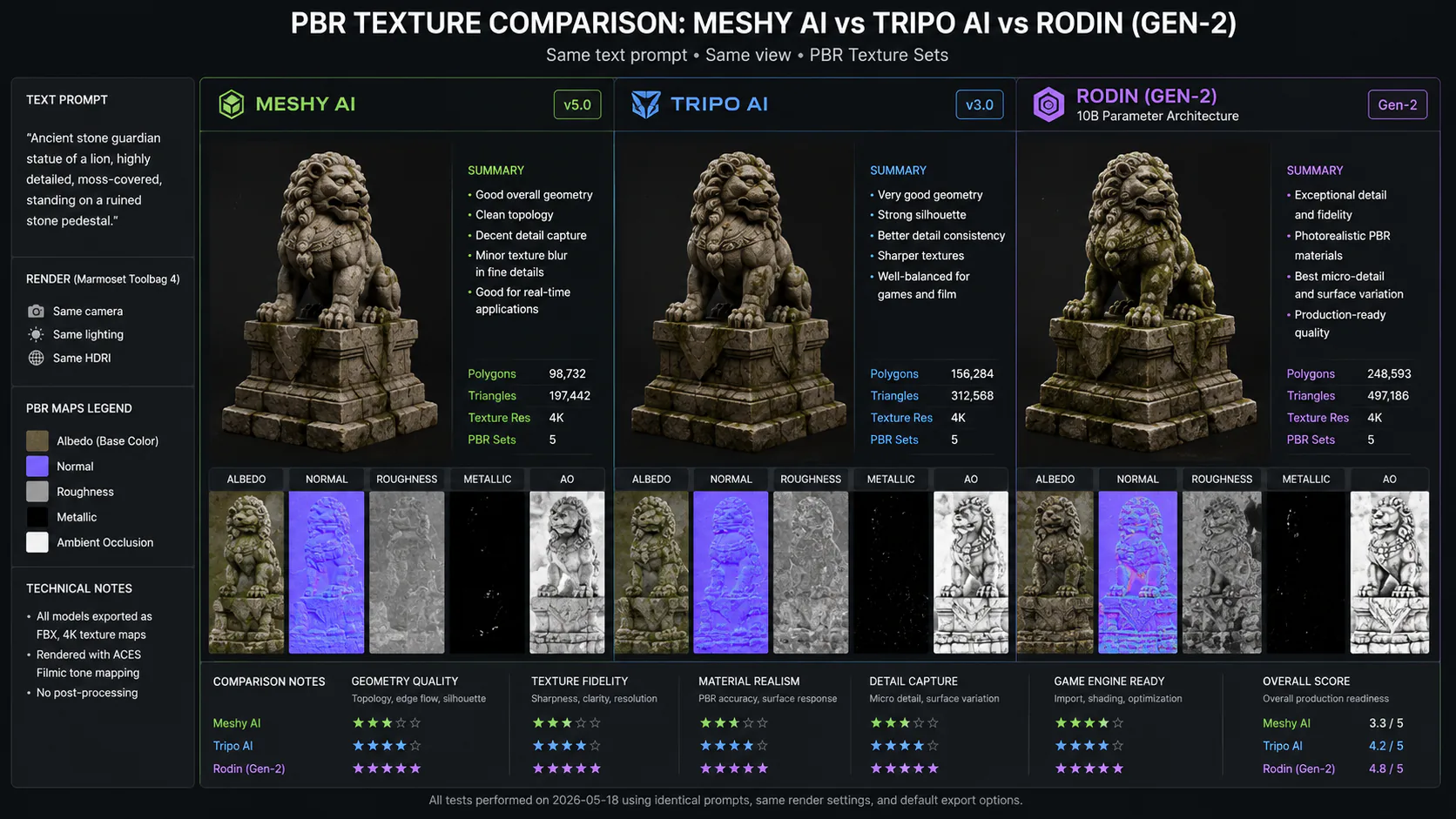
A 3D model is only as useful as its materials. Production-ready assets require PBR (Physically Based Rendering) texture sets: albedo, normal, roughness, metallic, and ambient occlusion maps. Every serious tool in 2026 generates these automatically. Rodin's 10-billion-parameter Gen-2 architecture produces the most photorealistic PBR outputs currently available.
The best text-to-3D tools in 2026
Meshy AI: best all-around for game developers
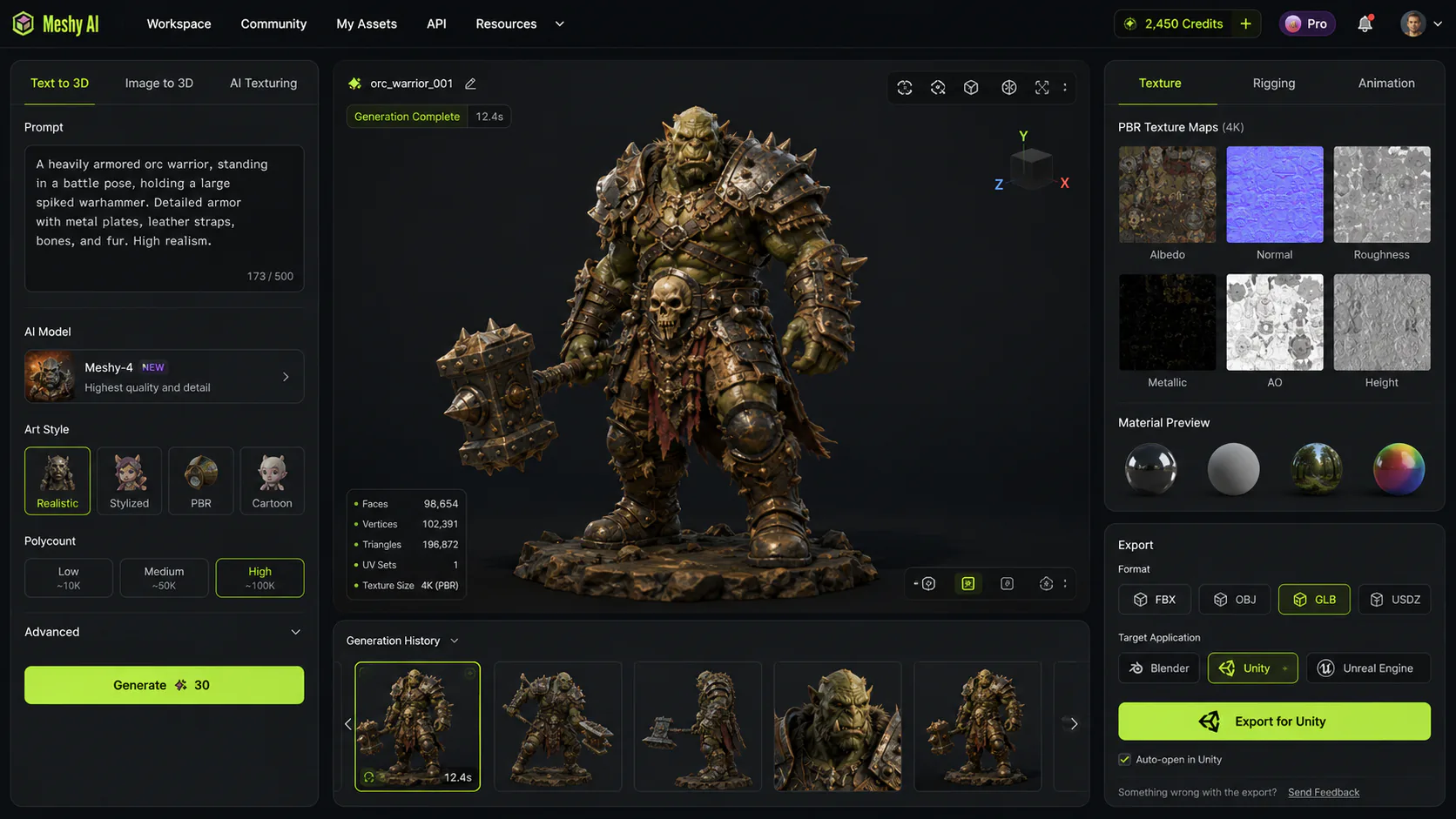
Meshy is the tool most game development studios reach for first, and the reasons are practical: it covers the entire asset pipeline in one browser interface, from text prompt to PBR-textured, rigged, export-ready model.
Generation takes 30 to 60 seconds. You get photorealistic PBR materials, 500+ animation presets, and direct export to FBX, OBJ, GLB, and USDZ. Native plugins for Blender, Unity, and Unreal Engine mean the import-export cycle is as close to zero-friction as the category gets.
Meshy rates 4.8 out of 5 across G2 and Trustpilot as of mid-2026, which is unusually high for AI tooling. The free tier lets you test the pipeline before committing. Paid plans start at roughly $20/month.
Where it falls short: Meshy's texturing is excellent but not the photorealistic ceiling; Rodin edges it out for hero-asset quality. Auto-rigging works reliably for humanoid characters but requires manual checking for non-standard anatomies or props with moving parts.
Best for: Game studios needing a complete asset pipeline. Teams that do not have dedicated 3D artists. Indie developers building environment props and secondary characters at volume.
Tripo AI: best for character assets
Tripo 3.0 is the fastest generation pipeline in the category (10 to 30 seconds) and produces notably clean quad-based mesh topology, which matters more than it sounds. Quad topology is what 3D artists structure meshes in manually, because it deforms cleanly during animation. Most AI-generated meshes produce chaotic triangulated geometry that needs retopology passes before rigging. Tripo's output often skips that step entirely.
The result is a noticeably tighter workflow for character-focused games: text prompt, auto-rig, import, animate. Tripo also supports Magic Brush for localized texture edits, so you can repaint specific areas of the texture without regenerating the full asset.
Where it falls short: The plugin ecosystem is less mature than Meshy's. Export formats are more limited on lower subscription tiers. For non-character assets like environments or architectural props, the advantage over Meshy narrows.
Best for: Indie developers building character-heavy games. Studios that prioritize rigging speed over environment volume. Any workflow where manual retopology is the current bottleneck.
Rodin (Hyper3D): best for photorealistic hero assets
Rodin is built differently from the other tools on this list. Its 10-billion-parameter Gen-2 architecture is optimized for one thing: the highest possible visual fidelity. The PBR textures it generates at 4K are the most photorealistic in the category as of mid-2026, and the model is explicitly designed for automated and enterprise workflows via API.
The tradeoffs are real. Generation takes 60 to 180 seconds. There is no native auto-rigging. The mesh topology is optimized for visual rendering, not animation or game engines, so retopology passes are expected in the workflow. Pricing is premium: around $99/month standalone, though it is accessible through aggregator platforms at lower effective cost per generation.
Best for: Studio-quality hero assets where visual fidelity justifies post-processing time. Architectural visualization. High-end product renders for client presentations or marketing. Any workflow where quality per asset matters more than volume per hour.
Luma AI: best for real-world object capture
Luma AI uses NeRF and 3D Gaussian Splatting to reconstruct 3D objects from real-world input: single images, multi-view photo sets, or video. This makes it categorically different from text-driven generators. Where Meshy or Tripo builds a 3D model of "a wooden barrel" from a description, Luma captures the actual geometry and lighting of a physical object you photograph.
The outputs are photorealistic in a way no text-to-3D model can match for real-world subjects, because the source is the real subject. Lighting, reflections, and material properties are captured rather than synthesized.
Where it falls short: NeRF and Gaussian Splatting outputs require retopology before game engine use. The workflow suits photorealistic environments and VFX significantly better than game props at volume.
Best for: Photorealistic environment capture. Digitizing physical products for AR or e-commerce. VFX and architectural visualization requiring real-world accuracy.
Kaedim: best for converting concept art
Kaedim takes a different approach entirely: it combines AI with human artist review. You provide 2D concept art or sketches; Kaedim delivers fully textured 3D assets with clean topology and UV unwrapping included. The human-in-the-loop step means the output quality and mesh structure are reliably production-ready.
The cost reflects this: $400 to $1,200/month puts it firmly in the studio budget tier. It is not a tool for high-volume rapid generation.
Best for: Game studios that have existing concept art pipelines and need to convert that art into production assets efficiently. Any project where topology cleanliness matters more than generation speed.
Spline AI and Alpha3D: specialized use cases
Spline AI is entirely browser-based and outputs interactive 3D scenes deployable directly to the web. It is the right tool for web designers and UI/UX teams building interactive product experiences or landing pages with 3D elements. It is not the right tool for game asset pipelines.
Alpha3D specializes in accurate product geometry for AR and e-commerce. AR-ready outputs optimized for Shopify and Amazon make it the practical choice for e-commerce brands building virtual try-on or interactive product pages, not for game developers.
Text-to-3D tools compared
| Feature | Meshy AI | Tripo AI | Rodin | Luma AI | Kaedim |
|---|---|---|---|---|---|
| Generation time | 30-60s | 10-30s | 60-180s | 1-4 hrs | 30-60 min |
| PBR textures | ✓ | ✓ (4K) | ✓ (4K, best quality) | ✓ | ✓ |
| Auto-rigging | ✓ | ✓ | ✗ | ✗ | ✗ |
| Topology quality | Good | Best (quad-based) | Render-optimized | Requires retopo | High |
| Real-world capture | ✗ | ✗ | ✗ | ✓ | ✗ |
| Engine plugins | Blender, Unity, Unreal | GLB/FBX export | API-first | Limited | Clean mesh output |
| Free tier | ✓ | ✓ | ✗ | Limited | ✗ |
| Pricing (entry paid) | ~$20/month | ~$25/month | ~$99/month | ~$30/month | $400/month |
| Best for | Full pipeline, volume | Characters, rigging | Hero assets | Real-world capture | Concept art conversion |
What the 2026 quality ceiling actually looks like
The honest answer most tool marketing avoids: AI text-to-3D is production-ready for a specific tier of asset, not for all assets.
For background props, environment objects, secondary characters, and early-stage prototypes, the best tools produce assets that go straight into the game engine with minimal cleanup. A solo developer building an RPG can generate 50 environment props in an afternoon (barrels, crates, furniture, foliage, ruins) that would have taken weeks to commission or create manually.
For hero characters, protagonist models, manufacturing-precision product parts, and lead characters requiring stylistic coherence across a large asset library, human artists are still the right tool. AI-generated hero assets have a distinctive look that trained eyes recognize, and maintaining consistent style across 40 AI-generated characters requires manual style-matching passes that consume much of the time you saved on generation.
The post-processing reality is also worth stating plainly. Most AI-generated assets still need at least some cleanup before they are truly production-ready: retopology passes for animation-ready meshes, UV cleanup, PBR channel verification. The tools that minimize this (Tripo for topology, Meshy for full-pipeline integration) are ahead precisely because they close that gap.
The CAD/manufacturing distinction
Text-to-3D mesh generators produce visual assets, not engineering-grade geometry. Workflows requiring precise dimensional accuracy, parametric editability, or STEP/DXF export for CNC machining need dedicated CAD tools. Blurring this distinction leads to the wrong tool choice. If you need a 3D model that you can physically manufacture, you want Onshape or Zoo, not Meshy.
Real pipeline examples
Indie game: RPG prop generation
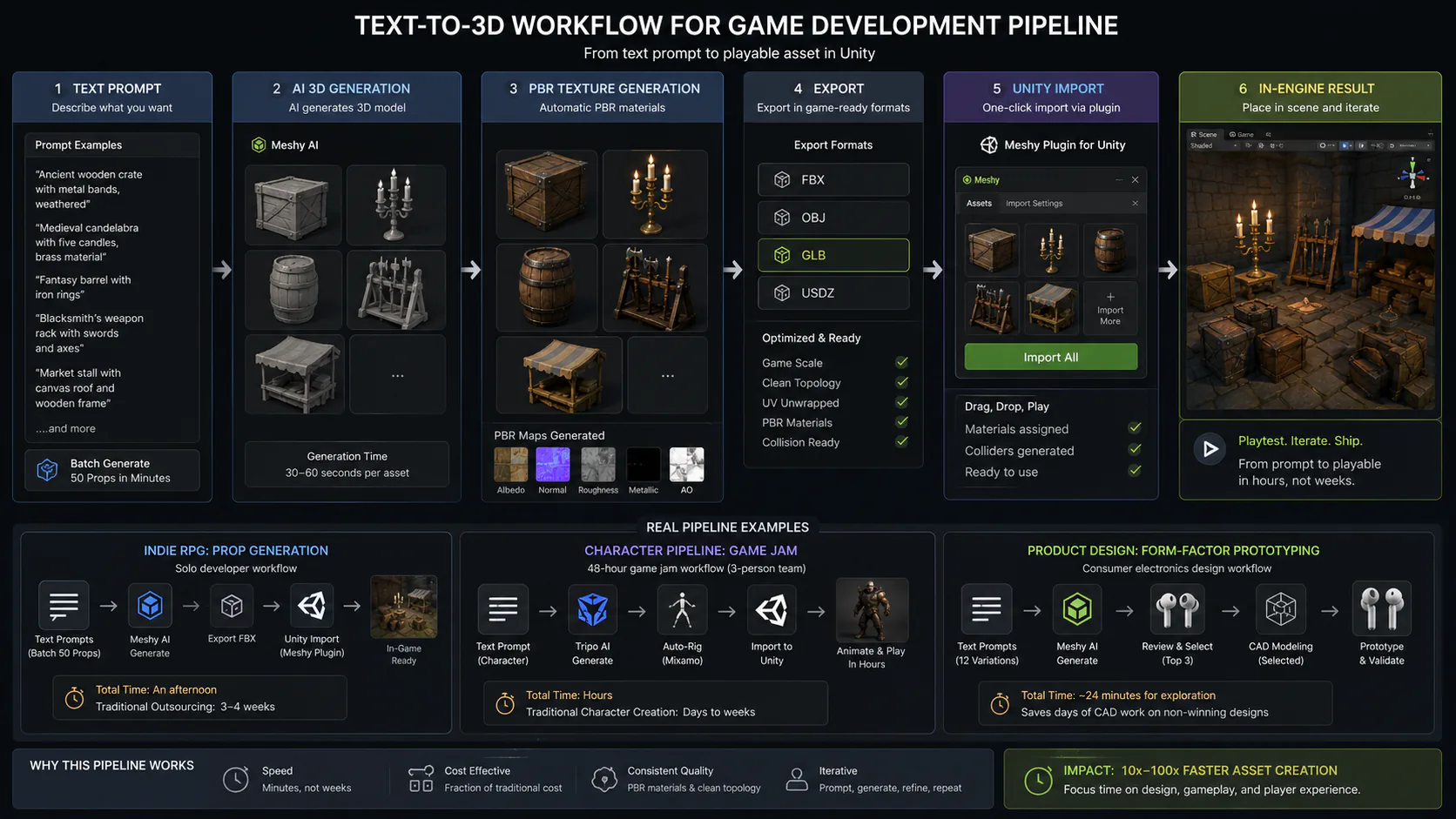
A solo developer building a fantasy RPG uses Meshy to batch-generate 50 environment props from text prompts. Crates, barrels, weapon racks, candelabras, market stalls. Each generates in under a minute, exports to FBX, and imports into Unity via the Meshy plugin. Total time: an afternoon. Traditional outsourcing equivalent: 3 to 4 weeks.
The developer then manually creates the protagonist character and primary NPCs with Blender, because those assets need the visual distinctiveness and stylistic intentionality that define the game's identity.
Character pipeline: game jam
During a 48-hour game jam, a three-person team uses Tripo AI to generate all character assets. Prompts describe each character's visual style and role. Tripo's quad-based topology auto-rigs cleanly in Mixamo. Characters are animated and playable in Unity within hours of generation.
Product design: form-factor prototyping
A consumer electronics designer uses Meshy to generate 12 form-factor variations on a new earphone design from text descriptions before investing in CAD modeling. Each variation takes two minutes to generate. The design team selects three directions to pursue, saving the CAD engineering time for the winning design rather than all 12 explorations.
What text-to-3D costs at production scale
Credit-based pricing is the dominant model, and the economics change significantly at volume. A few things to know before choosing a plan:
Most free tiers give you 3 to 10 generations per month, enough to evaluate quality but not enough for a production pipeline. Paid entry tiers at $20 to $30/month typically provide 200 to 500 generations.
For studios generating 50+ assets per project, aggregator platforms like 3D AI Studio are worth evaluating. Access to Meshy, Rodin, Tripo, and others under one subscription at approximately $19/month with roughly 1,000 credits gives meaningfully better economics than subscribing to each tool separately.
Rodin is the outlier: premium pricing reflects premium output quality. For studios where hero-asset visual fidelity directly affects their product's perceived quality, the cost-per-generation is justifiable. For indie developers focused on volume, it is not.
Pros and cons
Pros
- Generation times of 10 to 60 seconds per asset compress weeks of outsourcing into hours of in-house work, with iteration cheap enough to happen during development
- PBR texture generation is standard across all major tools, eliminating a separately skilled workflow step that previously required dedicated texture artists
- Direct engine plugins (Blender, Unity, Unreal) from Meshy and Tripo mean AI-generated assets reach production environments with minimal friction
- Batch generation at scale is practical and cost-effective for prop libraries, environment assets, and secondary characters
- The free tiers on Meshy and Tripo are genuinely useful for evaluation, not crippled demos
Cons
- Hero characters, protagonist models, and high-fidelity lead assets still require professional human artists; AI-generated replacements read as visually generic at close viewing distances
- Most assets need post-processing cleanup before they are truly production-ready: retopology for animation, UV verification, PBR channel checks
- Maintaining consistent art direction across a large library of AI-generated assets requires manual style-matching work that reduces (but does not eliminate) the time savings
- Credit-based pricing becomes expensive at high volume without careful platform selection or aggregator strategies
- AI 3D tools are not CAD tools: dimensional accuracy, parametric editability, and manufacturing tolerances are outside the capability of every platform in this category
Who should use text-to-3D tools
Use them if:
- You are an indie developer or small studio building games that need large volumes of environment props, secondary characters, or placeholder assets during development
- You are a product designer who needs to generate form-factor explorations and material variations quickly before committing to CAD modeling
- Your team lacks dedicated 3D artists and you need workable assets fast
- You are prototyping, building game jam projects, or populating early-stage level designs where speed matters more than hero-quality fidelity
- You are an e-commerce brand needing AR-ready product models without commissioning traditional 3D work
Skip them (or use them only as one step) if:
- Your pipeline requires manufacturing-precision geometry, STEP/DXF export, or dimensional accuracy
- You are building hero protagonist characters that define your game's visual identity
- Your art direction requires highly specific stylistic consistency that current tools cannot reliably lock in across large asset sets
- You need to digitize real-world objects with photorealistic capture (use Luma AI specifically for this, as text-to-3D synthesis is the wrong approach)
Is it worth it?
For game developers and product designers fitting the use cases above: yes, clearly. The productivity gain is not marginal. It is the difference between having 3D assets and not having them, particularly for solo developers and small studios operating below the budget threshold for professional 3D artists.
The right frame is not "AI replaces 3D artists." It is "AI handles the volume work so 3D artists can focus on the assets that actually define your product's quality." Studios using both are moving faster than studios using either alone.
Start with Meshy AI's free tier to evaluate generation quality for your specific asset types. If character topology is your bottleneck, test Tripo alongside it. Save Rodin for the assets where photorealistic hero quality justifies the longer generation time and higher cost.
For context on how these tools fit into the broader AI image and video tools hub, our Sora vs Veo vs Kling comparison covers adjacent generative media tooling, and the open-source AI coding tools comparison covers developer workflow decisions worth reading alongside this one.
Frequently asked questions
Meshy AI is the strongest choice for Unity pipelines in 2026. It has a native Unity plugin, exports FBX and GLB directly, generates PBR textures automatically, and includes auto-rigging with 500+ animation presets. The free tier lets you test quality before subscribing. Tripo AI is a close second for character-heavy projects due to its cleaner quad-based topology.
Not for all work. AI tools are production-ready for background props, environment assets, secondary characters, and early-stage prototypes. For hero characters, stylistically precise protagonist models, and anything requiring consistent art direction across a large library, skilled 3D artists are still required. The most effective studios use both: AI for volume work, human artists for assets that define the product's visual identity.
No. Text-to-3D tools generate visual meshes, not engineering-grade geometry. They do not support dimensional precision, parametric editability, or standard CAD export formats (STEP, DXF) required for CNC machining or manufacturing tolerances. For physical product manufacturing, use dedicated CAD tools like Onshape or Zoo. Text-to-3D is appropriate for product visualization and prototyping ideation, not for parts that will be physically produced.
Entry paid tiers from Meshy and Tripo run $20 to $30/month and provide 200 to 500 generations, which covers most indie studio needs. High-volume studios generating 50+ assets per project should evaluate 3D AI Studio, an aggregator offering access to Meshy, Rodin, and Tripo under one subscription at roughly $19/month with approximately 1,000 credits. Rodin standalone costs around $99/month and is only cost-effective when hero-asset quality justifies the premium.
It depends on the tool and the asset type. Tripo AI's quad-based topology often skips retopology entirely for character assets. Meshy's auto-rigging handles humanoid characters reliably. Rodin outputs, despite being highest quality visually, typically need retopology before game engine use because the mesh is optimized for rendering rather than animation. As a general rule: expect 5 to 15 minutes of cleanup per asset for standard props, and plan for more on complex characters regardless of which tool you use.