Setting Up MCP Servers for Your AI Agent Stack (2026)
A practical guide to setting up MCP servers for AI agents in 2026. Covers transport types, the best servers to install, mcp.json config, and security.

Most AI agent tutorials skip the setup that actually determines whether your agent is useful. You can pick the best model in the world, craft perfect prompts, and build a clean orchestration layer - and your agent will still be blind to your codebase, your database, your issue tracker, and everything else that matters. That gap is what MCP solves.
The Model Context Protocol crossed 97 million monthly SDK downloads in March 2026. OpenAI deprecated its proprietary Assistants API to support it. Google, Microsoft, LangGraph, and CrewAI all ship native support. If you're building AI agents that talk to external systems, MCP is not optional anymore.
This guide walks through the full setup: what MCP actually is under the hood, which servers are worth installing (and which archived tutorials you should ignore), how to write a working mcp.json, and how to keep your agent secure when it has write access to real systems.
TL;DR: Start with four servers: GitHub, Filesystem, Brave Search, and Memory. Those cover 80% of developer workflows. Then read the security section before giving your agent database write access.
What MCP actually does (and why context is the bottleneck)
Before installing anything, it helps to understand the problem MCP solves. Not the pitch version - the technical one.
Every AI coding assistant has the same limitation: it sees text. It sees the code you paste, the conversation history, whatever fits in its context window. It does not see your database schema, your GitHub issues, your Sentry errors, or your Slack threads - unless you manually copy-paste that content into the prompt. Every time.
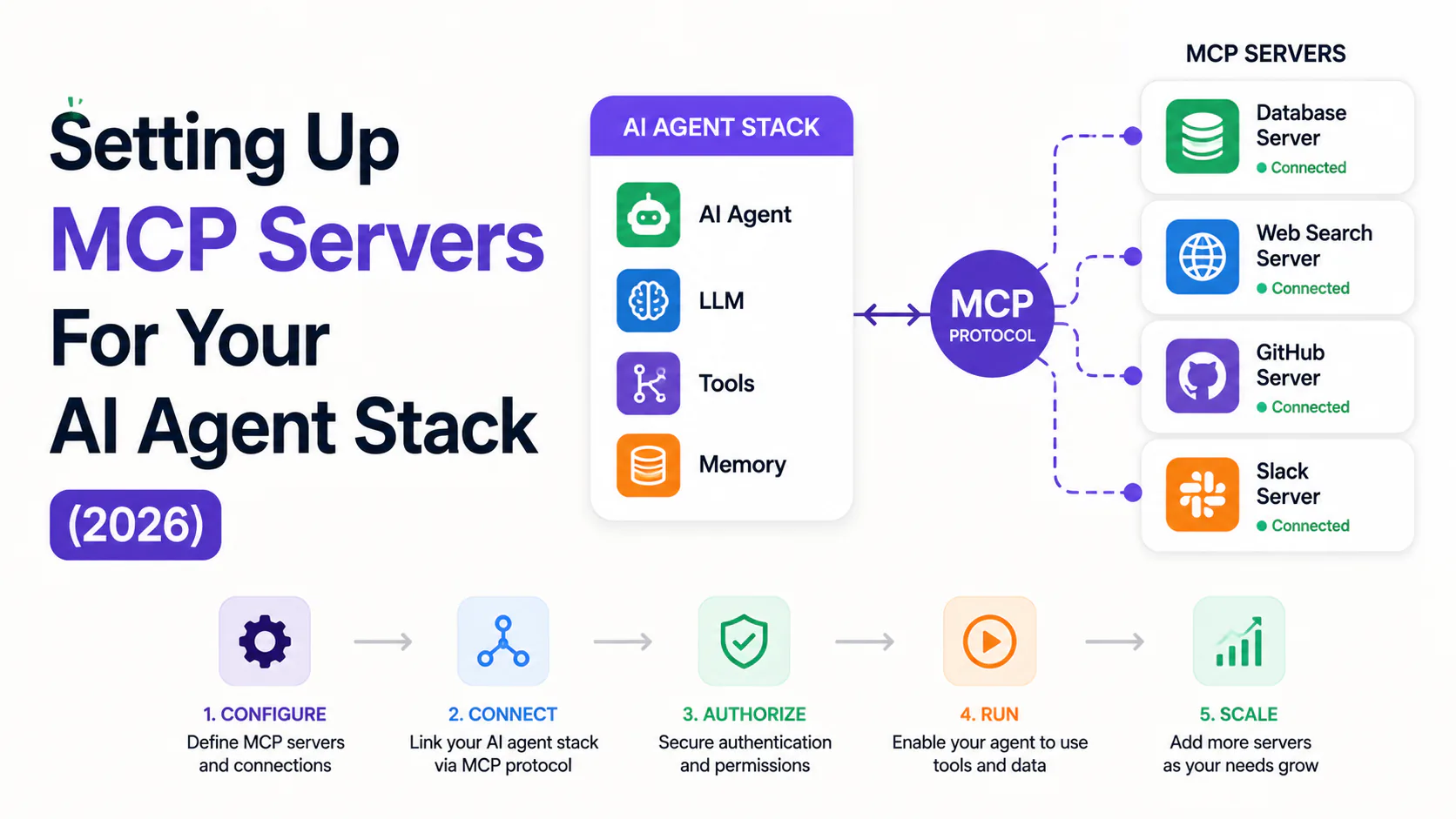
MCP fixes this with a client-server protocol built on JSON-RPC 2.0. You run an MCP server that exposes your tools and data sources. Your AI host (Claude Code, Cursor, VS Code, Windsurf) connects to it. The agent can then call those tools directly during a session, without you pasting anything.
The architecture has three components:
- MCP Host - the application running your AI (Claude Desktop, Cursor, VS Code)
- MCP Client - the in-process connection manager inside the host; one per server connection
- MCP Server - the external process exposing tools, resources, and prompts to the model
Servers declare capabilities through a schema handshake at startup. Add a new tool to your server and every connected client sees it on next initialization. No hardcoded endpoint lists, no stale documentation to keep in sync.
Your IDE / Claude Desktop  (Host)
        │
  MCP Client (in-process)
        │
   ┌────┴─────┬──────────┬──────────┐
GitHub      Postgres  Filesystem  Brave Search
MCP Server  MCP Server MCP Server  MCP Server
(stdio)     (stdio)    (stdio)     (stdio)
        │
Tools / Resources / Prompts
exposed to the AI at runtime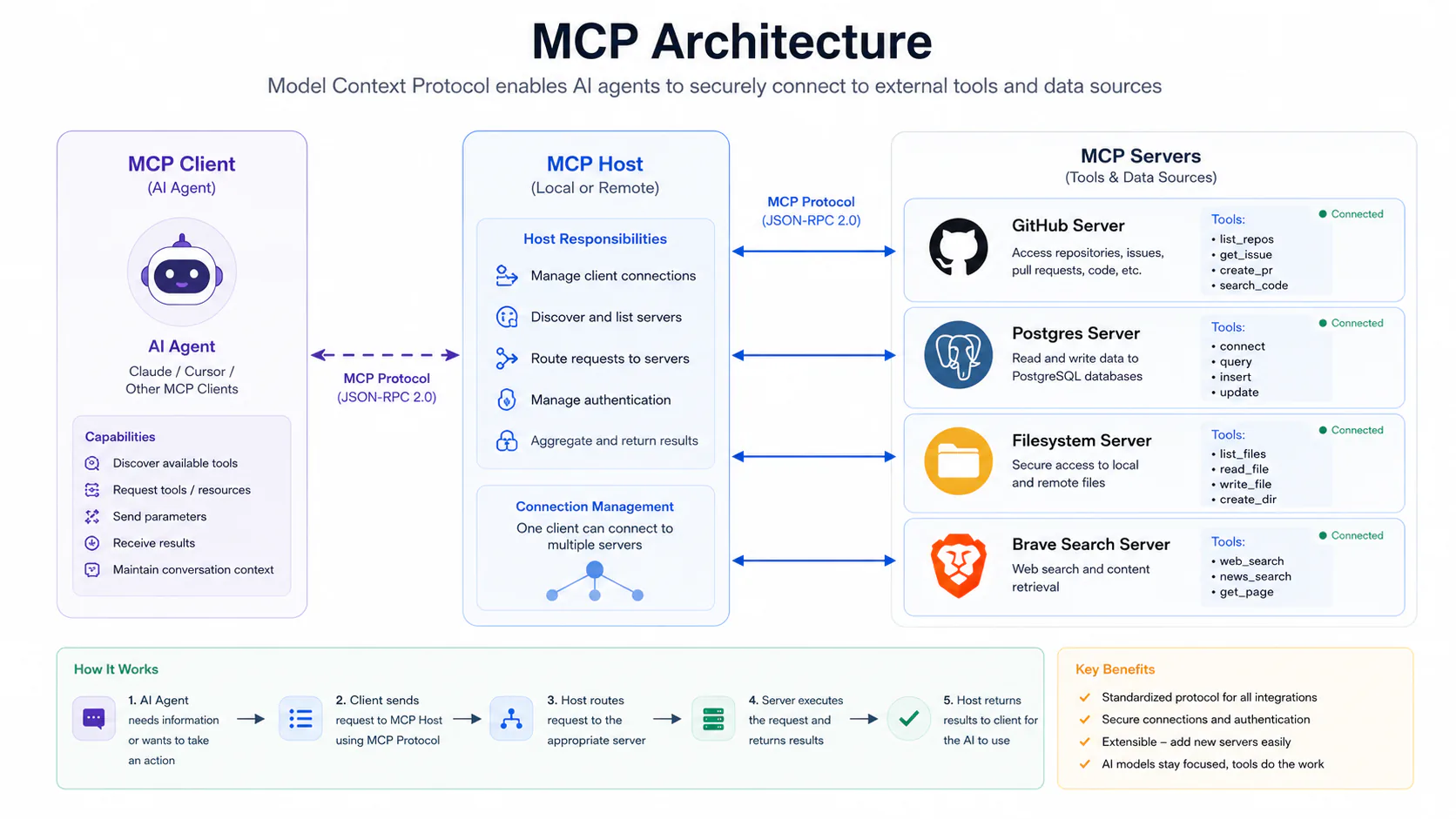
stdio vs. HTTP: the transport decision that drives everything else
Every MCP server uses one of two transports. Understanding the difference before you start saves you hours of debugging.
stdio (Standard Input/Output) runs the server as a local subprocess. The host spawns it, writes JSON-RPC requests to stdin, reads responses from stdout. No network exposure, no authentication setup. Use this for anything running on your machine: filesystem access, git operations, local database queries.
Streamable HTTP (Remote) runs the server as a network-accessible process with an HTTP endpoint. Use this for cloud services (GitHub, Slack, Figma), remote deployments, and tools shared across a team. The spec formally requires OAuth 2.1 with PKCE for remote server authentication.
The rule in practice: stdio for local; HTTP for cloud. If a tutorial tells you to point an HTTP server at localhost, it's probably pre-2025 content - check the publish date.
The archived server problem (read this before following any other guide)
This is the most important thing to understand before installing anything.
In 2025, Anthropic archived 13 of its 20 original reference servers and moved them to github.com/modelcontextprotocol/servers-archived. The archived list includes GitHub, Slack, Postgres, Google Drive, Brave Search, Sentry, SQLite, Puppeteer, and others. They were replaced by vendor-maintained versions.
A large fraction of MCP tutorials still link to these archived repositories. If you install from them, you're getting unmaintained servers that will likely break on the current spec.
Anthropic now actively maintains only 7 reference servers: Everything, Fetch, Filesystem, Git, Memory, Sequential Thinking, and Time.
For anything else, look for the vendor-maintained server first. Before installing any server, check: when was the last commit? Is it in the archived repo? Does the README mention the current transport spec?
What to install first: the foundation four
Resist the urge to install 15 servers at once. The token overhead of having 20+ tools in every system prompt is real, and poorly-designed servers create tool-call failures that are genuinely hard to debug.
Start with four servers that cover 80% of developer workflows. Add more when a specific workflow demands it.
GitHub MCP
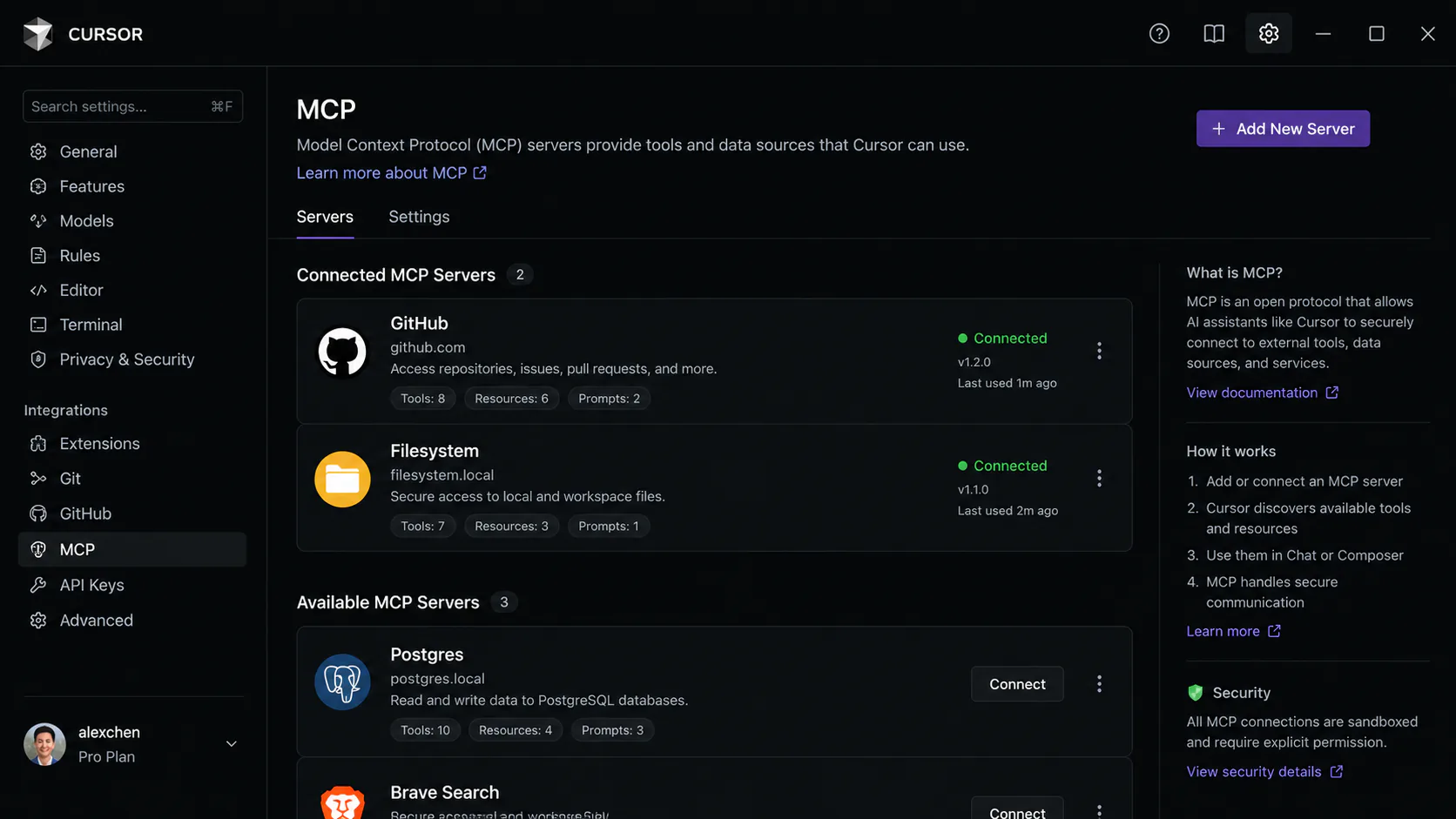
The GitHub MCP server is the single most-installed server in the ecosystem. It gives your agent full access to the GitHub API: create repositories, manage issues, review pull requests, trigger Actions workflows.
The practical difference this makes: instead of switching between your terminal and GitHub's web UI to create a PR, you tell the agent "create a PR that fixes the authentication bug" and it drafts one, including a description based on your recent commits.
Setup requires a GitHub Personal Access Token (PAT) scoped to the repos and permissions you need. Scope it minimally - read access to repos is usually enough for most workflows. Store the token in an environment variable, never in a config file committed to git.
Filesystem MCP
The Filesystem server exposes read/write access to specific directories. With 335,723 recorded installs, it's the most-installed MCP server in the ecosystem.
The security rule here is firm: pass only the directories you want the agent reading. Not /. Not $HOME. The path you specify is the boundary the agent operates within.
Brave Search MCP
Brave Search gives your agent web search capabilities. It's the best free option: a generous free tier, no per-query tracking, and it doesn't build a usage profile. Requires a Brave Search API key, which is free to obtain.
For more semantically capable search (useful for "find the 5 most relevant sources on this specific topic" queries), Exa MCP is the paid alternative that many developers add later.
Memory MCP
Memory provides persistent key-value storage across agent sessions. Without it, your agent forgets everything between conversations - decisions you made, preferences you set, project context you established. Memory is how you give an agent continuity.
Installing and configuring your stack
All major MCP clients (Cursor, Claude Code, VS Code, Windsurf) use a standard JSON config format. The file is typically named mcp.json or embedded in the client's settings file.
For stdio servers, you specify a command and args. For HTTP servers, you specify a URL. Credentials always go in environment variable references, never hardcoded.
Here's a working config for the foundation four:
{
  "mcpServers": {
    "filesystem": {
      "command": "npx",
      "args": [
        "-y",
        "@modelcontextprotocol/server-filesystem",
        "/path/to/your/project"
      ],
      "transport": "stdio"
    },
    "github": {
      "command": "npx",
      "args": ["-y", "@modelcontextprotocol/server-github"],
      "env": {
        "GITHUB_PERSONAL_ACCESS_TOKEN": "\${env:GITHUB_TOKEN}"
      },
      "transport": "stdio"
    },
    "brave-search": {
      "command": "npx",
      "args": ["-y", "@modelcontextprotocol/server-brave-search"],
      "env": {
        "BRAVE_API_KEY": "\${env:BRAVE_API_KEY}"
      },
      "transport": "stdio"
    },
    "memory": {
      "command": "npx",
      "args": ["-y", "@modelcontextprotocol/server-memory"],
      "transport": "stdio"
    }
  }
}
For a remote HTTP server (for example, a cloud-hosted Slack MCP), replace the command/args fields with a url field pointing to the server's Streamable HTTP endpoint:
"slack": {
  "url": "https://your-mcp-host.example.com/slack/mcp",
  "transport": "http"
}
Expanding beyond the foundation
Once the foundation four are working, add servers based on your actual workflow. Here are the ones worth considering by category.
For database work: Postgres MCP
Postgres MCP lets your agent query your database, run migrations, and inspect schemas from chat. The capability is powerful and the risk is proportional: give the agent a read-only role for exploration. Reserve write access for workflows where you have reviewed and approved the agent's plan before execution.
A practical agent workflow this enables: "why did signups drop 40% on Tuesday?" The agent queries the database for that time window, cross-references with your application logs, and returns a structured answer - without you writing SQL or running queries manually.
For documentation: Context7
Context7 provides up-to-date library documentation and code examples, and has over 54,000 GitHub stars. Pair it with GitHub MCP for a coding workflow where the agent has access to both your codebase and the current docs for the libraries it's writing against. Stale training data is one of the most common sources of hallucinated API calls; Context7 addresses it directly.
For browser automation: Playwright MCP
Playwright MCP lets agents control a headless Chrome browser: navigate pages, click elements, fill forms, take screenshots, and extract content from rendered pages. Useful for testing web apps, scraping dynamic content, and automating browser-based workflows that require JavaScript execution. Over 30,000 GitHub stars as of mid-2026.
For error monitoring: Sentry MCP
Sentry MCP connects your agent to your error monitoring. When a bug is reported, the agent reads the full Sentry context - stack trace, breadcrumbs, frequency - without you copy-pasting it into the prompt. Pair it with GitHub MCP and Filesystem MCP for a bug-fix workflow where the agent reads the error, finds the relevant source file, and opens a patch PR.
For team workflows: Slack MCP
Slack MCP exposes channel listing, message reading, and message sending as tools. Best used in workflows where the agent needs to triage or summarize Slack threads, or where it should notify a team channel after completing a multi-step task.
Security: what you need to know before giving an agent write access
The MCP ecosystem grew faster than its security practices. As of April 2026, only 8.5% of MCP servers use OAuth for authentication. A 2025 Trend Micro survey found 492 exposed MCP servers with no authentication or encryption at all. This is not a hypothetical risk.
The practical rules for production setups:
Use read-only credentials by default. A Postgres MCP connection should use a database user with SELECT-only permissions unless you specifically need the agent to write. Read access is enough for 90% of analytical and debugging workflows.
Scope filesystem paths tightly. The path argument in your Filesystem MCP config is a hard boundary. Set it to your project directory, not your home directory.
Store credentials in environment variables. Never put API keys, database connection strings, or tokens in config files that could be committed to git. Use ${env:VARIABLE_NAME} references in mcp.json.
Rotate tokens the same way you rotate CI tokens. MCP server credentials have the same access profile as CI credentials. Treat them accordingly.
Review what the agent did, not just what it said. The moment you auto-approve every tool call, a hallucinated action can run against a real system. Build a review step into any workflow that includes writes, deletes, or API calls with side effects.
Check server provenance before installing. The MCP ecosystem counts in the tens of thousands of listed servers; the production-quality, actively-maintained universe is approximately 50 tier-1 vendor servers plus about 200 high-quality community servers. Check last commit dates and GitHub stars before installing anything you find in a roundup post.
For remote (HTTP) servers in team or enterprise settings, the spec requires OAuth 2.1 with PKCE. Moving production systems from static credentials (used by 53% of current deployments) to OAuth 2.1 flows is the most important security upgrade most teams can make in 2026.
A real example: the CI/CD pipeline workflow
Here's what a production workflow looks like when these servers are connected correctly.
A failing PR lands in your repository. Without MCP, you: check GitHub for the error, open Sentry to read the stack trace, navigate to the relevant source file, write a fix, push a commit, open a PR, and post in Slack. Seven steps across four tools.
With MCP, one agent session handles it: GitHub MCP reads the failing PR, Sentry MCP pulls the full error context, Filesystem MCP reads the relevant source files, the agent writes the fix, GitHub MCP opens a patch PR with a generated description, and Slack MCP notifies the team.
The agent never leaves its session. You review the PR.
This is what the "AI gives your tools a USB cable" framing actually means in practice. The agent is not smarter - it just has access to the context it needs to act, rather than asking you to paste it in.
MCP vs. the alternatives
A few comparisons that come up often when teams are evaluating MCP.
MCP vs. LangChain Tools: LangChain predates MCP and uses its own tool-calling abstractions that work only within the LangChain framework. MCP servers are client-agnostic - build one server and it works with Claude, Cursor, ChatGPT, VS Code, and every other client that supports the spec. The practical conclusion: MCP for tool exposure (build once, use everywhere); LangChain for agent orchestration logic. Many teams use both.
MCP vs. Composio: Composio is a meta-layer that exposes tools for over 250 platforms through a single MCP connection, managing OAuth on your behalf. It trades individual OAuth setup complexity for a dependency on Composio's infrastructure and credentials pipeline. Reasonable for teams that want broad coverage quickly; a security consideration for teams that cannot route credentials through third-party services.
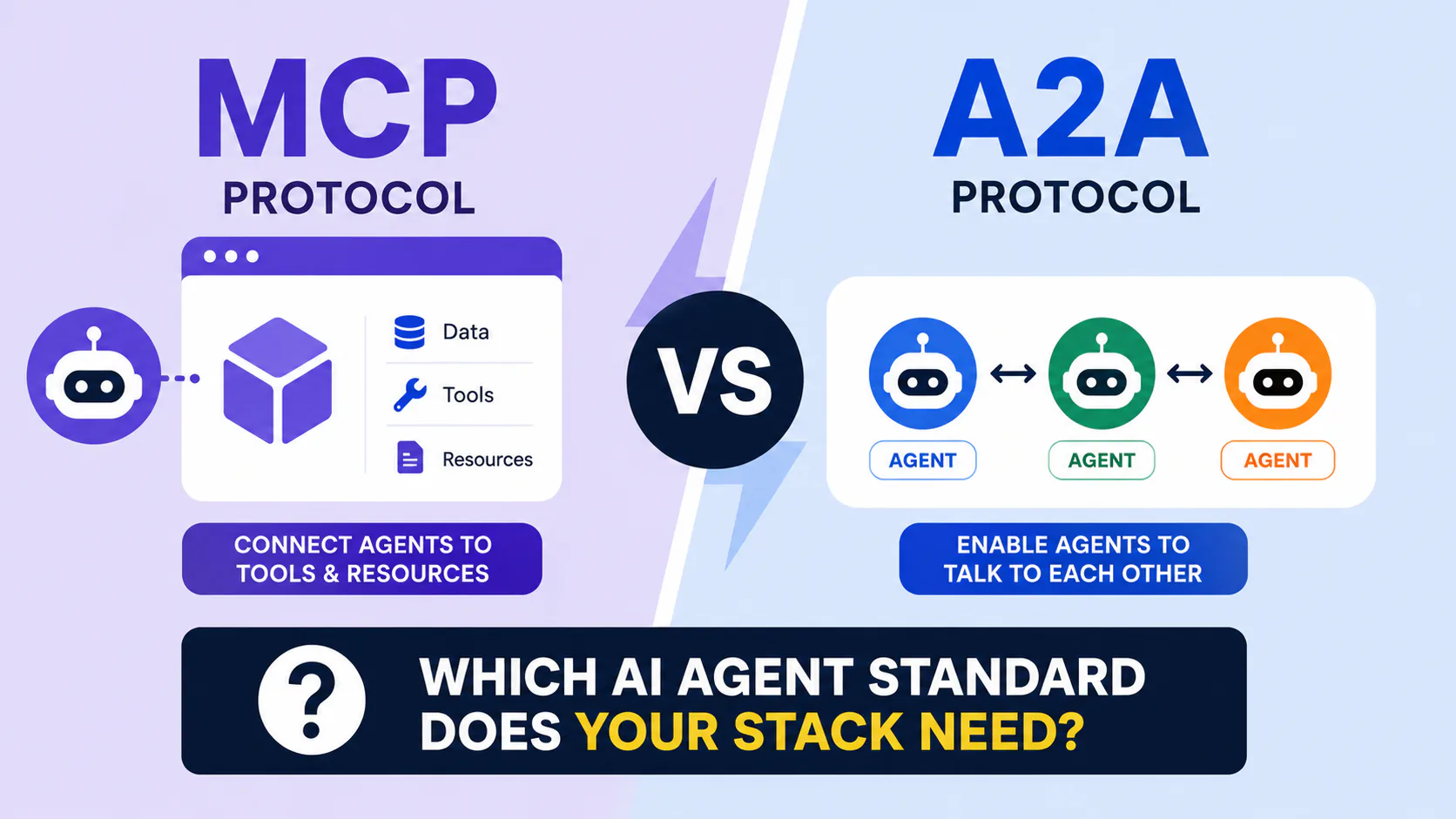
MCP vs. A2A: The Model Context Protocol connects agents to external tools and data. The Agent-to-Agent (A2A) protocol defines how agents communicate with each other. They address different layers and are designed to work together: an agent uses MCP to read from a database and call an API, then uses A2A to hand a subtask to a specialist agent in another system.
Where to go from here
The official MCP server registry is the authoritative source for actively-maintained servers. The servers-archived repo is the list to avoid. For new servers, check glama.ai for install counts and last-activity dates - a useful quality filter before you spend time on a setup that turns out to be abandoned.
If you're building AI coding workflows specifically, the developer tools category on Bytewaves has reviews of Claude Code, Cursor, and the tooling that pairs with MCP in production environments. For a design-to-code workflow, see our Figma MCP + Claude Code guide and Cursor Background Agents tutorial.
Start with the foundation four. Get them working. Verify that your agent can read a file, search the web, and access your GitHub issues in a single session. Then add Postgres MCP or Playwright MCP when a specific workflow demands it.
Frequently asked questions
MCP (Model Context Protocol) is an open standard that lets AI agents connect to external tools and data sources through a single interface. Without it, an AI can only see what you paste into the prompt. With MCP servers running, the agent can query your database, read your GitHub issues, search the web, and access your filesystem directly during a session, without manual copy-paste.
Start with four: GitHub MCP, Filesystem MCP, Brave Search MCP, and Memory MCP. Those cover roughly 80% of what most developers use MCP for. Add specialized servers (Postgres, Playwright, Sentry, Slack) when a specific workflow requires them.
The protocol itself is open source with no cost. Individual servers vary. Anthropic's reference servers (Filesystem, Git, Memory, Fetch) are free and open source. Third-party servers often require API keys for the underlying service - Brave Search has a free tier; Exa and most cloud services require paid plans.
In 2025, Anthropic archived 13 of its original 20 reference servers and moved them to
github.com/modelcontextprotocol/servers-archived. They were superseded by vendor-maintained
versions. Anthropic now actively maintains 7 servers: Everything, Fetch, Filesystem, Git, Memory,
Sequential Thinking, and Time. If a tutorial links to the archived repository for GitHub, Slack,
or Postgres, skip it and find the vendor-maintained version instead.
Use read-only credentials by default. Scope filesystem paths to your project directory, not your home directory. Store API keys in environment variables, not config files. Rotate tokens the same way you would CI tokens. Review every agent action that involves writes or API calls with side effects - do not auto-approve tool calls blindly.