How to Deploy a Private LLM with Agent-Ready Open-Weight Models
Deploy a self-hosted, agent-ready LLM in 2026: model selection, quantization, vLLM vs SGLang serving, MCP integration, RAG, and production sizing guide.

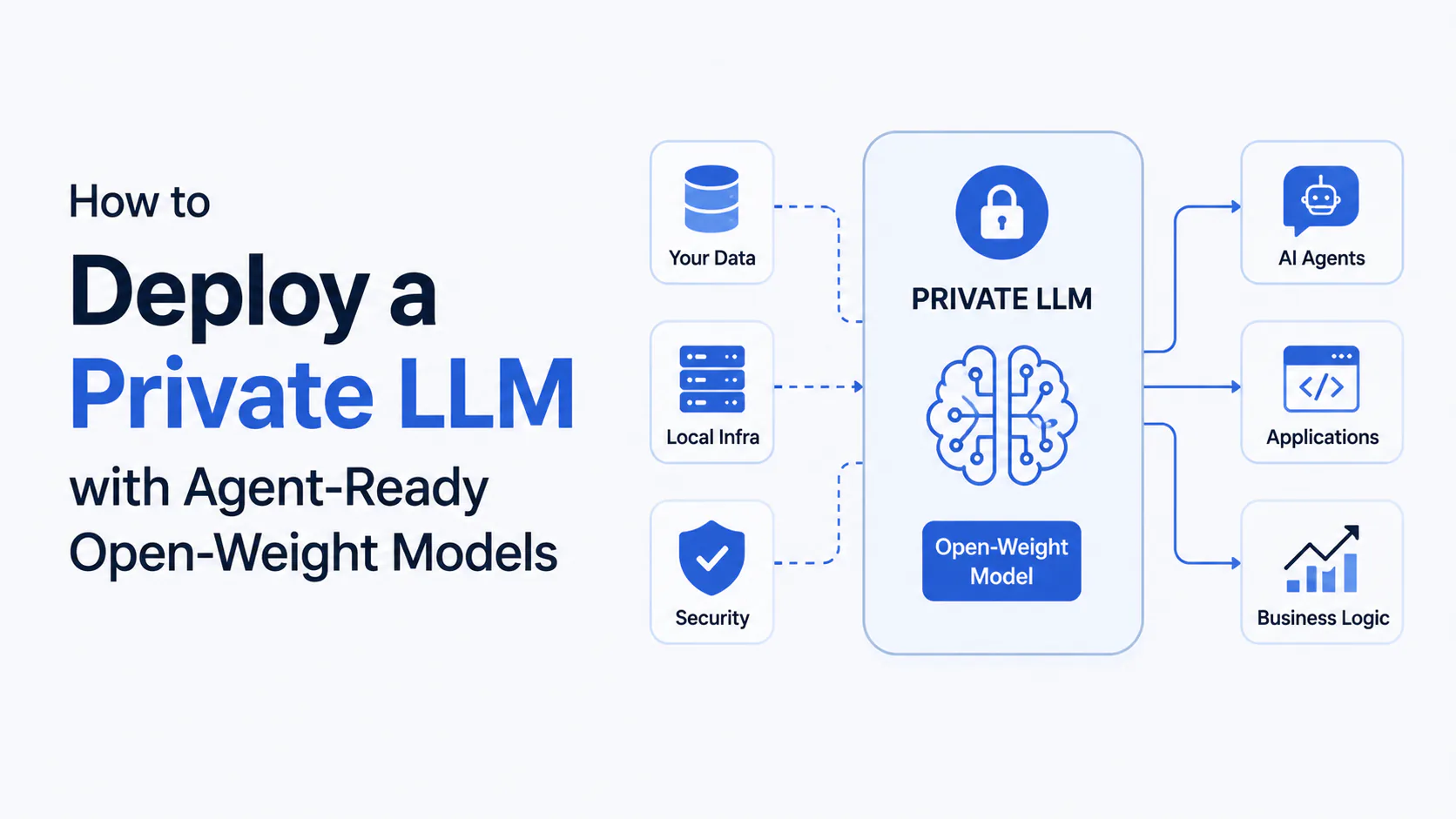
A private LLM deployment that would have taken a dedicated ML platform team six weeks to build in 2024 now takes an afternoon. The stack has matured that fast.
Open-weight models in 2026 are competitive with commercial APIs on the tasks most enterprises actually run: code assistance, document analysis, contract review, RAG over private knowledge bases, and multi-step agentic workflows. Inference serving engines have consolidated around two well-documented, production-hardened options. The Model Context Protocol (MCP) means you connect your model to internal systems once, not once per tool.
This guide walks through every layer of the private LLM stack from scratch: picking the right model, quantizing it to fit your hardware, standing up a serving engine, wiring in an agent framework with MCP and RAG, and sizing hardware for your workload. By the end, you will have a working agent-ready private LLM and a clear decision framework for production deployment.
TL;DR: For most private deployments, start with Mistral Small 4 or Qwen3.6-35B (Apache 2.0 licensed, fit on a single GPU, strong function calling) served via vLLM with AWQ quantization. Wire agents through LangGraph with MCP servers for your internal tools. Upgrade to Llama 3.3 70B or DeepSeek V4 when workloads justify the hardware. Do not self-host unless you are processing more than roughly 1 billion tokens per month or have a hard compliance requirement. The math rarely works otherwise.
What we are building
By the end of this tutorial you will have:
- A quantized open-weight model running on your own GPU infrastructure
- A vLLM inference server exposing an OpenAI-compatible API on port 8000
- An MCP server connecting the model to a local file system and database
- A LangGraph agent that uses the model to complete multi-step tasks with tool calls
- A RAG pipeline that answers questions grounded in your private documents
The full stack looks like this:
User / Application
      │
Agent Framework (LangGraph)
      │
┌─────┴──────┐
MCP Servers  RAG Pipeline
(tools/data) (vector DB)
      │
Inference Engine (vLLM)
OpenAI-compatible :8000/v1
      │
Quantized Open-Weight Model
(AWQ on GPU / GGUF on CPU)
      │
Compute (GPU server / workstation)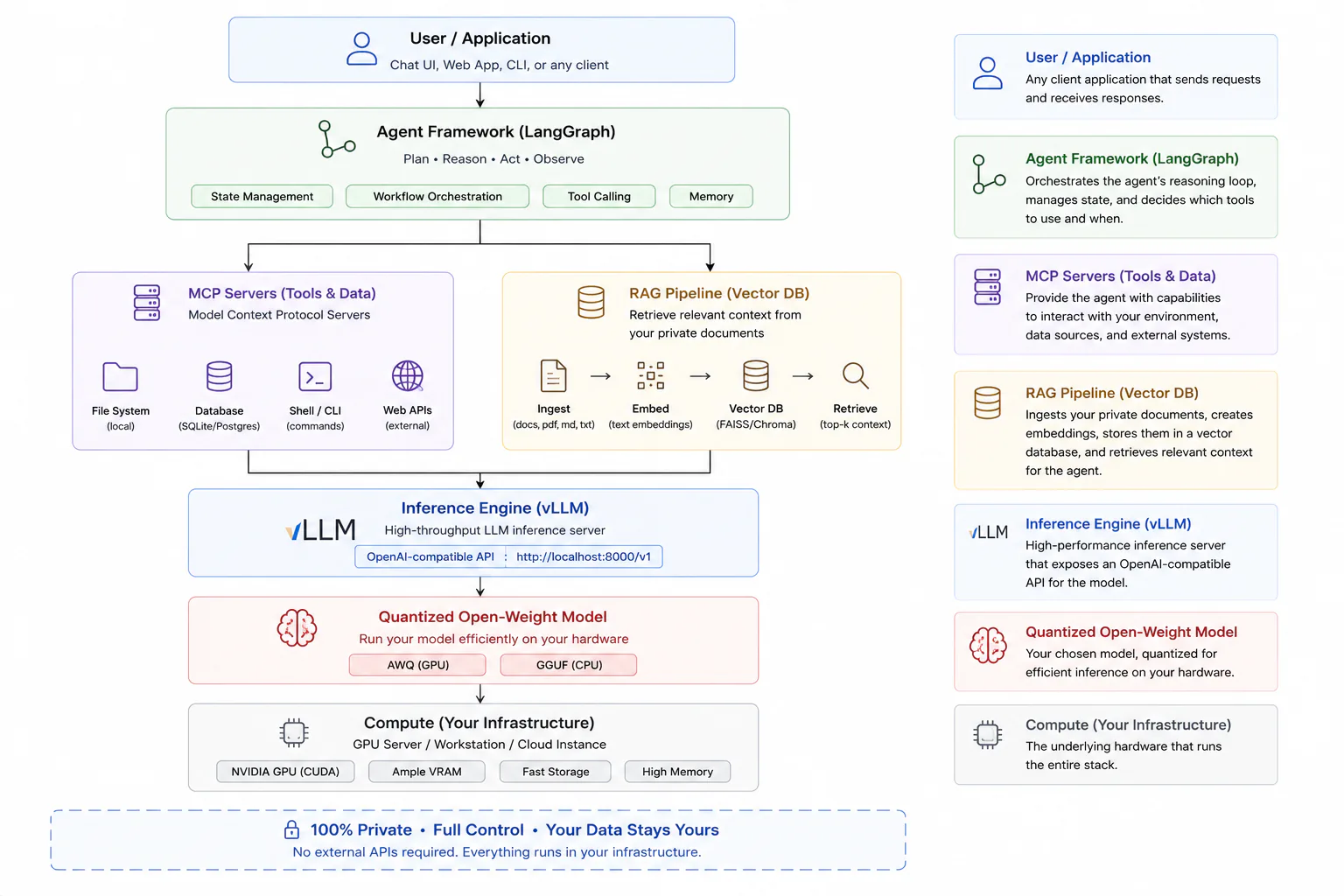
Prerequisites
Before starting, confirm you have the following:
- A Linux server or workstation with at least one NVIDIA GPU (24 GB VRAM minimum for 7B to 13B models; 40+ GB for 70B models at INT4)
- Python 3.10+ and pip installed
- Docker (optional but recommended for production serving)
- CUDA 12.1+ and the appropriate NVIDIA drivers installed
- At least 50 GB of free disk space for model weights
- Basic familiarity with the command line and Python virtual environments
No GPU? Ollama with GGUF models runs on CPU (including Apple Silicon M-series) for development and light workloads. It is not suitable for production serving beyond 10 to 20 concurrent users, but it is the fastest way to validate a model choice before committing to GPU hardware.
Step 1: Pick the right open-weight model
Model selection is the decision with the largest downstream consequences, and it is where teams most commonly spend time on the wrong variables. Benchmark scores matter less than three practical criteria: license, hardware fit, and function-calling reliability.
The license question first
This is non-negotiable for commercial deployments and needs to be resolved before you spend time on anything else.
| License | Key models | Commercial use | Fine-tune and redistribute |
|---|---|---|---|
| Apache 2.0 | Qwen3.6-35B, Mistral Small 4, Qwen 2.5 72B | ✓ Unrestricted | ✓ |
| MIT | DeepSeek R1, Phi-4-Reasoning, GLM-5.1 | ✓ Unrestricted | ✓ |
| Meta Community License | Llama 3.3 70B, Llama 4 | ✓ (under 700M MAU) | Restricted |
| Gemma Terms of Use | Gemma 4 31B | ✓ (with conditions) | Restricted |
If your legal team requires a fully OSI-approved license, your shortlist is Apache 2.0 and MIT models. The Qwen and Mistral families have clean commercial licensing and are strong performers.
Match the model to your hardware
At BF16 (full precision), GPU memory requirements scale roughly at 2 GB per billion parameters. Quantization brings this down significantly:
| Model | BF16 VRAM | INT4 (AWQ) VRAM | Fits on |
|---|---|---|---|
| 7B | ~14 GB | ~5 GB | RTX 4090, M2 Max |
| 13B | ~26 GB | ~9 GB | RTX 4090, RTX 3090 |
| 35B (MoE 3B active) | ~70 GB | ~20 GB | RTX 4090 |
| 70B | ~140 GB | ~40 GB | 2x RTX 3090 / A100 80GB |
| 671B MoE (37B active) | 1.3 TB | ~370 GB | 8x H100 |
The Qwen3.6-35B-A3B is worth special attention here. It is a Mixture-of-Experts model with 35B total parameters but only 3B active parameters per token. In practice, it runs on a single RTX 4090 (24 GB) with INT4 quantization while delivering performance well above its active parameter count. It is one of the best value-per-GPU options available with an Apache 2.0 license.
Choose for your primary use case
- Agentic coding and tool use: Kimi K2.6, DeepSeek V4 Pro, GLM-5.1 (all for enterprise GPU budgets); Qwen3-Coder or Mistral Small 4 for single-GPU deployments
- General RAG and chat: Llama 3.3 70B (best benchmark results on general tasks), Qwen 2.5 72B (Apache 2.0 alternative)
- Edge and consumer GPU: Phi-4-Reasoning, Gemma 4 31B, Mistral Small 4
- Reasoning tasks: DeepSeek R1, Phi-4-Reasoning
For this tutorial, we will use Mistral Small 4 (Apache 2.0, strong native function calling, single GPU, fast iteration) for the development walkthrough, with notes on swapping to larger models for production.
Step 2: Download and quantize the model
Download from Hugging Face
# Install the Hugging Face CLI
pip install huggingface_hub

# Log in (required for gated models like Llama)

huggingface-cli login

# Download Mistral Small 4 (Apache 2.0 - no login required)

huggingface-cli download mistralai/Mistral-Small-Instruct-2409 \
 --local-dir ./models/mistral-small-4
Quantize with AWQ for GPU serving
AWQ (Activation-Aware Weight Quantization) is the recommended format for production GPU inference. It compresses weights to INT4 while preserving the most activation-sensitive parameters, giving near-full-precision quality at roughly 30% of the original VRAM cost.
pip install autoawqfrom awq import AutoAWQForCausalLM
from transformers import AutoTokenizer
model_path = "./models/mistral-small-4"
quant_path = "./models/mistral-small-4-awq"
# Load the model and tokenizer
tokenizer = AutoTokenizer.from_pretrained(model_path)
model = AutoAWQForCausalLM.from_pretrained(
model_path,
device_map="auto",
safetensors=True
)
# Quantize: w_bit=4 is INT4; zero_point=True is standard AWQ
quant_config = {
"zero_point": True,
"q_group_size": 128,
"w_bit": 4,
"version": "GEMM"
}
model.quantize(tokenizer, quant_config=quant_config)
model.save_quantized(quant_path)
tokenizer.save_pretrained(quant_path)
print(f"Quantized model saved to {quant_path}")Skip quantization if a pre-quantized model exists. Check Hugging Face for {model - name}-AWQ
or {model - name}-GPTQ variants in the TheBloke or bartowski namespaces before running
quantization yourself. Pre-quantized models from trusted namespaces save 30 to 60 minutes of
compute time.
For GGUF format (Ollama, LM Studio, CPU inference):
git clone https://github.com/ggerganov/llama.cpp
cd llama.cpp && make

python convert_hf_to_gguf.py ../models/mistral-small-4 \
 --outfile ../models/mistral-small-4-q4_k_m.gguf \
 --outtype q4_k_m
Q4_K_M is the recommended GGUF quantization level for balancing quality and size. Q8_0 gives near-lossless quality at roughly double the VRAM; Q2_K fits more on smaller hardware but shows noticeable quality degradation.
Step 3: Serve with vLLM
vLLM is the production-grade inference engine for GPU deployments. It uses PagedAttention for efficient KV cache management, exposes an OpenAI-compatible API, and has mature Kubernetes support via Helm charts.
Install and start vLLM
# Requires CUDA 12.1+
pip install vllmpython -m vllm.entrypoints.openai.api_server \
--model ./models/mistral-small-4-awq \
--quantization awq \
--dtype auto \
--max-model-len 32768 \
--host 0.0.0.0 \
--port 8000 \
--gpu-memory-utilization 0.90The server exposes an OpenAI-compatible API at http://localhost:8000/v1. Any library or tool that works with the OpenAI SDK will work against this endpoint by changing the base_url.
Verify the server is running
from openai import OpenAI

client = OpenAI(
    base_url="http://localhost:8000/v1",
    api_key="not-required"  # vLLM does not enforce keys by default
)

response = client.chat.completions.create(
    model="mistral-small-4",  # matches the model name vLLM loaded
    messages=[{"role": "user", "content": "Summarize what a RAG pipeline does in two sentences."}],
    max_tokens=200
)
print(response.choices[0].message.content)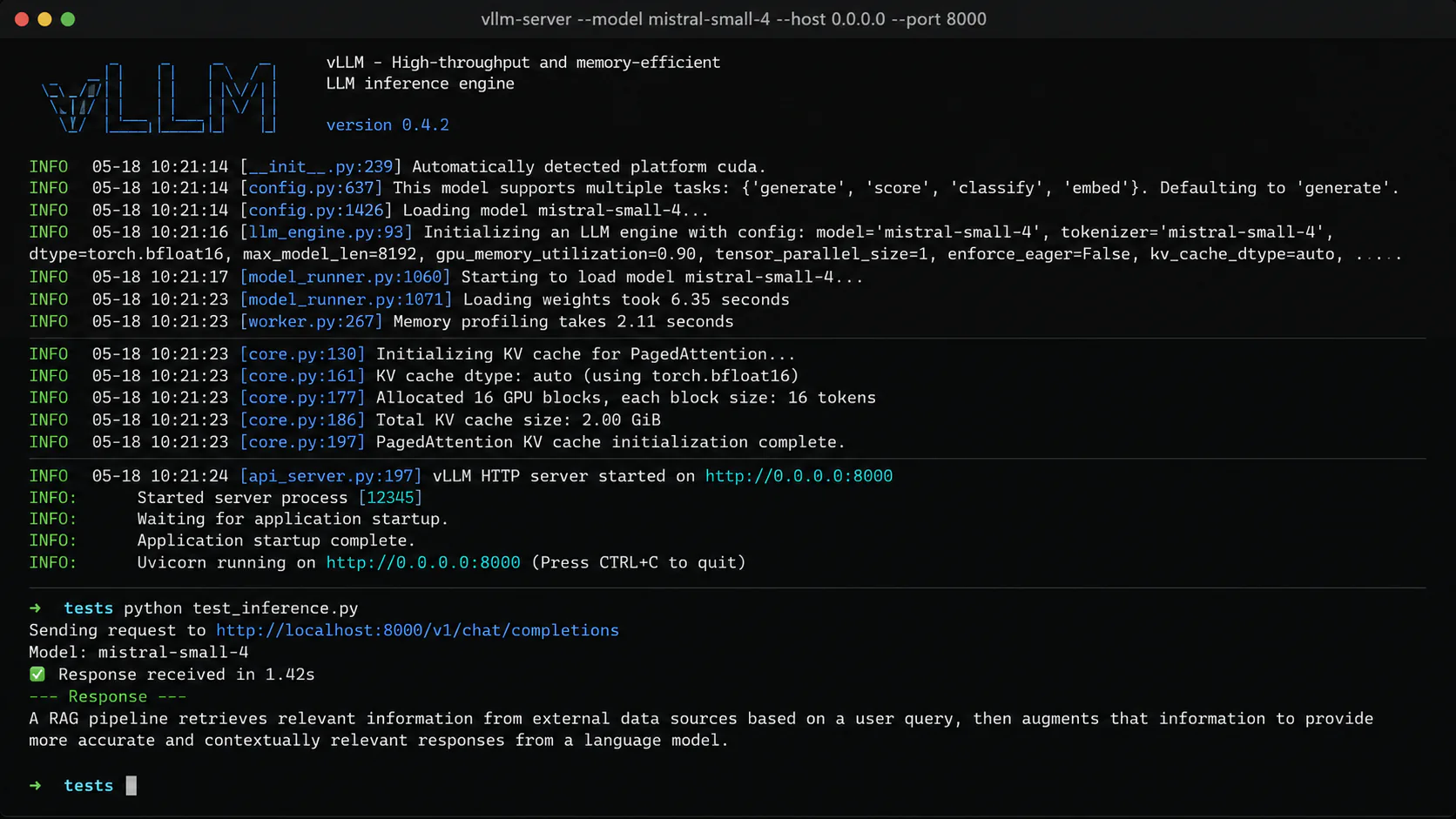
vLLM vs SGLang: which one to use
Both are production-ready. The choice depends on your workload:
| vLLM | SGLang | |
|---|---|---|
| Best for | High-throughput general serving | Agent and multi-turn workloads |
| KV cache strategy | PagedAttention | RadixAttention (shared prefix caching) |
| Throughput advantage | Baseline | 29% higher on smaller models; stronger for repeated system prompts |
| Hardware support | NVIDIA, AMD, AWS Trainium | NVIDIA, AMD |
| Production maturity | High (battle-tested Helm charts) | High |
| Setup | pip install vllm | pip install sglang |
Use SGLang when your agent workload involves many requests that share a long system prompt or prefix. RadixAttention caches and reuses those shared prefixes rather than recomputing them on every request, which is the dominant bottleneck in agent serving. For all other production cases, vLLM's broader hardware support and ecosystem integrations make it the safer default.
Do not use Ollama for production multi-user serving. Ollama is excellent for development, local experimentation, and Apple Silicon. It is designed for a small number of concurrent users (10 to 20 maximum). For serving more than a handful of developers simultaneously, deploy vLLM or SGLang instead.
Step 4: Add MCP tool integration
The Model Context Protocol provides a standardized interface for your LLM to interact with external systems. Instead of writing custom tool-calling code for every integration, you implement MCP once and gain access to a growing ecosystem of pre-built MCP servers.
Install the MCP Python SDK
pip install mcpCreate a simple MCP server
This example exposes a file system reader and a basic database query tool to the model:
from mcp.server import Server
from mcp.server.stdio import stdio_server
from mcp import types
import sqlite3, pathlib

app = Server("private-tools")

@app.list_tools()
async def list_tools() -> list[types.Tool]:
    return [
        types.Tool(
            name="read_file",
            description="Read a text file from the local file system",
            inputSchema={
                "type": "object",
                "properties": {
                    "path": {"type": "string", "description": "Absolute path to the file"}
                },
                "required": ["path"]
            }
        ),
        types.Tool(
            name="query_db",
            description="Run a read-only SQL query on the internal SQLite database",
            inputSchema={
                "type": "object",
                "properties": {
                    "sql": {"type": "string", "description": "SELECT statement to execute"}
                },
                "required": ["sql"]
            }
        )
    ]

@app.call_tool()
async def call_tool(name: str, arguments: dict) -> list[types.TextContent]:
    if name == "read_file":
        path = pathlib.Path(arguments["path"])
        if not path.exists():
            return [types.TextContent(type="text", text=f"Error: file not found at {path}")]
        return [types.TextContent(type="text", text=path.read_text())]

    if name == "query_db":
        conn = sqlite3.connect("./data/internal.db")
        cursor = conn.execute(arguments["sql"])
        rows = cursor.fetchall()
        cols = [d[0] for d in cursor.description]
        result = [dict(zip(cols, row)) for row in rows]
        return [types.TextContent(type="text", text=str(result))]

async def main():
    async with stdio_server() as (read_stream, write_stream):
        await app.run(read_stream, write_stream, app.create_initialization_options())

if __name__ == "__main__":
    import asyncio
    asyncio.run(main())
Restrict the SQL tool to SELECT statements only. The example above does not enforce this at
the code level. In production, add a check that rejects any SQL not beginning with SELECT, or
connect to a read-only database replica. Giving an LLM write access to a production database via
an MCP tool is a serious security risk.
The MCP ecosystem includes pre-built servers for many common systems: PostgreSQL, MySQL, file systems, web search, GitHub, Slack, Jira, and more. Check the MCP server registry before writing a custom server for a common integration.
Step 5: Build a RAG pipeline for private knowledge
RAG (Retrieval-Augmented Generation) lets the model answer questions about your private documents without retraining. The pipeline: chunk documents, embed them into a vector database, retrieve relevant chunks at query time, inject them into the model's context.
pip install langchain-community chromadb sentence-transformersfrom langchain_community.document_loaders import DirectoryLoader, TextLoader
from langchain.text_splitter import RecursiveCharacterTextSplitter
from langchain_community.embeddings import HuggingFaceEmbeddings
from langchain_community.vectorstores import Chroma
# Load and chunk your private documents
loader = DirectoryLoader("./docs/", glob="**/*.txt", loader_cls=TextLoader)
docs = loader.load()
splitter = RecursiveCharacterTextSplitter(chunk_size=512, chunk_overlap=64)
chunks = splitter.split_documents(docs)
# Embed with a local sentence-transformer model (no data leaves your server)
embeddings = HuggingFaceEmbeddings(model_name="BAAI/bge-small-en-v1.5")
# Store in a local ChromaDB vector database
vectorstore = Chroma.from_documents(
chunks,
embeddings,
persist_directory="./chroma_db"
)
vectorstore.persist()
print(f"Indexed {len(chunks)} chunks from {len(docs)} documents.")Use a local embedding model. BAAI/bge-small-en-v1.5 runs fast on CPU and keeps all data
local. Sending documents to an external embedding API (OpenAI, Cohere) defeats the purpose of a
private deployment. For larger document sets or multilingual content, BAAI/bge-m3 is a strong
multilingual alternative.
Step 6: Wire a LangGraph agent
LangGraph connects the model, MCP tools, and RAG retriever into a stateful agent that can plan, call tools, observe results, and reason across multiple steps.
pip install langgraph langchain-openaifrom langchain_openai import ChatOpenAI
from langchain_community.vectorstores import Chroma
from langchain_community.embeddings import HuggingFaceEmbeddings
from langchain.tools.retriever import create_retriever_tool
from langchain_core.tools import tool
from langgraph.prebuilt import create_react_agent
import subprocess, json
# Point to your local vLLM server
llm = ChatOpenAI(
base_url="http://localhost:8000/v1",
api_key="not-required",
model="mistral-small-4",
temperature=0
)
# RAG retriever tool
embeddings = HuggingFaceEmbeddings(model_name="BAAI/bge-small-en-v1.5")
vectorstore = Chroma(persist_directory="./chroma_db", embedding_function=embeddings)
retriever = vectorstore.as_retriever(search_kwargs={"k": 4})
rag_tool = create_retriever_tool(
retriever,
name="search_internal_docs",
description="Search the company knowledge base. Use for questions about internal policies, procedures, or documentation."
)
# MCP tool wrapper (calls the MCP server as a subprocess)
@tool
def read_file(path: str) -> str:
"""Read a file from the local file system."""
request = {"jsonrpc": "2.0", "id": 1, "method": "tools/call",
"params": {"name": "read_file", "arguments": {"path": path}}}
result = subprocess.run(
["python", "mcp_server.py"],
input=json.dumps(request),
capture_output=True, text=True
)
return result.stdout
# Build the agent
tools = [rag_tool, read_file]
agent = create_react_agent(llm, tools)
# Run a query
result = agent.invoke({
"messages": [{"role": "user", "content": "What does our internal refund policy say, and is there a policy document at /docs/refund-policy.txt?"}]
})
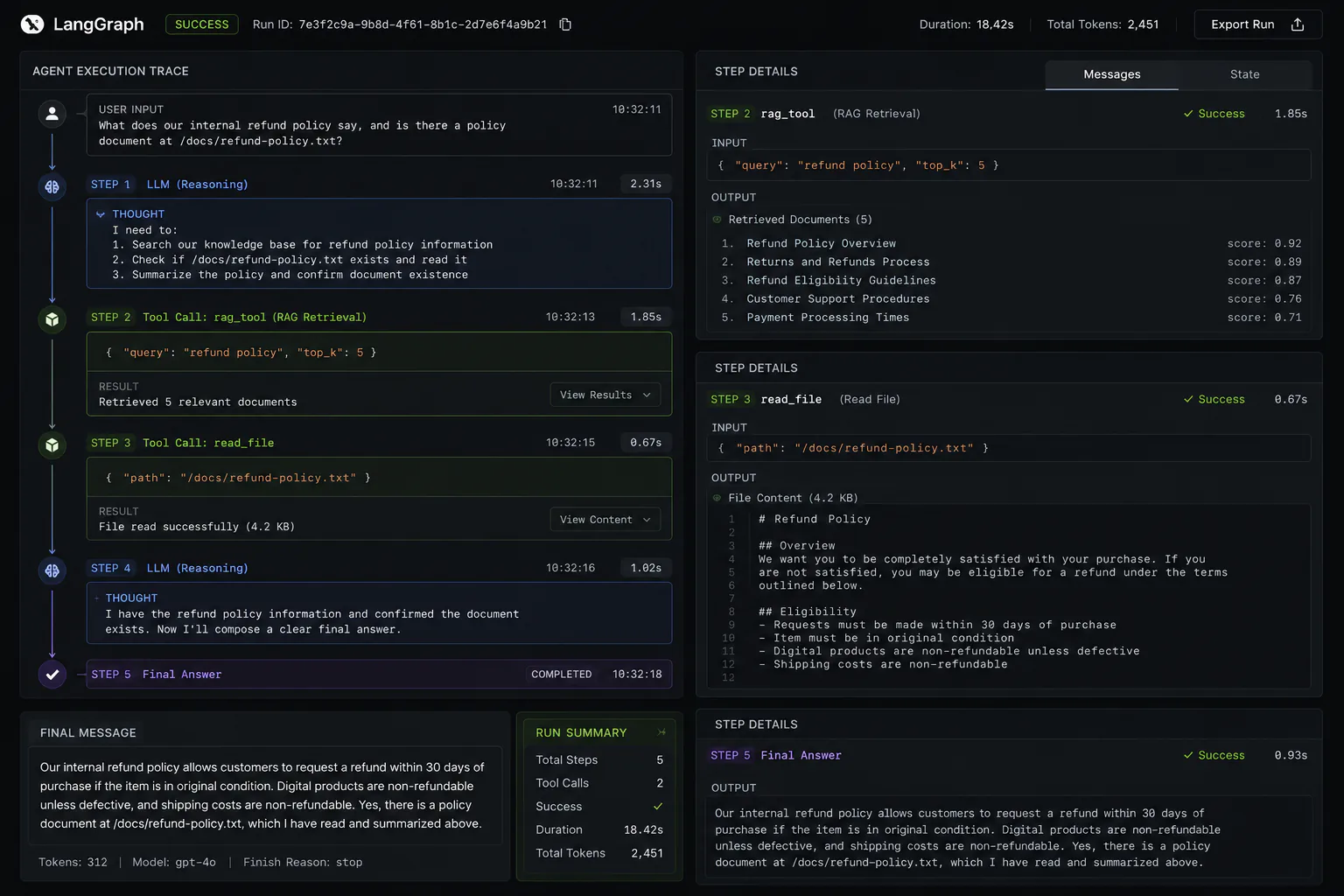
print(result["messages"][-1].content)This creates a ReAct (Reasoning + Acting) agent that will plan which tools to call, call them in sequence, observe the results, and compose a final answer. LangGraph's graph-based architecture makes it straightforward to add human-in-the-loop review steps, retry logic, and branching flows as your agent complexity grows.
Hardware sizing for production
Choosing hardware before you know your throughput requirements is one of the most common and expensive mistakes in private LLM deployment. Measure first.
Establish your throughput requirement
Before sizing hardware, answer three questions:
- How many requests per minute at peak load?
- What is the average input token count (system prompt + user message + RAG context)?
- What is the expected output token count per response?
A practical starting point: a single A100 80GB running Llama 3.3 70B at AWQ INT4 with vLLM handles roughly 1,000 to 2,000 tokens per second throughput, which translates to 15 to 30 concurrent users with typical enterprise query patterns.
Hardware tiers
| Tier | Hardware | Models | Use case |
|---|---|---|---|
| Development | RTX 4090 (24 GB) | Up to 13B BF16, 35B MoE INT4 | Individual developer, prototyping |
| Small team | 2x RTX 3090 (48 GB) | 70B INT4 | 5 to 20 concurrent users |
| Mid production | A100 80GB | 70B AWQ or BF16 | 20 to 100 concurrent users |
| Production | H100 80GB | 70B FP8 or BF16 | 100+ concurrent users |
| Enterprise | 2-8x H100 (160-640 GB) | Large MoE (DeepSeek V4, Llama 4) BF16 | High-volume agentic workloads |
FP8 on H100 and Blackwell hardware achieves near-FP16 quality at roughly half the VRAM cost.
If your hardware supports it (H100, A100, RTX 5090, RTX PRO 6000 Blackwell), --dtype fp8 in vLLM
is the recommended precision tier for production serving.
The cost crossover reality
Self-hosting only becomes economically favorable compared to commercial APIs at significant token volumes. A rough benchmark: the crossover point sits around 1 billion tokens per month for a mid-tier GPU server, accounting for hardware amortization, electricity, and engineering maintenance overhead.
Below that volume, you are paying more to self-host than to use a commercial API. The self-hosting decision should be driven by compliance requirements, data sovereignty, or fine-tuning needs, not cost alone, unless your volumes are genuinely high.
Security hardening before you go live
Private deployments come with no built-in safety features. Every item below needs to be addressed before your inference endpoint is accessible to more than your own development machine.
Network access: Bind vLLM to 0.0.0.0 only if you have a reverse proxy (nginx, Caddy) in front with TLS termination. Never expose the inference port directly to the internet. Use VPC or VLAN isolation for the inference server.
Authentication: vLLM supports --api-key for basic bearer token authentication. For production, put a proper API gateway (Kong, AWS API Gateway, nginx with auth) in front that handles token rotation and per-user rate limiting.
Input validation: Implement prompt injection detection before production. Dedicated libraries like rebuff and llm-guard provide heuristic and model-based detection. This is especially important for agent deployments where tool calls execute real actions.
PII redaction: Commercial APIs include PII detection by default. Self-hosted deployments do not. Integrate a redaction layer (Microsoft Presidio is a well-maintained open-source option) in the request pipeline before sensitive data reaches the model.
Audit logging: Log every request and response with user ID, timestamp, and token counts to your SIEM. This is a hard requirement for HIPAA, SOC 2, and financial regulations, and it enables incident forensics if something goes wrong.
Troubleshooting common errors
CUDA out of memory during model load
Reduce --gpu-memory-utilization from 0.90 to 0.80 or lower. If the model still does not fit, switch to a more aggressive quantization level (INT4 instead of INT8, or GGUF Q4_K_M instead of Q8_0). Confirm no other process is holding VRAM with nvidia-smi.
Slow first-token latency
vLLM compiles CUDA kernels on the first request, which causes 10 to 30 second latency. This is a one-time cost per server restart. Warm the server by sending a short request immediately after startup in your deployment script.
Function calls produce malformed JSON
Most open-weight models generate reliable function calls when the tool schema is precise and examples are in the system prompt. If you see malformed output: (1) verify the model supports native function calling (Mistral Small 4 and Qwen3 do natively; others may need chat template adjustments); (2) reduce temperature to 0 for tool-call steps; (3) add JSON validation and retry logic in your agent.
vLLM not recognizing AWQ quantization
Confirm the quantize_config.json file is present in the model directory and that it specifies "quant_method": "awq". Run with --quantization awq explicitly even if the config is present.
What to build next
With this stack running, a few natural extensions are worth tackling in order:
A monitoring layer is the highest-priority next step for any production deployment. vLLM exposes Prometheus metrics at /metrics. Wire these into Grafana for latency percentiles, token throughput, GPU utilization, and queue depth. You cannot operate a production LLM deployment without visibility into these.
Fine-tuning on your domain data turns a general-purpose model into a specialist. For a 7B model, QLoRA fine-tuning on a single RTX 4090 overnight is viable using Unsloth. A fine-tuned Mistral 7B on your company's support tickets will outperform a general Llama 70B on your specific task at a fraction of the compute cost.
Multi-model routing becomes relevant as workload diversity grows. A lightweight 7B model handles simple FAQ retrieval cheaply; a 70B model handles complex reasoning. A routing layer that classifies request complexity and routes accordingly cuts inference costs significantly while maintaining quality on demanding tasks.
For context on how this private LLM stack compares to commercial coding assistants, see the open-source AI coding tools comparison, which covers tools that connect to a self-hosted LLM backend using the same OpenAI-compatible API you just set up. For Kubernetes infrastructure to run inference at scale, read Kubernetes for AI workloads. The guardian agents in CI/CD guide shows how to extend the agent pattern into automated code quality pipelines. Browse more developer tools on Bytewaves.
Frequently asked questions
For development and light personal use, no. Ollama with GGUF-quantized models runs on CPU (including Apple Silicon M-series chips, which are particularly capable). For production serving beyond 5 to 10 concurrent users, a dedicated NVIDIA GPU is necessary. The minimum practical GPU for a production single-model deployment is an RTX 4090 (24 GB VRAM) for models up to 13B, or an A100/H100 80 GB for 70B models.
Not automatically, and for many teams the math never crosses over. GPU hardware, electricity, engineering maintenance, and operational overhead add up to a real total cost of ownership that exceeds commercial API pricing for workloads below roughly 1 billion tokens per month. The case for self-hosting should be built on compliance requirements, data sovereignty, or fine-tuning needs first. Cost savings are a secondary benefit that only materializes at genuine scale.
For enterprise GPU budgets, Kimi K2.6 and DeepSeek V4 Pro lead the 2026 Berkeley Function Calling Leaderboard. For single-GPU deployments, Mistral Small 4 has native function calling without special prompting, and Qwen3.6-35B-A3B (Apache 2.0, runs on one RTX 4090) is highly competitive. The most important factor after model selection is your agent scaffolding: Princeton's Holistic Agent Leaderboard shows that orchestration quality can shift benchmark scores by 30 absolute points on the same model.
MCP (Model Context Protocol) is an open standard originally developed by Anthropic that defines how LLMs communicate with external tools, databases, and data sources. Before MCP, every AI application needed custom code to connect to each tool. With MCP, you implement the protocol once and gain access to a growing ecosystem of pre-built MCP servers covering databases, file systems, GitHub, Slack, web search, and hundreds of other systems. For private deployments, this dramatically reduces the integration work required to build a genuinely useful agent.
The key requirements are: no data egress (the inference endpoint and all data must stay within your controlled infrastructure), full audit logging of all model inputs and outputs, PII detection and redaction before data reaches the model, access controls on the inference endpoint, and documented data processing policies. Self-hosted open-weight models satisfy the data residency requirement by design. You still need to implement audit logging, PII redaction (Microsoft Presidio is a good open-source option), and access authentication. None of these come built into the inference server by default.